nerdexam
Microsoft

MB-230 · Question #347

Drag and Drop Question You are using Omnichannel for Customer Service. You need to configure Power Virtual Agents to route calls to a live representative when cases come into Dynamics 365 Customer Ser

The correct answer is Select or create a work stream.; Create context variables.; Create a routing rule for a virtual agent and add the rule to the work stream.. Explanation: Configuring Power Virtual Agents to Route to a Live Agent in Omnichannel The Core Logic This sequence follows the infrastructure-first principle: you build the container, then configure data, then attach the routing rule that uses that data. --- Step 1: Select or cre

implement routing

Question

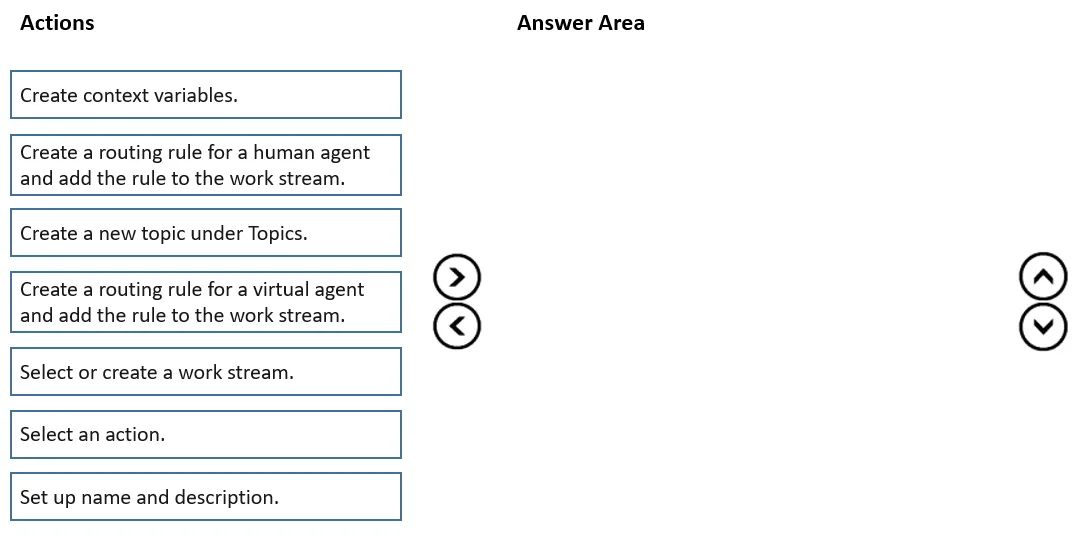
Drag and Drop Question You are using Omnichannel for Customer Service. You need to configure Power Virtual Agents to route calls to a live representative when cases come into Dynamics 365 Customer Service. Which three actions should you perform in sequence? To answer, move the appropriate actions from the list of actions to the answer area and arrange them in the correct order. Answer:

Exhibit
MB-230 question #347 exhibit

Answer Area

Drag items

Create context variables.Create a routing rule for a human agent and add the rule to the work stream.Create a new topic under Topics.Create a routing rule for a virtual agent and add the rule to the work stream.Select or create a work stream.Select an action.Set up name and description.

Correct arrangement

  • Select or create a work stream.
  • Create context variables.
  • Create a routing rule for a virtual agent and add the rule to the work stream.

Explanation

Explanation: Configuring Power Virtual Agents to Route to a Live Agent in Omnichannel

The Core Logic

This sequence follows the infrastructure-first principle: you build the container, then configure data, then attach the routing rule that uses that data.


Step 1: Select or create a work stream

Why first: A work stream is the foundational routing container in Omnichannel for Customer Service. It defines how incoming conversations are handled - channel, capacity, and routing behavior. Nothing else (context variables, routing rules, bot connections) can exist without a work stream to attach to. This is the mandatory starting point.

Common mistake: Skipping this step because a default work stream already exists. Even so, you must explicitly select the appropriate work stream before configuring anything within it.


Step 2: Create context variables

Why second: Context variables are data fields tied to a specific work stream that pass information between Power Virtual Agents and Omnichannel. When PVA needs to escalate to a human agent, it sets these variables (e.g., escalation reason, customer intent) to signal the handoff. They must exist before the routing rule is created because the routing rule references them to determine escalation conditions.

Common mistake: Putting this step after the routing rule. The routing rule needs to reference context variables - you can't reference something that doesn't exist yet.


Step 3: Create a routing rule for a virtual agent and add the rule to the work stream

Why third: With the work stream selected and context variables defined, you now create the routing rule that connects Power Virtual Agents to the work stream. This rule tells Omnichannel to send incoming conversations to the bot first. When PVA triggers an escalation (via context variables), the system handles the transfer to a human agent.

Common mistake: Choosing "Create a routing rule for a human agent" instead. The configuration focus here is on wiring up the virtual agent - the human agent escalation is a consequence of the PVA bot logic, not a separate manual routing rule step in this sequence.


Why the Other Items Are Excluded

ItemWhy excluded
Create a routing rule for a human agentHuman escalation is handled by PVA's escalation topic internally, not a separate Omnichannel routing rule in this flow
Create a new topic under TopicsDone inside PVA itself, not part of the Omnichannel work stream configuration sequence
Select an actionA sub-step within PVA topic authoring, not a distinct Omnichannel configuration step
Set up name and descriptionPart of creating a topic in PVA, not a standalone configuration action in this context

Summary

Work stream (container) → Context variables (data bridge) → Virtual agent routing rule (connection)

This mirrors the standard infrastructure pattern: define scope, define data, define behavior.

Topics

#Power Virtual Agents#bot-to-human escalation#workstream#routing rules

Community Discussion

No community discussion yet for this question.

Full MB-230 Practice