nerdexam
Microsoft

MB-230 · Question #243

Drag and Drop Question You are a Dynamics 365 Customer Service administrator. You create a new entity named Root Cause Escalation. Queues must be used for new Root Cause Escalation records. The…

The correct answer is Navigate to the Root Cause Escalation entity in Customizations; Set the field named Queues to a value of True on the Root Cause Escalation entity; Set the field Automatically move records to the owner's default queue when a record is created or assigned to a value of True. Dynamics 365: Enabling Queues for a Custom Entity The Core Concept In Dynamics 365, custom entities do not have queue functionality enabled by default. To make an entity queue-enabled and configure auto-assignment behavior, you work at the entity definition level - not through…

implement routing

Question

Drag and Drop Question You are a Dynamics 365 Customer Service administrator. You create a new entity named Root Cause Escalation. Queues must be used for new Root Cause Escalation records. The records must be automatically assigned to the record owner's default queue when a record is created. You need to implement the proper functionality to meet the requirements. Which three actions should you perform in sequence? To answer, move the appropriate actions from the list of actions to the answer area and arrange them in the correct order. Answer:

Exhibit
MB-230 question #243 exhibit

Answer Area

Drag items

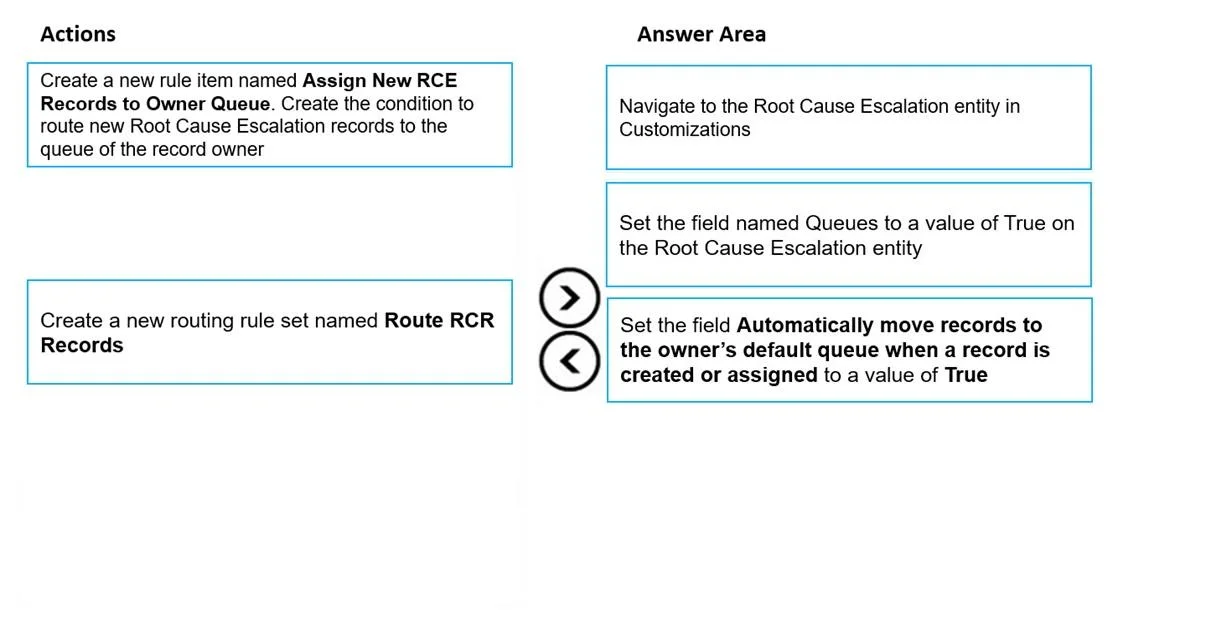
Create a new rule item named Assign New RCE Records to Owner Queue. Create the condition to route new Root Cause Escalation records to the queue of the record ownerNavigate to the Root Cause Escalation entity in CustomizationsCreate a new routing rule set named Route RCR RecordsSet the field named Queues to a value of True on the Root Cause Escalation entitySet the field Automatically move records to the owner's default queue when a record is created or assigned to a value of True

Correct arrangement

  • Navigate to the Root Cause Escalation entity in Customizations
  • Set the field named Queues to a value of True on the Root Cause Escalation entity
  • Set the field Automatically move records to the owner's default queue when a record is created or assigned to a value of True

Explanation

Dynamics 365: Enabling Queues for a Custom Entity

The Core Concept

In Dynamics 365, custom entities do not have queue functionality enabled by default. To make an entity queue-enabled and configure auto-assignment behavior, you work at the entity definition level - not through routing rules - when the requirement is simply "assign to owner's default queue."


Why These Three, In This Order

Step 1: Navigate to the Root Cause Escalation entity in Customizations

This is the mandatory starting point. You cannot modify entity-level settings without first opening the entity in the customization area (Settings > Customizations > Customize the System > Entities). Nothing else is possible until you are on the entity's configuration page.

Step 2: Set the field named Queues to a value of True

This enables queue support for the entity. By default, custom entities cannot be added to queues at all. Flipping this to True registers the entity as "queue-enabled." This step is a prerequisite for Step 3 - the auto-move setting is logically dependent on queues being enabled first; you cannot auto-route to a queue if the entity doesn't support queues.

Step 3: Set "Automatically move records to the owner's default queue when a record is created or assigned" to True

This is the built-in Dynamics 365 setting that directly fulfills the business requirement. Once queues are enabled, this checkbox automates assignment without any custom logic. This comes last because it depends on Step 2 being complete.


Why the Other Two Items Are Wrong

DistractorWhy It's Wrong
Create a routing rule set named "Route RCR Records"Routing rule sets are for complex conditional routing (e.g., route by case type, priority, customer). The requirement here is simple: route to the owner's default queue. A built-in entity setting already does this.
Create a rule item "Assign New RCE Records to Owner Queue"Rule items belong inside routing rule sets. Same problem - this is the wrong tool for a straightforward default-queue assignment. It adds unnecessary complexity.

Common Misconceptions

  • "I need routing rules to auto-assign to a queue." No - routing rules solve complex multi-queue routing. The entity-level auto-move toggle handles the simple "owner's default queue" scenario natively.
  • "I can enable auto-move before enabling queues." The auto-move option is either unavailable or meaningless unless the entity is queue-enabled first. Always enable Queues = True before touching the auto-move setting.
  • "The order of Steps 2 and 3 doesn't matter." It does - Step 2 is a hard prerequisite for Step 3 to be valid.

Topics

#custom entity#queue configuration#automatic routing#owner default queue

Community Discussion

No community discussion yet for this question.

Full MB-230 Practice