MB-230 · Question #242
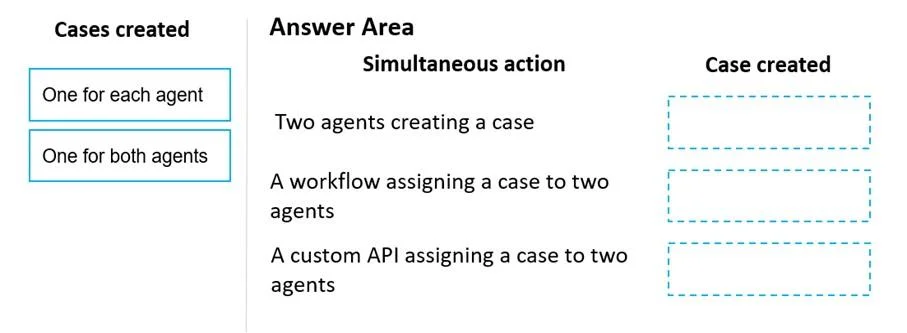
Drag and Drop Question A service manager discovers a high number of cases in the agent queues. Cases are created manually but can be reassigned using a workflow or custom API. The manager needs to…
The correct answer is One for each agent; One for each agent; One for each agent. Explanation: Simultaneous Case Creation & Assignment in Dynamics 365 Context This question tests your understanding of how Dynamics 365 Customer Service handles concurrent operations - specifically whether simultaneous actions by multiple agents produce duplicate cases. --- The…
Question
Exhibit
Answer Area
Drag items
Correct arrangement
- One for each agent
Explanation
Explanation: Simultaneous Case Creation & Assignment in Dynamics 365
Context
This question tests your understanding of how Dynamics 365 Customer Service handles concurrent operations - specifically whether simultaneous actions by multiple agents produce duplicate cases.
The Core Principle
In Dynamics 365, each case creation or assignment operation executes independently. The system does not natively detect or block concurrent operations on the same record trigger. This means:
Every simultaneous action = every agent gets their own case
Why All Three Answers Are "One for Each Agent"
Placement 1 - Simultaneous Manual Case Creation
When two agents manually create a case at the same time (e.g., both open a new case form and save), the system processes each save request as a separate transaction. There is no duplicate detection at the point of creation unless explicitly configured (e.g., duplicate detection rules). Result: two separate cases are created - one per agent.
Placement 2 - Simultaneous Case Assignment via Workflow
When a workflow triggers case assignment for multiple agents at the same time, each workflow execution runs as its own instance. Workflows operate independently; one execution does not cancel or merge with another. Result: each agent's workflow fires and produces its own case or assignment - one per agent.
Placement 3 - Simultaneous Case Assignment via Custom API
A custom API call also executes as an independent transaction per caller. Two simultaneous API calls are not aware of each other. Each call completes its own operation. Result: each API call creates or assigns a case independently - one per agent.
Why "One for Both Agents" Is Wrong in All Scenarios
"One for both agents" would imply the system merges or deduplicates concurrent operations automatically. It does not. There is no built-in concurrency lock that says "these two agents are working on the same trigger - give them one shared case."
Common Misconceptions
| Misconception | Reality |
|---|---|
| Workflows prevent duplicates automatically | Workflows run per-trigger instance; they don't cross-check concurrent runs |
| Custom APIs have conflict resolution built in | Each API call is stateless relative to concurrent calls |
| "One for both agents" applies when agents share a queue | Sharing a queue doesn't merge creation events |
Key Takeaway
The duplicate case problem the manager observes is systemic - regardless of the method (manual, workflow, or API), simultaneous actions by multiple agents each produce their own independent case. The fix requires adding explicit duplicate detection rules, concurrency controls, or queue routing logic - not relying on default behavior.
Topics
Community Discussion
No community discussion yet for this question.