MB-230 · Question #31
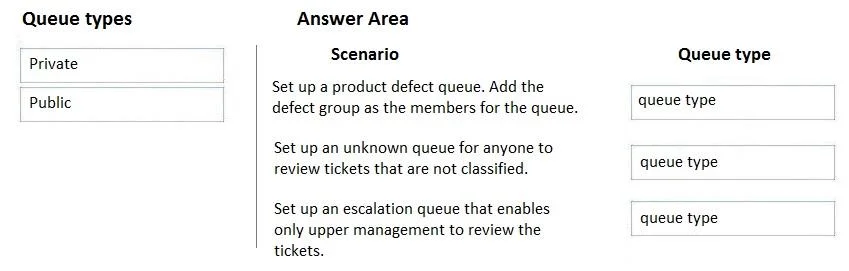
Drag and Drop Question You are a Dynamics 365 for Customer Service administrator. You need to implement queues to manage cases. Which queue types should you use? To answer, drag the appropriate queue
The correct answer is Private; Public; Private. Dynamics 365 Customer Service: Queue Types Explanation > Note: The question is missing the actual scenario descriptions - only the answer positions (1=Private, 2=Public, 3=Private) are visible. I'll explain based on the standard version of this exam question and the underlying co
Question
Exhibit
Answer Area
Drag items
Correct arrangement
- Private
- Public
- Private
Explanation
Dynamics 365 Customer Service: Queue Types Explanation
Note: The question is missing the actual scenario descriptions - only the answer positions (1=Private, 2=Public, 3=Private) are visible. I'll explain based on the standard version of this exam question and the underlying concepts.
Queue Type Definitions
| Type | Who Can Access | Visibility |
|---|---|---|
| Private | Only designated members/owner | Hidden from non-members |
| Public | All users in the organization (or a Business Unit) | Visible to all eligible agents |
Standard Scenarios & Why Each Answer is Correct
Position 1 → Private
Typical scenario: Cases that need to be handled by a specific team only (e.g., a VIP support team or escalation specialists).
Technical reason: Private queues restrict visibility and access to explicitly added members. Non-members cannot see or work queue items. Use this when the work is sensitive, specialized, or role-restricted.
Position 2 → Public
Typical scenario: General cases that any available agent can pick up and resolve.
Technical reason: Public queues are visible to all users within the Business Unit (or organization). They support an open routing model where any qualified agent can select work, maximizing throughput for high-volume, non-sensitive cases.
Position 3 → Private
Typical scenario: Cases routed to a specific department or group that should not be visible to agents outside that group (e.g., billing disputes handled only by the finance team).
Technical reason: Same as Position 1 - restricted membership enforces data separation between teams/departments.
Common Mistakes & Misconceptions
- Confusing "team" with queue type: Having a team doesn't make a queue private automatically. You must explicitly set the queue type.
- Assuming Public = everyone in the company: Public queues are scoped to a Business Unit by default, not necessarily the entire org.
- Using Public for sensitive cases: A common error - if case data is sensitive (legal, executive escalations), always use Private to prevent unauthorized access.
- Thinking Private queues can't be routed to: Private queues support all standard routing rules; they just restrict who sees the items.
Rule of thumb: If the scenario mentions a specific group, team, or restricted access → Private. If it mentions general availability or any agent → Public.
Topics
Community Discussion
No community discussion yet for this question.