nerdexam
Microsoft

MB-230 · Question #41

Drag and Drop Question You make a phone call regarding an existing case record. You need to create a phone call activity that appears on the case record timeline. Which three actions should you perfor

The correct answer is Select an existing case record; Select Add phone call activity; Enter a subject. Explanation: Creating a Phone Call Activity on a Case Record Timeline This question tests your knowledge of Microsoft Dynamics 365 Customer Service - specifically how activity records are linked to case timelines. --- The Correct Sequence 1. Select an existing case record You mus

Manage cases in Customer Service

Question

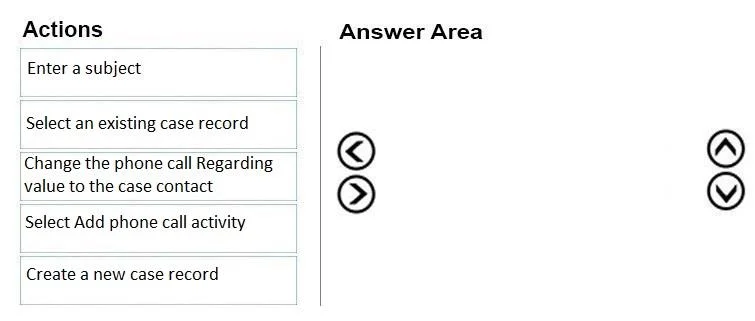
Drag and Drop Question You make a phone call regarding an existing case record. You need to create a phone call activity that appears on the case record timeline. Which three actions should you perform in sequence? To answer, move the appropriate actions from the list of actions to the answer area and arrange them in the correct order. Answer:

Exhibit
MB-230 question #41 exhibit

Answer Area

Drag items

Enter a subjectSelect an existing case recordChange the phone call Regarding value to the case contactSelect Add phone call activityCreate a new case record

Correct arrangement

  • Select an existing case record
  • Select Add phone call activity
  • Enter a subject

Explanation

Explanation: Creating a Phone Call Activity on a Case Record Timeline

This question tests your knowledge of Microsoft Dynamics 365 Customer Service - specifically how activity records are linked to case timelines.


The Correct Sequence

1. Select an existing case record

You must navigate to the case first. The question explicitly states the case already exists, so creating a new one is irrelevant. The case record is your context - every subsequent action happens within it. Without opening the case first, there is no timeline to add activities to.

2. Select Add phone call activity

From inside the case record, you use the timeline's Add Activity button and choose "Phone Call." This is the critical step: creating the activity from within the case automatically populates the Regarding field with that case record. This is what causes the activity to appear on the case's timeline - the linkage is established implicitly by where you initiate the action.

3. Enter a subject

Once the phone call form opens, the subject is a required field and must be filled in to save the record. It comes last because the form only appears after step 2.


Why the Other Items Are Wrong

ItemWhy it's excluded
Create a new case recordThe question says the case already exists. This contradicts the scenario.
Change the phone call Regarding value to the case contactThis is the most common trap. The Regarding field is automatically set to the case when you add the activity from the case timeline. Manually changing it to the contact would actually move the activity off the case timeline and onto the contact's timeline instead - the opposite of what you want.

Key Misconception to Avoid

Many students assume they must manually set the Regarding field to link the phone call to the case. In reality, Dynamics 365 sets this automatically when you initiate the activity from the case record itself. Manually overriding it (especially to a contact) breaks the link to the case timeline.

Topics

#phone call activity#case timeline#activity management#regarding field

Community Discussion

No community discussion yet for this question.

Full MB-230 Practice