MB-230 · Question #339
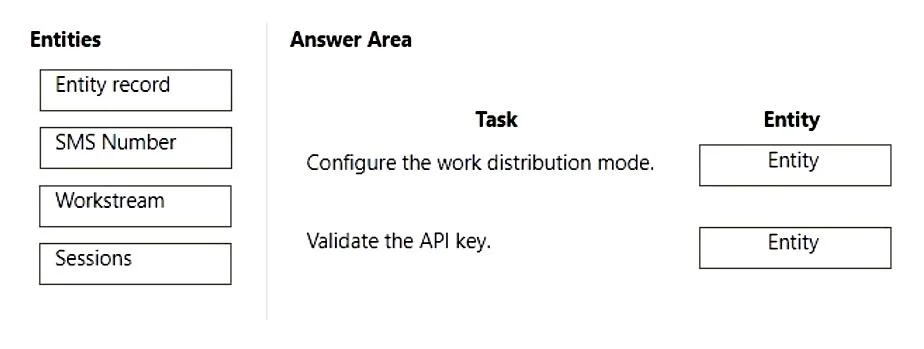
Drag and Drop Question You are implementing a new channel within Omnichannel. You need to enable an SMS channel. On which entity should you configure each task? To answer, drag the appropriate…
The correct answer is Workstream; SMS Number. SMS Channel Configuration in Dynamics 365 Omnichannel This question tests your knowledge of where specific SMS channel setup tasks are performed in Microsoft Dynamics 365 Omnichannel for Customer Service. --- The Two Tasks and Their Correct Entities The question presents two…
Question
Drag and Drop Question You are implementing a new channel within Omnichannel. You need to enable an SMS channel. On which entity should you configure each task? To answer, drag the appropriate entities to the correct tasks. Each entity may be used once, more than once, or not at all. You may need to drag the split bar between panes or scroll to view content. NOTE: Each correct selection is worth one point. Answer:
Exhibit
Answer Area
Drag items
Correct arrangement
- Workstream
- SMS Number
Explanation
SMS Channel Configuration in Dynamics 365 Omnichannel
This question tests your knowledge of where specific SMS channel setup tasks are performed in Microsoft Dynamics 365 Omnichannel for Customer Service.
The Two Tasks and Their Correct Entities
The question presents two sequential configuration tasks for enabling an SMS channel:
Task 1 → Workstream
What it is: A Workstream is a container that defines how incoming conversations are routed, distributed, and handled by agents.
Why here: When enabling SMS as a channel, you first create or select an existing Workstream and define it as the SMS channel type. This is where you configure:
- Channel type (SMS)
- Work distribution mode (push or pick)
- Routing rules and capacity
The Workstream is the backbone of the channel - nothing else works without it being configured first.
Task 2 → SMS Number
What it is: The specific phone number customers will text to reach support.
Why here: After the Workstream exists, you add an SMS Number to it. This is where you:
- Associate a provisioned phone number (from a provider like Twilio or Azure Communication Services)
- Link it to the Workstream you just configured
The number cannot function independently - it must be tied to a Workstream.
Why the Other Items Are Wrong
| Item | Why Not Used |
|---|---|
| Entity record | Generic CRM records (Accounts, Contacts) - unrelated to channel setup |
| Sessions | Relates to agent session capacity/presence, not channel configuration |
Common Mistakes
- Confusing SMS Number with Workstream: People assume the number is configured first. In practice, the Workstream must exist before you can attach a number to it.
- Selecting Entity record: Sounds plausible but refers to CRM data entities, not channel infrastructure.
- Thinking Sessions is involved: Sessions are an agent-side concept, not a channel setup entity.
Topics
Community Discussion
No community discussion yet for this question.
