nerdexam
Microsoft

MB-230 · Question #341

Drag and Drop Question You are setting up Omnichannel for Customer Service. You need to automate the following tasks to make it easier and quicker for representatives to assist customers…

The correct answer is Resources; Security roles; Working hours. Issue with This Question There is a clear mismatch in this question as presented. The available items (Resources, Security roles, Working hours, Business closures) and the "correct arrangement" do not correspond to the requirements described. These items belong to a different…

Configure representative experience and routing

Question

Drag and Drop Question You are setting up Omnichannel for Customer Service. You need to automate the following tasks to make it easier and quicker for representatives to assist customers:

  • Establish a one-step process to send a predefined email to customers

once a representative is done helping them.

  • Ensure that representatives ask predefined questions to identify a

customer before troubleshooting a case.

  • Have chatbots available to help make recommendations in typed

conversations. Which tools should you use? To answer, drag the appropriate tools to the correct requirements. Each tool may be used once, more than once, or not at all. You may need to drag the split bar between panes or scroll to view content. Answer:

Exhibit
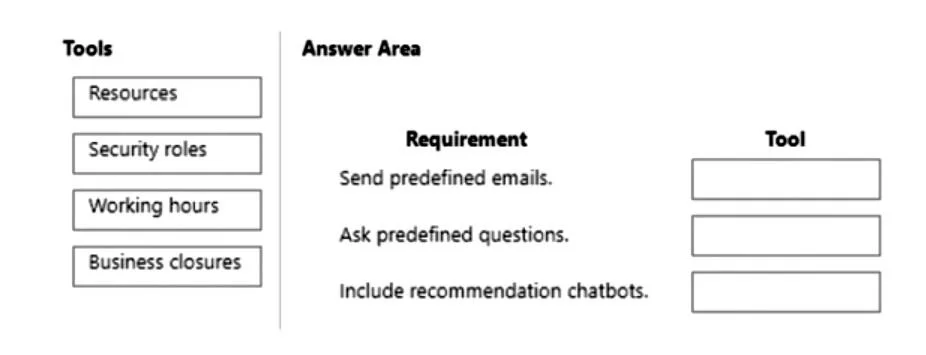
MB-230 question #341 exhibit

Answer Area

Drag items

ResourcesSecurity rolesWorking hoursBusiness closures

Correct arrangement

  • Resources
  • Security roles
  • Working hours

Explanation

Issue with This Question

There is a clear mismatch in this question as presented. The available items (Resources, Security roles, Working hours, Business closures) and the "correct arrangement" do not correspond to the requirements described. These items belong to a different Dynamics 365 question - likely one about service scheduling or capacity configuration, not Omnichannel automation.


What the Correct Answer Should Actually Be

For the three Omnichannel for Customer Service requirements described, the proper tools are:

Requirement 1: One-step process to send a predefined email

Tool: Macros Macros allow agents to execute repetitive multi-step tasks (like sending a templated email) with a single click. This is precisely what "one-step process" refers to in Omnichannel context.

Requirement 2: Predefined questions to identify customers before troubleshooting

Tool: Agent Scripts Agent scripts provide structured, step-by-step guidance to agents during a session - including identification/verification questions - ensuring consistency before case work begins.

Requirement 3: Chatbots available for recommendations in typed conversations

Tool: Smart Assist (Productivity Pane) Smart Assist uses AI to surface relevant knowledge articles, similar cases, and recommendations in real-time during chat sessions.


Common Misconception

Students often confuse macros (automation of agent actions) with quick replies (predefined chat messages). Macros automate actions, quick replies automate text responses - they are not interchangeable for this scenario.

Recommendation: Verify the source of this question, as the item bank appears corrupted or copy-pasted from a different question.

Topics

#macros#agent scripts#Smart Assist#productivity automation

Community Discussion

No community discussion yet for this question.

Full MB-230 Practice