
MB-230 · Question #370
Drag and Drop Question A company uses Dynamics 365 Customer Service. The company connects chatbots to its Omnichannel configuration. The chatbot does not escalate calls to agents. You need to…
The correct answer is Create the chatbot application and assign it as an agent.; Set code to engage the chatbot.; Add the chatbot to a voice workstream.; Add the chatbot to the queues.; Set escalation rules. Dynamics 365 Omnichannel: Chatbot Escalation Troubleshooting Context: The chatbot exists but fails to escalate to human agents. The correct order represents a full-stack verification/rebuild of the bot configuration, ending at the component most likely causing the failure…
Question
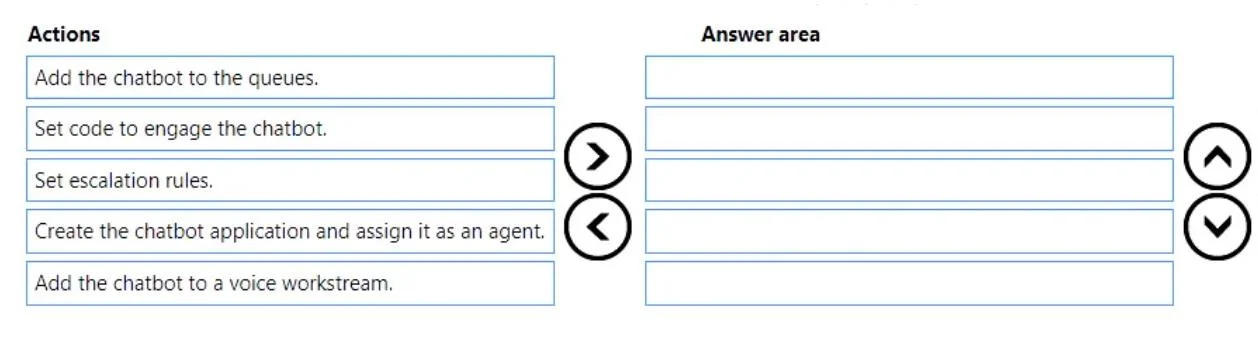
Drag and Drop Question A company uses Dynamics 365 Customer Service. The company connects chatbots to its Omnichannel configuration. The chatbot does not escalate calls to agents. You need to troubleshoot the chatbot issue. In which order should you perform the actions? To answer, move all actions from the list of actions to the answer area and arrange them in the correct order. NOTE: More than one order of answer choices is correct. You will receive credit for any of the correct orders you select. Answer:
Exhibit
Answer Area
Drag items
Correct arrangement
- Create the chatbot application and assign it as an agent.
- Set code to engage the chatbot.
- Add the chatbot to a voice workstream.
- Add the chatbot to the queues.
- Set escalation rules.
Explanation
Dynamics 365 Omnichannel: Chatbot Escalation Troubleshooting
Context: The chatbot exists but fails to escalate to human agents. The correct order represents a full-stack verification/rebuild of the bot configuration, ending at the component most likely causing the failure.
Step-by-Step Breakdown
1. Create the chatbot application and assign it as an agent
This is the mandatory foundation. In Omnichannel, bots are registered as agent users in the system - they have no presence or routing eligibility until this is done. If this step was skipped or misconfigured, nothing downstream can work. Troubleshooting always starts by verifying the bot exists and is properly registered.
Common mistake: Assuming the bot is "connected" just because it appears in the Azure Bot Service. It must be explicitly added as an agent in Dynamics 365.
2. Set code to engage the chatbot
Once the bot is registered, its engagement logic (the code/trigger that fires when a conversation starts) must be configured. Without this, the bot never activates to handle - let alone escalate - a conversation.
Common mistake: Skipping this step when troubleshooting escalation, assuming engagement is working since "the bot does respond." But a misconfigured engagement trigger can cause silent failures in the escalation path.
3. Add the chatbot to a voice workstream
Workstreams define the routing channel and rules. A bot must be attached to a workstream before it can be placed in queues. Voice workstreams are specific to voice channel routing - adding the bot here makes it eligible to receive and handle voice conversations.
Common mistake: Reversing steps 3 and 4 - trying to add the bot to a queue before it belongs to the workstream that contains that queue. Queues exist within workstreams.
4. Add the chatbot to the queues
Queues are the specific holding areas where work items are distributed to agents. The bot must be a member of the relevant queue(s) to receive routed conversations. Without queue membership, the bot is attached to the workstream but unreachable by the router.
Common mistake: Adding the bot to the wrong queue, or not adding it at all and assuming workstream membership is sufficient.
5. Set escalation rules
This is the direct fix for the stated problem. Escalation rules define the conditions under which the bot transfers a conversation to a human agent. This step comes last because:
- The bot must be fully operational before escalation logic is meaningful.
- This is the specific component that is broken (bot isn't escalating), so it is the final corrective action after confirming all prerequisites are in place.
Common mistake: Jumping straight to escalation rules without verifying the upstream configuration. If the bot isn't registered as an agent or isn't in the right queue, fixing escalation rules alone will not resolve the issue.
Why This Order Matters
The sequence follows a dependency chain: each step creates the prerequisite for the next.
Bot exists as agent → Bot has engagement logic → Bot is in a workstream → Bot is in a queue → Bot knows when to escalate
Troubleshooting in this order ensures you're not patching escalation rules on a broken foundation.
Topics
Community Discussion
No community discussion yet for this question.