nerdexam
Microsoft

MB-230 · Question #343

Drag and Drop Question A company is using Omnichannel for Customer Service. You add a live chat button to your company's website for existing customers. Requests for chats are handled by the next…

The correct answer is Create a work stream.; Set the routing rule.; Set the Enable Agent Affinity to Yes.; Create context variables. Dynamics 365 Omnichannel: Live Chat Configuration Sequence Core Concept In Omnichannel for Customer Service, configuring a live chat channel follows a strict dependency chain: you must build the container before filling it, and set core routing before applying overrides or…

implement routing

Question

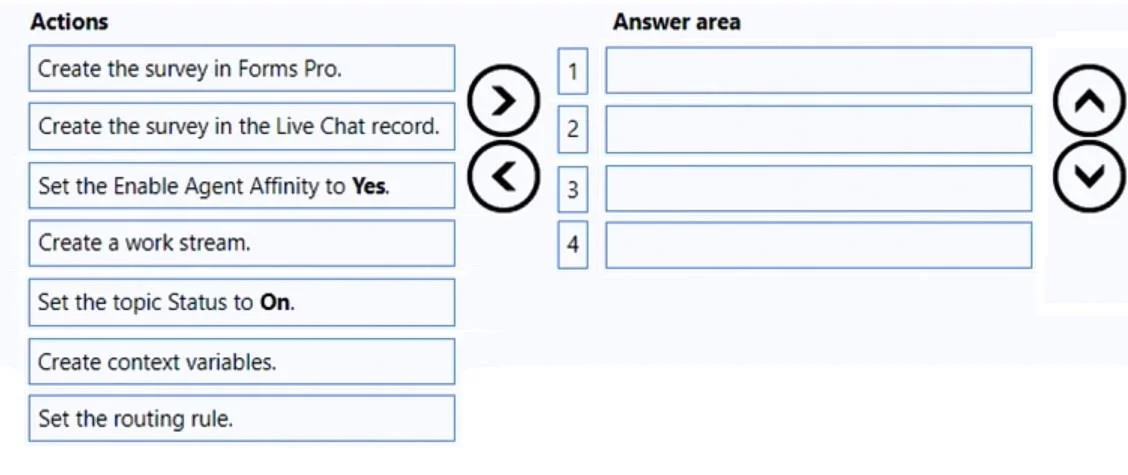
Drag and Drop Question A company is using Omnichannel for Customer Service. You add a live chat button to your company's website for existing customers. Requests for chats are handled by the next available representative. The chat must route the customer to the same representative if the customer is inadvertently disconnected. You need to configure the chat. Which four actions should you perform in sequence? To answer, move the appropriate actions from the list of actions to the answer area and arrange them in the correct order. Answer:

Exhibit
MB-230 question #343 exhibit

Answer Area

Drag items

Create the survey in Forms Pro.Create the survey in the Live Chat record.Set the Enable Agent Affinity to Yes.Create a work stream.Set the topic Status to On.Create context variables.Set the routing rule.

Correct arrangement

  • Create a work stream.
  • Set the routing rule.
  • Set the Enable Agent Affinity to Yes.
  • Create context variables.

Explanation

Dynamics 365 Omnichannel: Live Chat Configuration Sequence

Core Concept

In Omnichannel for Customer Service, configuring a live chat channel follows a strict dependency chain: you must build the container before filling it, and set core routing before applying overrides or enrichments.


The Correct Sequence Explained

1. Create a work stream The work stream is the foundational object for any Omnichannel channel. It defines the channel type (Live Chat), capacity units, and serves as the parent container for all routing configuration. Nothing else can be configured until this exists - routing rules, agent affinity, and context variables all live within or attach to a work stream. This is always step one.

2. Set the routing rule Routing rules define how incoming chats are assigned to agents. The scenario specifies "next available representative," which is the assignment logic configured here. This must come before agent affinity because affinity is an exception to normal routing - you need the normal routing baseline established first before configuring what happens when it's bypassed.

3. Set the Enable Agent Affinity to Yes Agent Affinity is the specific setting that routes a returning/reconnected customer back to their previous agent, bypassing the normal routing rules. It must come after the routing rule exists (it overrides it) and after the work stream exists (it's a property of it). This directly addresses the requirement: "route the customer to the same representative if inadvertently disconnected."

4. Create context variables Context variables capture customer/session data (e.g., customer ID, account tier) that can be passed to agents or used in routing conditions. They are last because they are optional enrichments - they may reference the work stream and routing rules but don't block their creation. For existing customers, these variables would surface identifying information to the agent on reconnect.


Why the Other Items Are Wrong

ItemWhy It's Excluded
Create the survey in Forms ProPost-chat surveys are not part of routing configuration - the scenario has no CSAT requirement
Create the survey in the Live Chat recordSame reason - survey setup is irrelevant here
Set the topic Status to OnThis controls Knowledge Article topic visibility, unrelated to live chat routing

Common Mistakes

  • Including survey steps - Test-takers see "customer service" and assume surveys are required. Read the requirements: only routing and reconnection handling are asked for.
  • Putting context variables before routing rules - Context variables can be used by routing rules, so the routing rule framework must exist first.
  • Skipping Agent Affinity - It's not enabled by default. Many candidates assume reconnection handling is automatic; it requires explicit configuration.
  • Thinking "Set the topic Status to On" relates to chat - It does not; it's a Knowledge Management concept.

Topics

#live chat#agent affinity#workstream#routing rules sequence

Community Discussion

No community discussion yet for this question.

Full MB-230 Practice