
MB-230 · Question #344
Drag and Drop Question You are an Omnichannel administrator for a company. The company is implementing a chat channel. You need to route all chats relating to work orders to the field service queue…
The correct answer is Create a work stream.; Set the routing rule.; Set the Enable Agent Affinity to Yes.; Create context variables. Explanation: Routing Work Order Chats to Field Service Queue This question tests your understanding of Microsoft Dynamics 365 Omnichannel for Customer Service - specifically the dependency chain for setting up chat routing. --- Why These 3 Items Are Excluded (Distractors) |…
Question
Drag and Drop Question You are an Omnichannel administrator for a company. The company is implementing a chat channel. You need to route all chats relating to work orders to the field service queue. In which order should you perform the actions? To answer, move all actions from the list of actions to the answer area and arrange them in the correct order. NOTE: More than one order of answer choices is correct. You will receive credit for any of the correct orders you select. Answer:
Exhibit
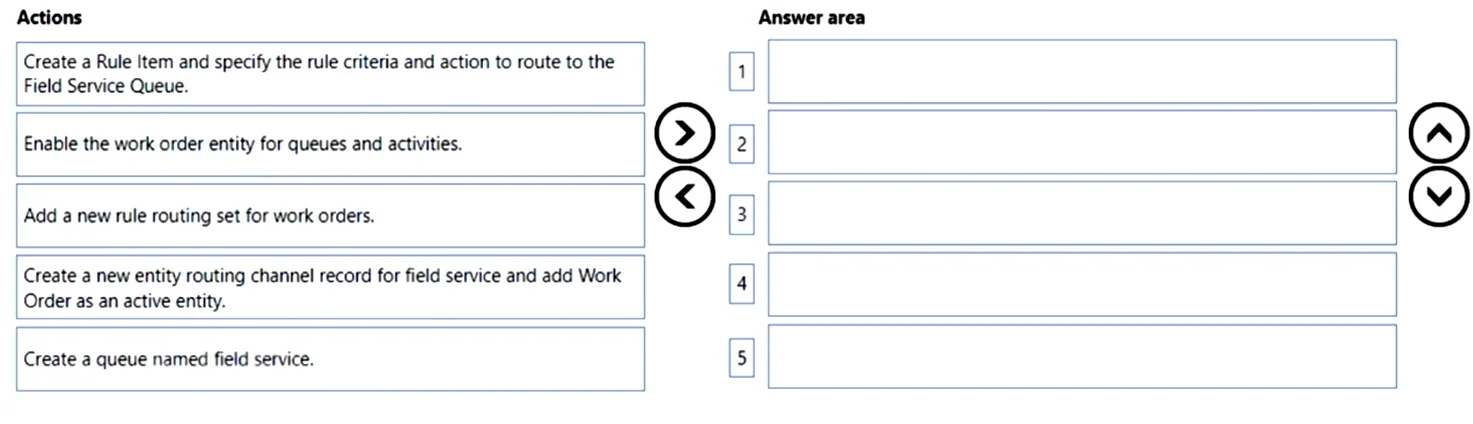
Answer Area
Drag items
Correct arrangement
- Create a work stream.
- Set the routing rule.
- Set the Enable Agent Affinity to Yes.
- Create context variables.
Explanation
Explanation: Routing Work Order Chats to Field Service Queue
This question tests your understanding of Microsoft Dynamics 365 Omnichannel for Customer Service - specifically the dependency chain for setting up chat routing.
Why These 3 Items Are Excluded (Distractors)
| Item | Why It's Excluded |
|---|---|
| Create the survey in Forms Pro | This creates post-chat satisfaction surveys - unrelated to routing setup |
| Create the survey in the Live Chat record | Same - survey configuration, not routing configuration |
| Set the topic Status to On | This applies to Power Virtual Agents bot topics, not chat-to-queue routing |
These are deliberate distractors testing whether you conflate feedback/bot features with routing configuration.
Correct Arrangement - Step by Step
1. Create a work stream
This is the non-negotiable first step. A work stream (workstream) is the foundational container in Omnichannel that defines:
- The channel type (chat, in this case)
- Work distribution mode
- The scope for all routing rules and context variables
Nothing else can exist without it. Routing rules, agent affinity, and context variables all live within or reference the work stream.
2. Set the routing rule
Routing rules define how incoming conversations are directed to a queue. Here, you need a rule that matches "work order" chats and sends them to the field service queue. This comes after the work stream because routing rules are attached to and configured within the work stream.
Common misconception: People assume context variables must be created before routing rules, since routing rules can reference them. However, you can define a routing rule first (routing by queue directly) and add context-variable-based conditions afterward. The question acknowledges this by stating multiple orderings are valid.
3. Set Enable Agent Affinity to Yes
Agent Affinity ensures that if a customer returns, they are routed to the same agent they previously spoke with. This is a work stream-level setting that applies on top of your routing rules. It's configured after basic routing is in place because it's a behavioral modifier, not a prerequisite.
Common misconception: Some assume this is set during initial work stream creation. It can be, but it logically follows establishing your routing foundation.
4. Create context variables
Context variables capture data from the chat session (e.g., a CaseType = "WorkOrder" value passed from a portal). These can be referenced in routing rules for conditional logic. They appear last here because:
- The basic routing setup (work stream + rule) is functional without them
- They are used to refine routing, not to establish it
- The question allows multiple valid orderings, recognizing that advanced context-based routing is an iterative refinement
Key Principle
The dependency chain is: Work Stream → Routing Rule → Enhancements (Affinity, Context Variables). The work stream must always be first; everything else is configuration layered on top of it.
Topics
Community Discussion
No community discussion yet for this question.