nerdexam
Microsoft

MB-230 · Question #299

Drag and Drop Question A company deploys Dynamics 365 Customer Service. A service manager requires a new classification ruleset for Bronze-type customers. The Bronze type customers require an answer…

The correct answer is Create a new ruleset in a workstream.; Create a new manual rule named Bronze.; Create a condition for the Bronze rule.; Create a rule named 5-hour response from the decisions list.; Create a demand rule for the Bronze rule. Dynamics 365 Classification Ruleset: Ordering Explanation This question tests your understanding of the hierarchical structure of classification rulesets in Dynamics 365 Customer Service. Each step depends on the previous one existing first. --- The Core Principle Think of it…

implement routing

Question

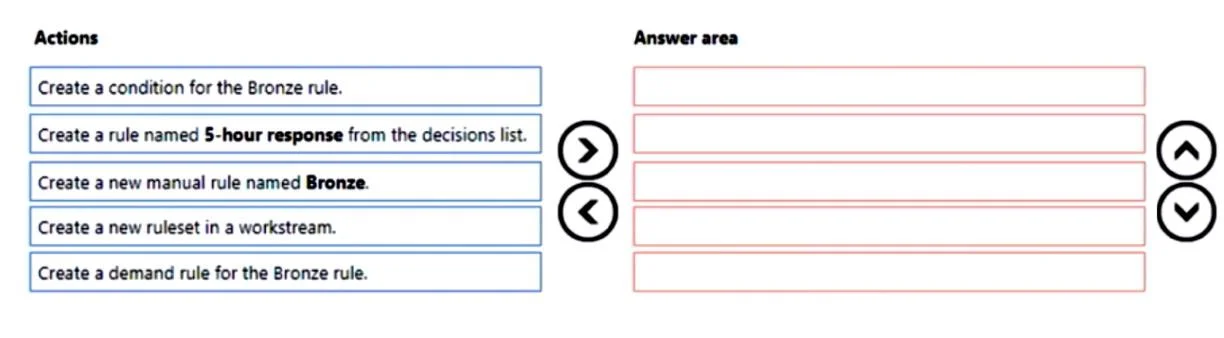
Drag and Drop Question A company deploys Dynamics 365 Customer Service. A service manager requires a new classification ruleset for Bronze-type customers. The Bronze type customers require an answer within five hours. You need to create the classification ruleset. In which order should you perform the actions? To answer, move all actions from the list of actions to the answer area and arrange them in the correct order. Answer:

Exhibit
MB-230 question #299 exhibit

Answer Area

Drag items

Create a condition for the Bronze rule.Create a rule named 5-hour response from the decisions list.Create a new manual rule named Bronze.Create a new ruleset in a workstream.Create a demand rule for the Bronze rule.

Correct arrangement

  • Create a new ruleset in a workstream.
  • Create a new manual rule named Bronze.
  • Create a condition for the Bronze rule.
  • Create a rule named 5-hour response from the decisions list.
  • Create a demand rule for the Bronze rule.

Explanation

Dynamics 365 Classification Ruleset: Ordering Explanation

This question tests your understanding of the hierarchical structure of classification rulesets in Dynamics 365 Customer Service. Each step depends on the previous one existing first.


The Core Principle

Think of it as building top-down: container → rule → trigger → action → routing.


Step-by-Step Breakdown

1. Create a new ruleset in a workstream

Technical reason: A ruleset is the top-level container. It must exist inside a workstream before any rules can be added. You cannot attach rules to nothing - the workstream provides the routing context that gives the ruleset its purpose.

2. Create a new manual rule named Bronze

Technical reason: With the ruleset in place, you now add a rule to it. A "manual rule" means you're explicitly defining the logic (vs. machine-learning-based rules). This rule is the named container for your Bronze customer logic. Nothing else can exist without this rule existing first.

3. Create a condition for the Bronze rule

Technical reason: A rule without a condition never fires. The condition defines the trigger - what makes this rule match an incoming case (e.g., customer type = Bronze). You must have the rule before you can attach a condition to it.

4. Create a rule named 5-hour response from the decisions list

Technical reason: After defining when the rule fires (condition), you define what it does - the decision. The "5-hour response" decision is selected from a predefined decisions list and represents the SLA/response target that gets applied when the Bronze condition is met. Conditions must exist before decisions are meaningful.

5. Create a demand rule for the Bronze rule

Technical reason: Demand rules handle capacity and routing logic - they determine how agents are assigned to work items that match this classification. This is the final layer because it operates on top of the already-classified item (Bronze + 5-hour response), determining who handles it.


Common Mistakes

MistakeWhy It's Wrong
Creating the rule before the rulesetRules live inside rulesets - no container, no rule
Adding a decision before a conditionDecisions are the outcome of conditions being met; the sequence is trigger → action
Placing demand rules earlierDemand rules act on classified items; classification (condition + decision) must be defined first
Skipping straight to the conditionYou must have a named rule to attach the condition to

Mental Model

Think of it like a flowchart being built layer by layer:

Workstream
  └── Ruleset
        └── Rule (Bronze)
              ├── Condition (customer = Bronze) → triggers the rule
              ├── Decision (5-hour response)   → applies the classification
              └── Demand Rule                  → routes to the right agent

Each level is a prerequisite for the next - you always build the container before its contents.

Topics

#classification ruleset#routing#workstream#rule conditions

Community Discussion

No community discussion yet for this question.

Full MB-230 Practice