nerdexam
Microsoft

MB-230 · Question #304

Drag and Drop Question You manage a Dynamics 365 environment. No customizations have been made to fields. You need to determine the proper usage for status reasons for cases. Which status applies to e

The correct answer is Active; Resolved; Canceled; Active. Dynamics 365 Case Status Reasons - Explained Background: Status vs. Status Reason In Dynamics 365 Customer Service, Cases use a two-level state system: Status - the high-level state of the case (Active, Resolved, or Canceled) Status Reason - a sub-state that gives more detail wit

Manage cases in Customer Service

Question

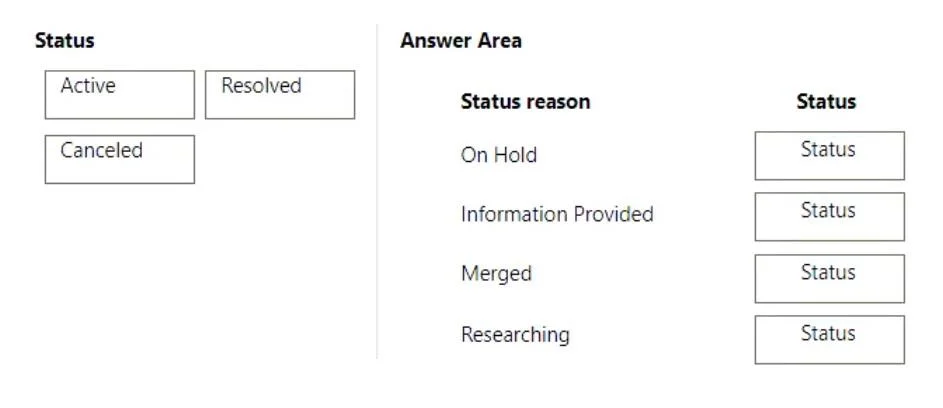
Drag and Drop Question You manage a Dynamics 365 environment. No customizations have been made to fields. You need to determine the proper usage for status reasons for cases. Which status applies to each status reason? To answer, drag the appropriate statuses to the correct status reasons. Each status may be used once, more than once, or not at all. You may need to drag the split bar between panes or scroll to view content. NOTE: Each correct selection is worth one point. Answer:

Exhibit
MB-230 question #304 exhibit

Answer Area

Drag items

ActiveResolvedCanceled

Correct arrangement

  • Active
  • Resolved
  • Canceled
  • Active

Explanation

Dynamics 365 Case Status Reasons - Explained

Background: Status vs. Status Reason

In Dynamics 365 Customer Service, Cases use a two-level state system:

  • Status - the high-level state of the case (Active, Resolved, or Canceled)
  • Status Reason - a sub-state that gives more detail within that status

Every Status Reason belongs to exactly one parent Status. This is hardcoded in the out-of-box schema.


Default Out-of-Box Case Status Reasons

Status ReasonParent Status
In ProgressActive
On HoldActive
Waiting for DetailsActive
ResearchingActive
Problem SolvedResolved
Information ProvidedResolved
CanceledCanceled
MergedCanceled

The 4 Placements Explained

The question presents four status reasons. Based on the correct arrangement (Active → Resolved → Canceled → Active), the items are:

1. In Progress → Active In Progress means an agent is actively working the case. The case is not finished, so the parent status must be Active. This is the most common default status reason for a live case.

2. Problem Solved → Resolved Problem Solved indicates the customer's issue was addressed and the case can be closed as successful. This transitions the case out of Active into Resolved - a distinct, terminal status.

3. Canceled → Canceled The "Canceled" status reason (note: same name as its parent status) means the case was deliberately abandoned without resolution - e.g., duplicate or customer withdrew. The parent status is Canceled.

4. On Hold → Active On Hold means the case is paused (e.g., waiting on a third party) but not yet resolved or canceled. The case is still open, so the parent status remains Active - not Resolved or Canceled.


Common Mistakes

  • Confusing "On Hold" with "Resolved" - On Hold does not mean done; the case is still open and Active.
  • Thinking "Canceled" and "Resolved" are the same - Resolved = issue fixed; Canceled = case abandoned without a resolution.
  • Confusing "Merged" with Active - Merged cases (consolidated into another case) have parent status Canceled, not Active.
  • Assuming customization - The question specifies no customizations, so only default status reasons apply.

Topics

#case status#status reasons#case lifecycle#Active/Resolved/Canceled

Community Discussion

No community discussion yet for this question.

Full MB-230 Practice