nerdexam
Microsoft

MB-230 · Question #22

Drag and Drop Question A customer uses Dynamics 365 for Customer Service. Customer service representatives must be able to create knowledge base articles. You need to ensure that all knowledge base ar

The correct answer is Create a knowledge article; Mark the knowledge article for review; Approve the article; Publish the article. Dynamics 365 Knowledge Article Review Workflow The Core Concept Dynamics 365 for Customer Service has a built-in knowledge article lifecycle with distinct statuses: Draft → In Review → Approved → Published. The question requires enforcing a review gate before articles go live. --

manage cases and Knowledge Management

Question

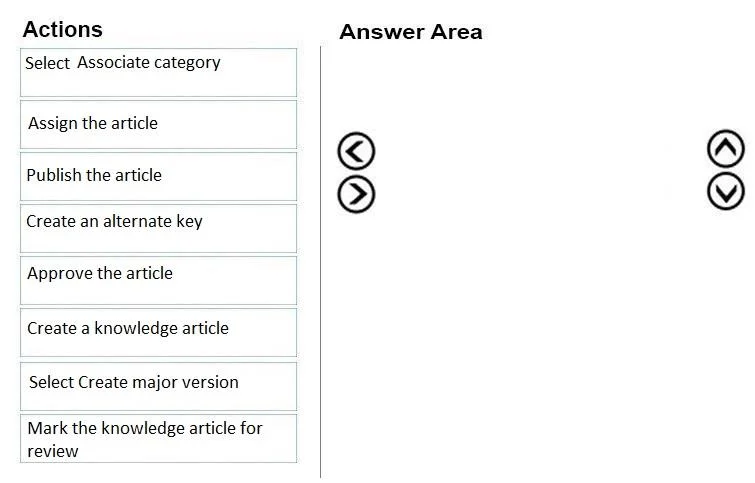
Drag and Drop Question A customer uses Dynamics 365 for Customer Service. Customer service representatives must be able to create knowledge base articles. You need to ensure that all knowledge base articles are submitted for review and approval before they are made available to use. Which four actions must be performed in sequence? To answer, move the appropriate actions from the list of actions to the answer area and arrange them in the correct order. Answer:

Exhibit
MB-230 question #22 exhibit

Answer Area

Drag items

Select Associate categoryAssign the articlePublish the articleCreate an alternate keyApprove the articleCreate a knowledge articleSelect Create major versionMark the knowledge article for review

Correct arrangement

  • Create a knowledge article
  • Mark the knowledge article for review
  • Approve the article
  • Publish the article

Explanation

Dynamics 365 Knowledge Article Review Workflow

The Core Concept

Dynamics 365 for Customer Service has a built-in knowledge article lifecycle with distinct statuses: Draft → In Review → Approved → Published. The question requires enforcing a review gate before articles go live.


Why This Specific Order

1. Create a knowledge article This is the mandatory starting point. A knowledge article must exist before any other action can occur. It begins in Draft status, meaning it's visible only to the author and is not yet searchable or usable by agents.

2. Mark the knowledge article for review Once drafted, the author marks it for review, which changes the article's status to In Review. This is what triggers the approval workflow - it signals to reviewers/managers that the content is ready to be examined. You cannot skip to approval without first placing the article in this state.

3. Approve the article A user with the Knowledge Manager or reviewer role must explicitly approve the article. This changes the status to Approved. Approval is a separate, required gate - without it, the article cannot be published. This is the step that fulfills the business requirement of ensuring articles are reviewed before going live.

4. Publish the article Only after approval can the article be published. Publishing changes the status to Published, making it available in the knowledge base for agents and customers to use. Publishing an unapproved article is not possible in the standard workflow.


Distractors Explained

ItemWhy It's Wrong
Assign the articleThis assigns the article to a specific reviewer - it's optional and not part of the core 4-step sequence required here.
Select Associate categoryCategories help organize articles but are not required steps in the approval workflow.
Create an alternate keyThis is a Dataverse/entity configuration concept - completely unrelated to knowledge article workflows.
Select Create major versionUsed when revising an already-published article to track versioning - not part of initial creation and approval.

Common Misconceptions

  • "Assign the article" seems like it should be in the sequence - many assume you must assign it before review, but assignment is optional; articles can go through review without being formally assigned.
  • Skipping "Mark for review" - some assume you can go straight from Draft to Approval. In Dynamics 365, the status transition is enforced; you must mark it for review first.
  • Publishing before approval - the UI enforces status order, so this isn't technically possible in the standard workflow, but candidates often confuse the sequence on paper.

Topics

#knowledge articles#review process#approval workflow#publish

Community Discussion

No community discussion yet for this question.

Full MB-230 Practice