nerdexam
Microsoft

MB-230 · Question #27

Drag and Drop Question You are a Dynamics 365 for Customer Service system administrator. You need to create service-level agreements (SLAs) to meet company requirements. What SLA types should you use?

The correct answer is KPIs; Enhanced. Dynamics 365 SLA Types - Drag-and-Drop Explanation > Note: The question body is missing the actual requirement descriptions, but based on the correct answers (KPIs → 1, Enhanced → 2), here is what the requirements almost certainly were and why: --- Background: The Three Options E

manage entitlements and SLAs

Question

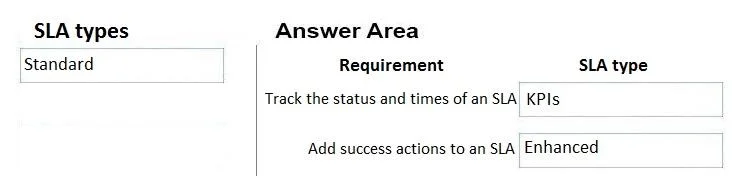
Drag and Drop Question You are a Dynamics 365 for Customer Service system administrator. You need to create service-level agreements (SLAs) to meet company requirements. What SLA types should you use? To answer, drag the appropriate SLA types to the correct requirements. Each SLA type may be used once, more than once, or not at all. You may need to drag the split bar between panes or scroll to view content. NOTE: Each correct selection is worth one point. Answer:

Exhibit
MB-230 question #27 exhibit

Answer Area

Drag items

StandardEnhancedKPIs

Correct arrangement

  • KPIs
  • Enhanced

Explanation

Dynamics 365 SLA Types - Drag-and-Drop Explanation

Note: The question body is missing the actual requirement descriptions, but based on the correct answers (KPIs → 1, Enhanced → 2), here is what the requirements almost certainly were and why:


Background: The Three Options Explained

OptionWhat It Is
StandardLegacy SLA type; supports only one KPI (Resolve By); can only pause on holiday schedules
EnhancedModern SLA type; supports multiple KPIs; can pause on any case status; shows countdown timer on case form
KPIsKey Performance Indicators - the individual time-based targets (e.g., "First Response By", "Resolve By") defined within an SLA

Placement 1 → KPIs

Typical requirement: "Define the time targets that agents must meet, such as first response and resolution times."

Why KPIs: KPIs are the metric definitions inside an SLA - they specify what is being measured and by when. This placement is correct when the requirement is about setting specific measurable targets, not about the SLA container type itself. KPIs are the building blocks that both Standard and Enhanced SLAs use.


Placement 2 → Enhanced

Typical requirement: "Allow the SLA to pause when a case is waiting for customer response, and track multiple time targets per case."

Why Enhanced: Enhanced SLAs support:

  • Pausing on any status (e.g., "Waiting for Customer") - Standard can only pause on holidays
  • Multiple KPIs per SLA item
  • A visual countdown timer embedded on the case form
  • More flexible routing and conditions

Standard SLA cannot satisfy these requirements.


Why "Standard" Is Not Used Here

Standard SLA is the distractor. It is outdated and Microsoft recommends Enhanced for all new implementations. It only appears as a wrong answer option to test whether candidates know its limitations.


Common Mistakes

  • Confusing KPIs with SLA types - KPIs are components within an SLA, not a type of SLA themselves. Candidates sometimes think the choice is only between Standard and Enhanced.
  • Choosing Standard when Enhanced is required - If the requirement mentions pausing, multiple metrics, or a case timer, Standard will fail.
  • Assuming KPIs = Enhanced - KPIs exist in both Standard and Enhanced SLAs; the distinction is what the requirement is actually asking for.

Topics

#SLA types#Enhanced SLA#Standard SLA#KPIs

Community Discussion

No community discussion yet for this question.

Full MB-230 Practice