
CSA · Question #396
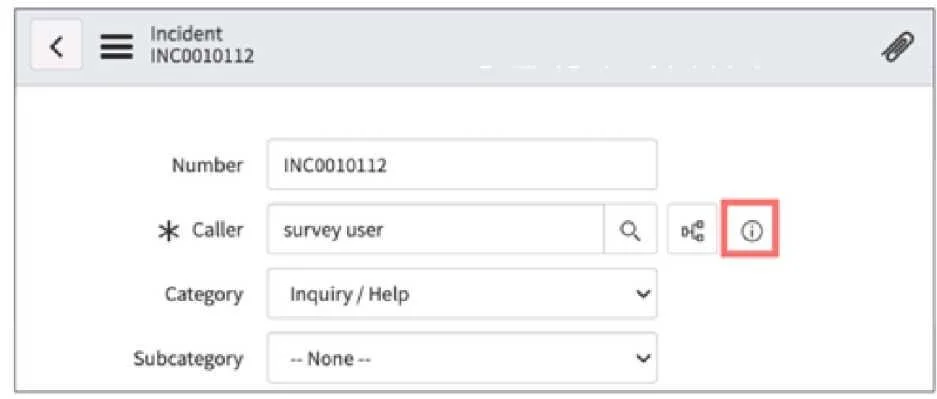
On a form, which type of Geld has this icon which can be clicked, 10 S00 a preview of the associated record?
The correct answer is F. Reference. On a form, the icon allowing you to click and preview an associated record identifies a Reference field, which links to a record in another table.
Question
On a form, which type of Geld has this icon which can be clicked, 10 S00 a preview of the associated record?
Exhibit
Options
- ADrilkdown
- BLookup
- CQuickview
- DPreview
- ESnapshot
- FReference
How the community answered
(42 responses)- B5% (2)
- E2% (1)
- F93% (39)
Why each option
On a form, the icon allowing you to click and preview an associated record identifies a Reference field, which links to a record in another table.
'Drilldown' refers to a navigational action to view more detailed data, not a specific field type associated with a preview icon.
'Lookup' describes the action of searching for a record, but it is not the name of the field type that includes the preview icon.
'Quickview' is not a standard ServiceNow field type, although it describes the functionality.
'Preview' describes the action of viewing a record summary, but it is not the name of the field type itself.
'Snapshot' is not a standard ServiceNow field type.
Reference fields in ServiceNow forms allow users to select a record from another table. These fields are typically accompanied by an information icon (e.g., 'i') or a magnifying glass icon that, when clicked, displays a pop-up preview of the referenced record's details without navigating away from the current form.
Concept tested: Reference field functionality and UI
Source: https://docs.servicenow.com/bundle/utah-platform-administration/page/administer/form-administration/concept/c_ReferenceFields.html
Topics
Community Discussion
No community discussion yet for this question.