MB-800 · Question #43
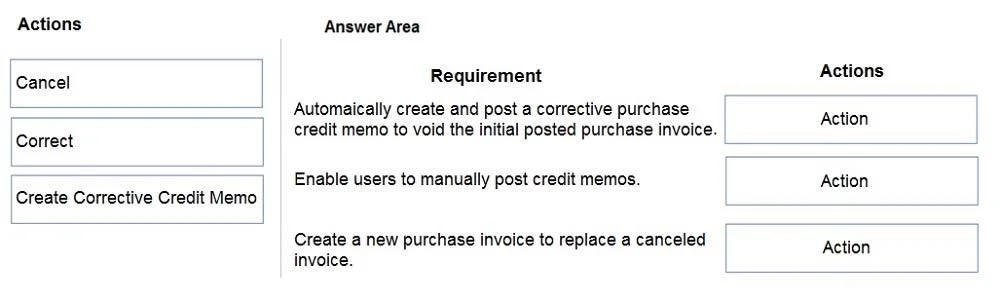
Drag and Drop Question You have multiple, unpaid posted purchase invoices to reverse. Some invoices require complete reversal while others need partial reversal. You need to process credit memos from
The correct answer is Correct; Create Corrective Credit Memo; Cancel. Dynamics 365 Business Central: Reversing Posted Purchase Invoices This question tests your knowledge of the three credit memo actions available on the Posted Purchase Invoices page in Business Central, and which scenario each applies to. --- The Three Actions Explained | Action |
Question
Exhibit
Answer Area
Drag items
Correct arrangement
- Correct
- Create Corrective Credit Memo
- Cancel
Explanation
Dynamics 365 Business Central: Reversing Posted Purchase Invoices
This question tests your knowledge of the three credit memo actions available on the Posted Purchase Invoices page in Business Central, and which scenario each applies to.
The Three Actions Explained
| Action | What It Does | Posts Automatically? | Editable? |
|---|---|---|---|
| Correct | Reverses the original invoice AND creates a new editable draft invoice | Yes (the reversal) | Yes (new invoice) |
| Create Corrective Credit Memo | Creates an unposted credit memo you can modify before posting | No | Yes |
| Cancel | Immediately posts a full reversing credit memo - no editing | Yes | No |
Why Each Position is Correct
Position 1 → Correct Used when you need to reverse and replace the invoice with a corrected version. It simultaneously posts a reversing credit memo and opens a new draft invoice pre-populated with the original data. This is the "fix the mistake and reissue" path.
Position 2 → Create Corrective Credit Memo Used for partial reversal. Because the credit memo is created in an unposted state, you can edit the lines - reducing quantities or amounts - before posting. This is the only action that gives you line-level control over how much to reverse.
Position 3 → Cancel Used for complete reversal with no changes needed. It posts a full reversing credit memo instantly. You cannot modify anything; it mirrors the original invoice exactly and marks it as cancelled.
Common Mistakes
- Confusing Cancel and Correct: Both perform a full reversal, but
Correctadditionally creates a new corrective invoice. UsingCorrectwhen you just want to void an invoice creates unnecessary draft documents. - Using Cancel for partial reversals: Cancel is all-or-nothing. You cannot adjust quantities - it will always reverse 100% of the original.
- Forgetting Create Corrective Credit Memo is unposted: Students sometimes expect it to immediately close the invoice. It requires a separate posting step, which is precisely what makes it suitable for partial scenarios.
Topics
Community Discussion
No community discussion yet for this question.