nerdexam
Microsoft

MB-800 · Question #46

Drag and Drop Question The accounts payable department of a company processes purchase invoices throughout the month. A vendor sends an invoice at the end of each week that combines all deliveries…

Purchase Invoicing Process - Step-by-Step Explanation This question tests knowledge of the combined invoice workflow in Microsoft Dynamics 365 Business Central, where a vendor sends one consolidated invoice covering multiple weekly deliveries. --- The Correct Order (Logical…

Purchasing

Question

Drag and Drop Question The accounts payable department of a company processes purchase invoices throughout the month. A vendor sends an invoice at the end of each week that combines all deliveries. The company wants to know how to process this invoice. You need to explain the steps involved in purchase invoicing. In which order should the steps be performed? To answer, move all actions from the list of actions to the answer area and arrange them in the correct order. Answer:

Exhibit
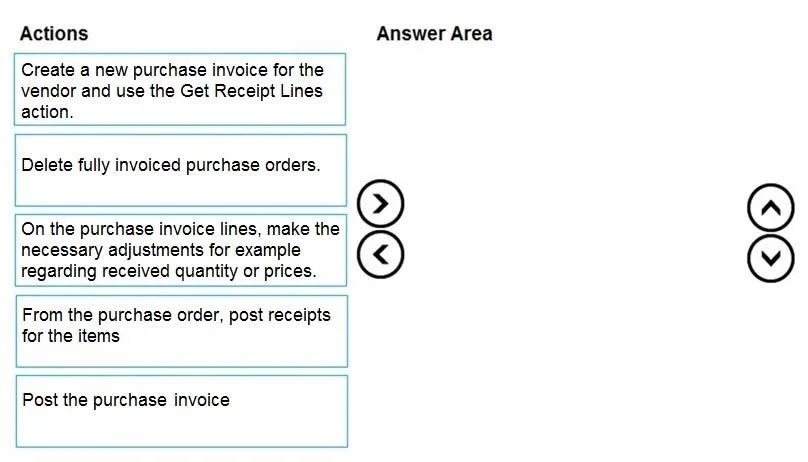
MB-800 question #46 exhibit

Options

  • Box1Create a new purchase invoice for the vendor and use the Get Receipt Lines action.
  • Box2Delete fully invoiced purchase orders.
  • Box3On the purchase invoice lines, make the necessary adjustments for example regarding received quantity or prices.
  • Box4From the purchase order, post receipts for the items
  • Box5Post the purchase invoice

Explanation

Purchase Invoicing Process - Step-by-Step Explanation

This question tests knowledge of the combined invoice workflow in Microsoft Dynamics 365 Business Central, where a vendor sends one consolidated invoice covering multiple weekly deliveries.


The Correct Order (Logical Flow)

Note: The box mapping as listed appears to have a numbering inconsistency. The logically and technically correct sequence - which matches standard Business Central workflow - is:

StepAction
1From the purchase order, post receipts for the items
2Create a new purchase invoice for the vendor and use the Get Receipt Lines action
3On the purchase invoice lines, make the necessary adjustments
4Post the purchase invoice
5Delete fully invoiced purchase orders

Why Each Step Goes Where It Does

Step 1 - Post receipts from the purchase order Goods must be physically received and posted before they can be invoiced. Posting a receipt records the inventory arrival and creates posted receipt lines in the system. Without this, there is nothing for the invoice to reference. This is the foundation of the entire workflow.

Step 2 - Create a purchase invoice + Get Receipt Lines Once all receipts for the week are posted, you create a standalone purchase invoice (not from any single PO). The Get Receipt Lines action then pulls in all posted receipt lines from that vendor - across multiple POs and deliveries - into one invoice. This is exactly the mechanism designed for the "combined invoice" scenario described.

Step 3 - Make necessary adjustments on the invoice lines After pulling in the receipt lines, you reconcile the system's figures against the vendor's actual invoice. Quantities, prices, or charges may differ slightly (e.g., a price change, a short delivery). You correct these discrepancies here, before posting, because corrections after posting require credit memos.

Step 4 - Post the purchase invoice Only after verification and adjustment do you post. Posting creates the accounts payable entry (liability to the vendor), updates the inventory valuation if needed, and records the transaction in the G/L. This is irreversible without a correction document.

Step 5 - Delete fully invoiced purchase orders After posting, POs that have been fully received and fully invoiced are no longer needed operationally. Deleting them keeps the open PO list clean. Business Central will prevent deletion of POs that are still open or partially invoiced - so this step is only possible and appropriate at the end.


Common Mistakes and Misconceptions

MistakeWhy It's Wrong
Creating the purchase invoice before posting receiptsGet Receipt Lines will find nothing - there are no posted receipt lines to pull yet
Posting the invoice before adjusting linesCorrections post-posting require credit memos and re-invoicing, creating extra work and audit complexity
Deleting POs before the invoice is postedBusiness Central may block this, and you risk losing traceability of what was ordered vs. received vs. invoiced
Using a purchase order's invoice function instead of a standalone invoiceFor combined/consolidated invoices spanning multiple POs, a standalone purchase invoice + Get Receipt Lines is the correct approach - not invoicing from within each individual PO

Topics

#purchase invoicing#accounts payable#combined invoice#purchase order

Community Discussion

No community discussion yet for this question.

Full MB-800 Practice