MB-800 · Question #45
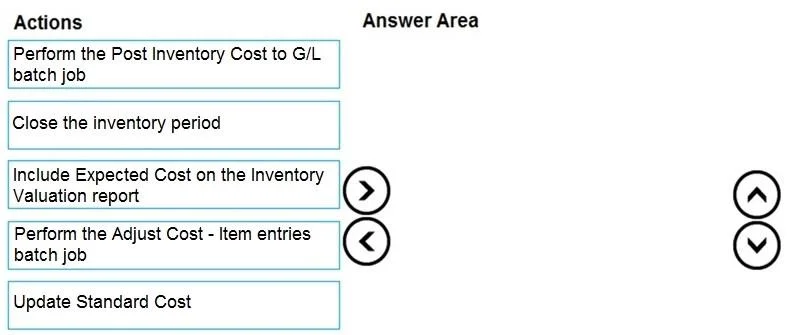
Drag and Drop Question You are implementing Dynamics 365 Business Central for a company. The company must perform inventory valuation according to the following business rules: - Include received…
Dynamics 365 Business Central - Inventory Valuation Month-End Process The Correct Three-Step Sequence | Order | Action | |-------|--------| | 1st | Perform the Adjust Cost – Item Entries batch job (Option 4) | | 2nd | Perform the Post Inventory Cost to G/L batch job (Option 1)…
Question
Exhibit
Options
- Option 1Perform the Post Inventory Cost to G/L batch job
- Option 2Close the inventory period
- Option 3Include Expected Cost on the Inventory Valuation report
- Option 4Perform the Adjust Cost - Item entries batch job
- Option 5Update Standard Cost
Explanation
Dynamics 365 Business Central - Inventory Valuation Month-End Process
The Correct Three-Step Sequence
| Order | Action |
|---|---|
| 1st | Perform the Adjust Cost – Item Entries batch job (Option 4) |
| 2nd | Perform the Post Inventory Cost to G/L batch job (Option 1) |
| 3rd | Close the inventory period (Option 2) |
Options 3 (Include Expected Cost on report) and 5 (Update Standard Cost) are distractors - not part of this closing sequence.
Why This Order?
Step 1 - Adjust Cost – Item Entries
Must come first. This batch job reconciles item ledger entries with value entries and applies any outstanding cost adjustments (e.g., purchase invoice variance, freight charges posted after receipt). If you skip this, the G/L will receive incorrect values in Step 2. You cannot meaningfully close the period if costs are still unadjusted.
Step 2 - Post Inventory Cost to G/L
Requires Step 1 to be clean. This job takes the value entries created/updated by Step 1 and posts them as G/L entries. If Expected Cost Posting to G/L is enabled in Inventory Setup, this step also posts expected costs - satisfying the business rule about received-but-not-yet-invoiced items appearing on the balance sheet. Running this before adjusting costs would post stale numbers.
Step 3 - Close the Inventory Period
Must come last. Closing the inventory period locks it so no new item ledger entries can be backdated into it. This directly satisfies the business rule about locking inventory value by month end. Closing before posting to G/L would make it impossible (or at least disruptive) to complete Step 2 for that period.
Why the Distractors Are Wrong
| Option | Why it's a distractor |
|---|---|
| Include Expected Cost on Inventory Valuation report | This is a report parameter, not a closing process step. It's used for verification/auditing, not for actually posting expected costs to the balance sheet. Expected costs are enabled in Inventory Setup, posted via Step 2. |
| Update Standard Cost | This is only relevant for items using the Standard costing method. It has nothing to do with period closing or expected cost posting. |
Common Misconceptions
- "I can close the period first, then post to G/L." No - closing locks entries. You must finish all posting before closing.
- "Post to G/L handles the cost adjustment." No - Post to G/L only moves already-calculated value entries to G/L. Adjust Cost must run first.
- "Enabling expected cost posting is a step in this sequence." No - that's a one-time Inventory Setup configuration, not a recurring month-end action.
Topics
Community Discussion
No community discussion yet for this question.