MB-800 · Question #41
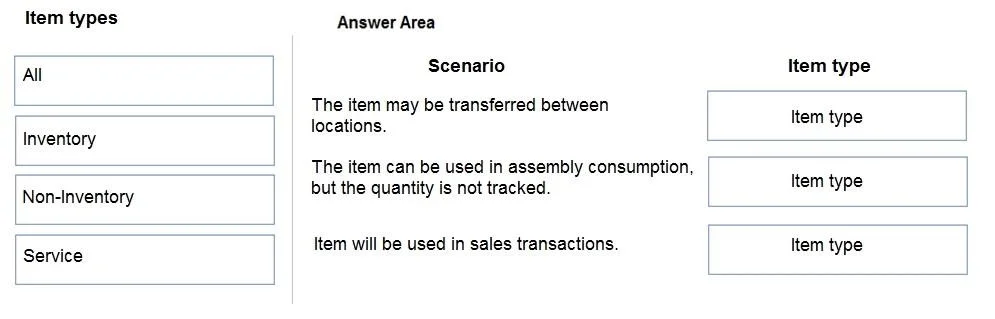
Drag and Drop Question You are configuring Dynamics 365 Business Central for a company. You need to create items. Which item types should you use? To answer, drag the appropriate item types to the cor
The correct answer is Inventory; Non-Inventory; All. Dynamics 365 Business Central - Item Types Explanation > Note: The scenario descriptions weren't included in your question text - only the correct answers. The explanation below covers the item types and infers the likely scenarios based on common exam patterns. --- Item Types in
Question
Exhibit
Answer Area
Drag items
Correct arrangement
- Inventory
- Non-Inventory
- All
Explanation
Dynamics 365 Business Central - Item Types Explanation
Note: The scenario descriptions weren't included in your question text - only the correct answers. The explanation below covers the item types and infers the likely scenarios based on common exam patterns.
Item Types in Business Central
| Type | Inventory Tracked? | Physical Item? | Typical Use |
|---|---|---|---|
| Inventory | Yes | Yes | Goods bought/sold/stored in a warehouse |
| Non-Inventory | No | Usually yes | Items purchased for direct use, not stocked |
| Service | No | No | Labor, fees, intangible services |
Placement Explanations
1. Inventory
Used for physical goods that must be quantity-tracked in your warehouse or storage locations. Posting transactions with this type affects the inventory valuation ledger and requires inventory adjustments. Typical scenario: "A company sells physical products and needs to track stock levels and costs."
2. Non-Inventory
Used for items that are purchased and resold but not warehouse-tracked - often consumables, packaging, or drop-shipped goods. No inventory ledger entries are created. Typical scenario: "Items are purchased directly for a job or customer without being stocked."
3. All
In BC, "All" appears in filter/selection contexts (e.g., item tracking code setup, where "All" means the rule applies to every transaction type - inbound and outbound). Typical scenario: "A tracking or posting rule should apply regardless of item type."
Common Mistakes
- Confusing Non-Inventory with Service - Non-Inventory can still be a physical product; Service is strictly intangible.
- Using Inventory for everything - This creates unnecessary warehouse complexity and overhead for items never stocked.
- Misplacing "All" - It is not a standalone item type for creating item cards; it's a filter/scope value used in configuration contexts.
Topics
Community Discussion
No community discussion yet for this question.