nerdexam
Microsoft

MB-800 · Question #39

Drag and Drop Question You are implementing Dynamics 365 Business Central. The accounting manager of the company provides you with the chart of accounts. You need to set up specific posting groups acc

The correct answer is Customer Posting Groups; Vendor Posting Groups; Inventory Posting Groups and Inventory Posting Setup. Dynamics 365 Business Central - Posting Groups Explanation The question asks you to match the correct posting group setup to the specific accounting action it supports. Based on the correct arrangement, three actions map to the three selected setups. The two unused items are Bank

Configure financials

Question

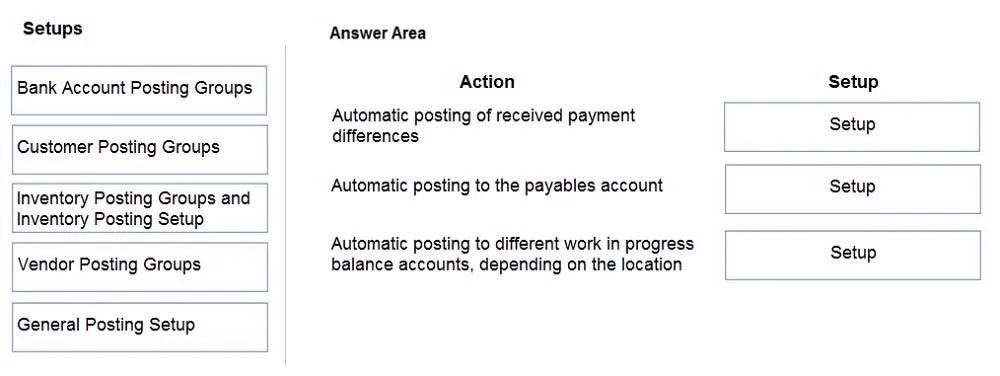
Drag and Drop Question You are implementing Dynamics 365 Business Central. The accounting manager of the company provides you with the chart of accounts. You need to set up specific posting groups according to the chart of accounts. Which setup should you use? To answer, drag the appropriate setup to the correct action. Each setup may be used once, more than once, or not at all. You may need to drag the split bar between panes or scroll to view content. NOTE: Each correct selection is worth one point. Answer:

Exhibit
MB-800 question #39 exhibit

Answer Area

Drag items

Bank Account Posting GroupsCustomer Posting GroupsInventory Posting Groups and Inventory Posting SetupVendor Posting GroupsGeneral Posting Setup

Correct arrangement

  • Customer Posting Groups
  • Vendor Posting Groups
  • Inventory Posting Groups and Inventory Posting Setup

Explanation

Dynamics 365 Business Central - Posting Groups Explanation

The question asks you to match the correct posting group setup to the specific accounting action it supports. Based on the correct arrangement, three actions map to the three selected setups. The two unused items are Bank Account Posting Groups and General Posting Setup.


Correct Placements

1. Customer Posting Groups

Customer Posting Groups link customer transactions to specific G/L accounts - primarily Accounts Receivable, but also service charges, payment discounts, and rounding accounts. When the accounting manager provides a chart of accounts with dedicated receivables accounts per customer segment (domestic, foreign, etc.), Customer Posting Groups is the mechanism that maps each customer group to the right G/L account. Every customer card must have a posting group assigned before any sales transactions can post.

2. Vendor Posting Groups

Vendor Posting Groups serve the same purpose on the payables side - they link vendor transactions to G/L accounts for Accounts Payable, payment discounts, and rounding. If the chart of accounts separates payables by vendor type (trade vendors, intercompany, etc.), each requires its own Vendor Posting Group. Like customers, every vendor card must have a posting group before purchase transactions can post.

3. Inventory Posting Groups and Inventory Posting Setup

This is a two-part setup:

  • Inventory Posting Groups are assigned to items and classify them (e.g., raw materials, finished goods).
  • Inventory Posting Setup is a matrix that combines the Inventory Posting Group with a Location to determine which G/L accounts receive inventory value entries (Inventory Account, COGS, WIP, etc.).

This setup is necessary whenever the chart of accounts has distinct inventory balance sheet and income accounts by item type or warehouse location.


Why the Other Items Are NOT Used

Bank Account Posting Groups - These link a bank account to a single G/L cash/bank account. They are simple and typically don't reflect complexity in a chart of accounts the way receivables, payables, and inventory do. The scenario described doesn't require bank account G/L mapping.

General Posting Setup - This is a matrix of Gen. Business Posting Group × Gen. Product Posting Group that drives Sales, COGS, purchase accounts, etc. It is critically important in BC, but it is not a "specific posting group" - it is a cross-combination setup. A common misconception is confusing General Posting Setup with the specific entity posting groups above. General Posting Setup handles revenue/expense flows; the three chosen setups handle balance sheet entity mapping.


Common Mistakes

  • Confusing General Posting Setup with Vendor/Customer Posting Groups: Students often think General Posting Setup handles receivables/payables - it does not. It handles sales revenue and purchase expense lines. Receivables and payables G/L accounts come exclusively from Customer and Vendor Posting Groups.
  • Forgetting Inventory Posting Setup is required alongside Inventory Posting Groups: Assigning only an Inventory Posting Group to an item is insufficient. The Inventory Posting Setup matrix must also be configured, or posting will error.
  • Overlooking Bank Account Posting Groups as a distractor: They sound relevant to "chart of accounts setup" but apply only to the bank reconciliation/payment journal side, not to the core AR/AP/inventory flows described here.

Topics

#posting groups#chart of accounts#general posting setup#GL accounts

Community Discussion

No community discussion yet for this question.

Full MB-800 Practice