nerdexam
Microsoft

MB-800 · Question #84

Drag and Drop Question An accountant discovers inconsistencies between financial statements and balances in the chart of accounts. You suspect that the discrepancies might be a result of missing…

Explanation: Chart of Accounts Discrepancy Resolution Context: This question is set in Microsoft Dynamics 365 Business Central (or a similar ERP). Financial statements are generated from GL accounts mapped to account categories and subcategories. Missing subcategories cause…

Configure financials

Question

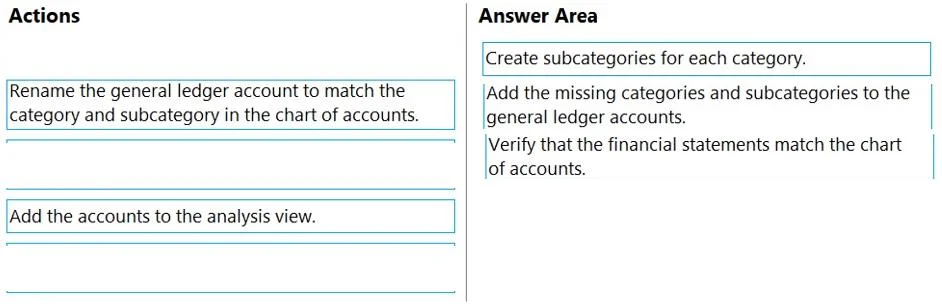
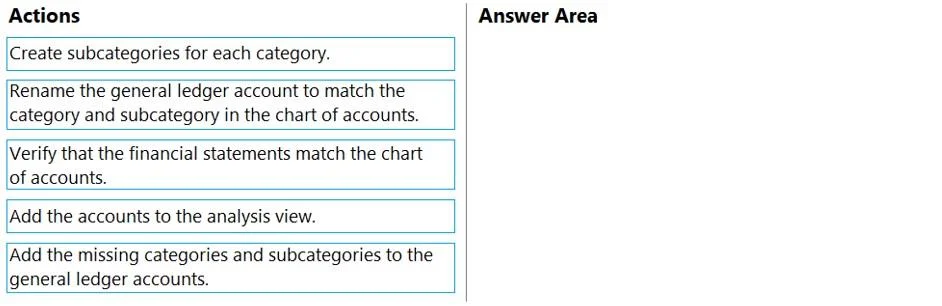
Drag and Drop Question An accountant discovers inconsistencies between financial statements and balances in the chart of accounts. You suspect that the discrepancies might be a result of missing categories and subcategories. You need to ensure that the financial statements match the chart of accounts. Which three actions should you perform in sequence? To answer, move the appropriate actions from the list of actions to the answer area and arrange them in the correct order. Answer:

Exhibits
MB-800 question #84 exhibit 1
MB-800 question #84 exhibit 2

Options

  • 1Create subcategories for each category.
  • 2Rename the general ledger account to match the category and subcategory in the chart of accounts.
  • 3Verify that the financial statements match the chart of accounts.
  • 4Add the accounts to the analysis view.
  • 5Add the missing categories and subcategories to the general ledger accounts.

Explanation

Explanation: Chart of Accounts Discrepancy Resolution

Context: This question is set in Microsoft Dynamics 365 Business Central (or a similar ERP). Financial statements are generated from GL accounts mapped to account categories and subcategories. Missing subcategories cause statements to omit or misclassify account balances, creating the discrepancies the accountant found.


The Correct Three-Step Sequence

Step 1 - Create subcategories for each category

You must build the subcategory structure first, before anything else can reference it. Subcategories are the classification layer that financial statements use to group GL accounts into meaningful report lines. Attempting to assign or rename accounts before the subcategories exist has nothing to point to.

Why not "Add the missing categories and subcategories to the general ledger accounts" first? That step (a distractor) describes assigning existing subcategories to accounts - but you can't assign what doesn't exist yet. Creation precedes assignment.


Step 2 - Rename the general ledger account to match the category and subcategory in the chart of accounts

Once the subcategories exist, you align each GL account's name and classification to match the COA structure. This is how the account gets properly categorized so that financial statements can pick it up. "Renaming to match" here means ensuring the account's metadata corresponds to the right category/subcategory slot.

Why before verification? You can't verify correctness until the accounts are actually aligned. Making the structural change must precede the check.


Step 3 - Verify that the financial statements match the chart of accounts

Only after creating the structure (Step 1) and aligning the accounts to it (Step 2) can you meaningfully confirm the fix worked. This is a validation step, not a corrective one.


The Distractors (Not Selected)

DistractorWhy it's wrong here
Add the accounts to the analysis viewAnalysis views are a separate Business Central feature for ad-hoc reporting/pivoting. They are unrelated to reconciling financial statements against the COA.
Add the missing categories and subcategories to the general ledger accountsThis describes assigning categories to accounts - but the question's Step 1 (create subcategories) and Step 2 (rename/align accounts) already accomplish this correctly in order. This option implies a reversed or redundant workflow.

Common Mistakes

  • Swapping Steps 1 and 2 - Students try to rename/assign accounts before the subcategories exist. You cannot map to a target that hasn't been created.
  • Selecting the analysis view option - "Analysis view" sounds financial, so it's a plausible-looking distractor, but it serves BI/reporting purposes and has no role in COA-to-statement reconciliation.
  • Treating verify as optional - Step 3 is required by the question's goal ("ensure financial statements match"), making it a mandatory closing action, not a nice-to-have.

Topics

#account categories#account subcategories#financial statements#chart of accounts

Community Discussion

No community discussion yet for this question.

Full MB-800 Practice