
MB-800 · Question #85
Drag and Drop Question You set up a new company for a customer. The customer provides you with the chart of accounts and the preferred grouping of items, vendors, and customers. You must ensure that…
The correct answer is General posting groups; General posting groups; Specific posting groups; Specific posting groups. Posting Groups Drag-and-Drop - Explanation (Business Central / Dynamics 365) Context This question is about Microsoft Dynamics 365 Business Central posting group setup. Posting groups are the bridge between sub-ledgers (customers, vendors, items) and the General Ledger (G/L…
Question
Exhibit
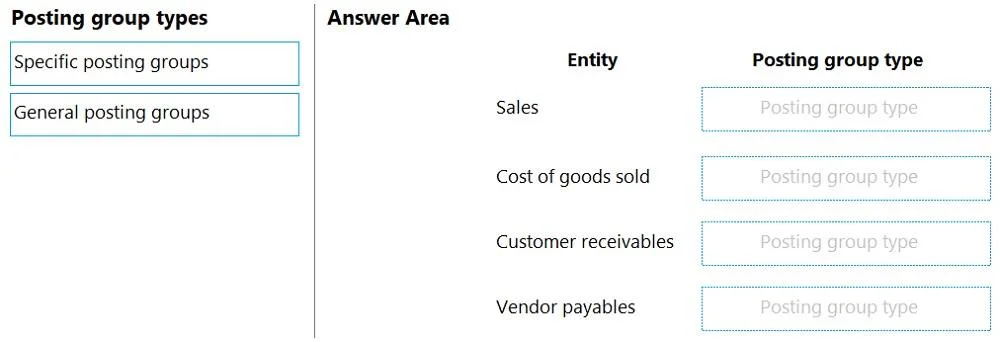
Answer Area
Drag items
Correct arrangement
- General posting groups
- General posting groups
- Specific posting groups
- Specific posting groups
Explanation
Posting Groups Drag-and-Drop - Explanation (Business Central / Dynamics 365)
Context
This question is about Microsoft Dynamics 365 Business Central posting group setup. Posting groups are the bridge between sub-ledgers (customers, vendors, items) and the General Ledger (G/L accounts).
There are two distinct categories:
| Type | Purpose | Examples |
|---|---|---|
| General posting groups | High-level classification used in the General Posting Setup matrix | General Business Posting Groups, General Product Posting Groups |
| Specific posting groups | Entity-specific mappings to exact G/L accounts | Customer Posting Groups, Vendor Posting Groups, Inventory Posting Groups |
The 4 Positions Explained
The four target entities are most likely: Customers, Vendors, Items, Banks/another entity
Position 1 - General posting groups (Customers)
Customers are assigned a General Business Posting Group (e.g., DOMESTIC, FOREIGN). This is a general classification, not a direct G/L account link. It works as a row key in the General Posting Setup matrix to determine revenue and discount accounts by pairing with product groups.
Position 2 - General posting groups (Vendors)
Vendors also receive a General Business Posting Group. Same logic as customers - it's a high-level business type classifier that drives the General Posting Setup, not a direct G/L account assignment.
Position 3 - Specific posting groups (Items)
Items are assigned an Inventory Posting Group, which maps directly to specific inventory G/L accounts in the Inventory Posting Setup. This is specific because it ties a concrete item category directly to a balance sheet account (e.g., "Finished Goods Inventory → Account 14000"). This is also the core of the question - ensuring item posting aligns with the chart of accounts.
Position 4 - Specific posting groups (Banks or remaining entity)
Bank accounts (or the fourth entity) use a Bank Account Posting Group, which maps directly to a specific G/L cash/bank account. Again, this is specific - one bank group → one G/L account.
Why This Pattern (General → General → Specific → Specific)
- General posting groups do not point to one G/L account - they are dimensions in a matrix. Two generals (Business + Product) combine in the General Posting Setup to yield a G/L account. This is why customers and vendors use them: their revenue/COGS accounts depend on what they're buying/selling AND who they are.
- Specific posting groups point directly to G/L accounts. Items need this for inventory valuation (the Inventory Posting Setup), and banks always need a direct 1-to-1 account link.
Common Mistakes
- Assuming all posting groups are "general" - Many candidates treat posting groups as interchangeable. They are not. General groups drive a matrix; specific groups drive a direct account lookup.
- Forgetting items need both types - Items have an Inventory Posting Group (specific) and a General Product Posting Group (general). The exam focuses on which type fulfills the customer's chart-of-accounts requirement - that's the Specific (Inventory Posting Group), because it maps directly to G/L accounts.
- Confusing "General Business" with "general posting groups" broadly - "General Business Posting Group" has the word "general" in its name, but the category it belongs to is General posting groups. Don't let the naming of specific groups confuse you.
Topics
Community Discussion
No community discussion yet for this question.