nerdexam
Microsoft

MB-800 · Question #158

Drag and Drop Question You are setting up new customers and items in Dynamics 365 Business Central. You need to configure the system. Which posting group should you use? To answer, drag the…

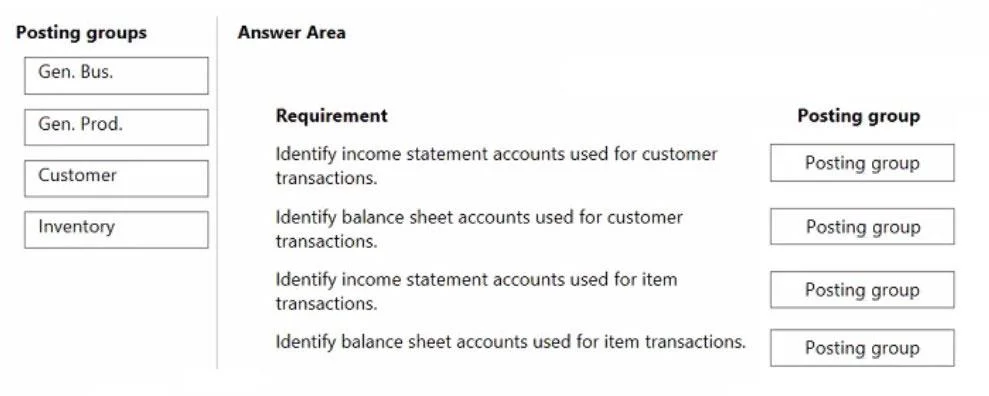
The correct answer is Gen. Bus.; Customer; Gen. Prod.; Inventory. Important Note The question as provided is incomplete - the use case descriptions for positions 1–4 are missing. Only the available items and the correct answer mapping are shown. I'll explain based on the standard exam format for this topic in D365 Business Central…

Configure financials

Question

Drag and Drop Question You are setting up new customers and items in Dynamics 365 Business Central. You need to configure the system. Which posting group should you use? To answer, drag the appropriate posting groups to the correct use cases. Each posting group may be used once, more than once, or not at all. You may need to drag the split bar between panes or scroll to view content. NOTE: Each correct selection is worth one point. Answer:

Exhibit
MB-800 question #158 exhibit

Answer Area

Drag items

Gen. Bus.Gen. Prod.CustomerInventory

Correct arrangement

  • Gen. Bus.
  • Customer
  • Gen. Prod.
  • Inventory

Explanation

Important Note

The question as provided is incomplete - the use case descriptions for positions 1–4 are missing. Only the available items and the correct answer mapping are shown. I'll explain based on the standard exam format for this topic in D365 Business Central.


Background: The Four Posting Groups

Posting GroupAssigned ToPurpose
Gen. Bus.Customers, VendorsIdentifies the business partner type for G/L mapping
CustomerCustomersMaps to Accounts Receivable and payment accounts
Gen. Prod.Items, Resources, G/L AccountsIdentifies the product/service type for G/L mapping
InventoryItemsMaps to inventory asset accounts on the balance sheet

Why Each Placement is Correct

Position 1 → Gen. Bus. (Customer setup)

When creating a customer, you assign a Gen. Bus. Posting Group so BC can combine it with the item's Gen. Prod. Posting Group via the General Posting Setup table to find the correct revenue and COGS G/L accounts. It answers: "what kind of customer is this?"

Position 2 → Customer (Customer setup)

The Customer Posting Group is also required on the customer card. It directly maps to the Accounts Receivable G/L account, along with payment discount and rounding accounts. It answers: "where do I post the receivable?"

Position 3 → Gen. Prod. (Item setup)

When creating an item, the Gen. Prod. Posting Group works as the counterpart to the customer's Gen. Bus. Posting Group. Together they look up the General Posting Setup to determine which income/expense accounts receive the posted amounts.

Position 4 → Inventory (Item setup)

The Inventory Posting Group combined with the Location drives the Inventory Posting Setup, which determines the balance sheet G/L account where inventory value sits (e.g., Raw Materials, Finished Goods).


Common Mistakes

  • Confusing Gen. Bus. with Customer Posting Group: Gen. Bus. is for income statement routing (revenue/COGS); Customer Posting Group is for the balance sheet (receivables). Both go on the customer, but serve different purposes.
  • Thinking Gen. Prod. alone posts to revenue: It only works in combination with Gen. Bus. - neither is sufficient alone.
  • Overlooking that Inventory Posting Group is item-only: It has no role on customer records; it purely governs inventory asset accounts.
  • Assuming one posting group handles everything: Customers need two (Gen. Bus. + Customer); Items need two (Gen. Prod. + Inventory).

Topics

#posting groups#customer posting group#item posting group#general posting setup

Community Discussion

No community discussion yet for this question.

Full MB-800 Practice