nerdexam
Microsoft

MB-800 · Question #288

Drag and Drop Question You are configuring Business Central for a client. The client has the following requirements to process documents in the system: - Invoice amounts in the local currency must…

The correct answer is Inv. Rounding Precision (LCY); Posting Preview Type; Enable Data Check. Explanation: General Ledger Setup - Business Central --- Requirement 1 → Inv. Rounding Precision (LCY) Inv. Rounding Precision (LCY) controls how invoice amounts in local currency (LCY) are rounded during posting. By setting this field to 0.01 (or the smallest unit), you…

Configure financials

Question

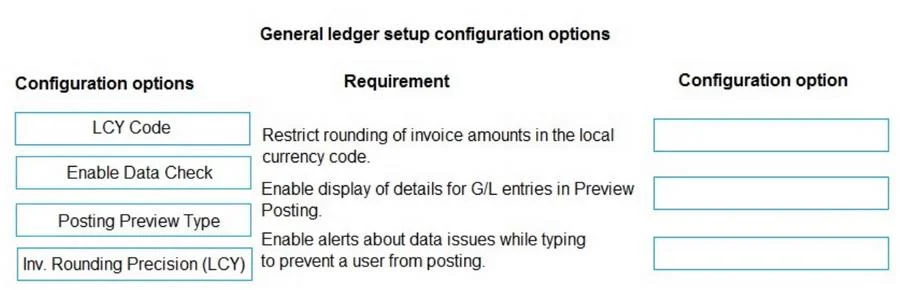
Drag and Drop Question You are configuring Business Central for a client. The client has the following requirements to process documents in the system: - Invoice amounts in the local currency must never be rounded. - Details for general ledger (G/L) entries must be displayed in Preview Posting. - During data entry, users must receive an alert about issues in documents and journals to prevent users from posting. You need to configure General Ledger Setup options to complete the configuration. Which configuration options should you use for each requirement? To answer, drag the appropriate configuration options to the correct requirements. Each configuration option may be used once, more than once, or not at all. You may need to drag the split bar between panes or scroll to view content. NOTE: Each correct selection is worth one point. Answer:

Exhibit
MB-800 question #288 exhibit

Answer Area

Drag items

LCY CodeEnable Data CheckPosting Preview TypeInv. Rounding Precision (LCY)

Correct arrangement

  • Inv. Rounding Precision (LCY)
  • Posting Preview Type
  • Enable Data Check

Explanation

Explanation: General Ledger Setup - Business Central


Requirement 1 → Inv. Rounding Precision (LCY)

Inv. Rounding Precision (LCY) controls how invoice amounts in local currency (LCY) are rounded during posting. By setting this field to 0.01 (or the smallest unit), you effectively eliminate rounding - the system will not apply any rounding adjustment to invoice amounts. Setting it to 0 disables invoice rounding entirely.

Common mistake: Confusing this with LCY Code, which simply defines what the local currency is (e.g., "USD" or "EUR") - it has nothing to do with rounding behavior.


Requirement 2 → Posting Preview Type

Posting Preview Type determines what level of detail is shown when a user clicks Preview Posting. Options typically include:

  • Standard - shows a summary view
  • Extended - shows detailed G/L entry-level information

Setting this to Extended satisfies the requirement to display G/L entry details in the preview, giving users full visibility before committing a posting.

Common mistake: Thinking this affects whether posting preview is available - it only controls the detail level of what's shown.


Requirement 3 → Enable Data Check

Enable Data Check activates real-time background validation on documents and journals during data entry - before the user attempts to post. When enabled, Business Central displays a FactBox with warnings and errors as the user types, alerting them to issues (e.g., missing mandatory fields, blocked accounts) proactively.

Common mistake: Confusing this with standard posting validation, which only fires at posting time. Enable Data Check is specifically the setting for pre-posting, during-entry alerts.


Why LCY Code is Not Used

LCY Code is a distractor here. It identifies the local currency (e.g., "USD") but does not affect rounding, preview detail, or data entry validation. It is a foundational setup field, not a behavioral control for any of these three requirements.

Topics

#General Ledger Setup#invoice rounding#preview posting#posting warnings

Community Discussion

No community discussion yet for this question.

Full MB-800 Practice