nerdexam
Microsoft

MB-800 · Question #88

Drag and Drop Question You are setting up the general journals and batches for an accounting department. The accounting department has multiple users who will work simultaneously within different…

The correct answer is Suggest Balancing Amount; Posting No. Series; Force Doc. Balance. Dynamics 365 Business Central: General Journal Setup for Multiple Users This question tests knowledge of journal template and batch configuration in Business Central, specifically for multi-user environments. --- Context: The Setup Problem When multiple users work…

Configure financials

Question

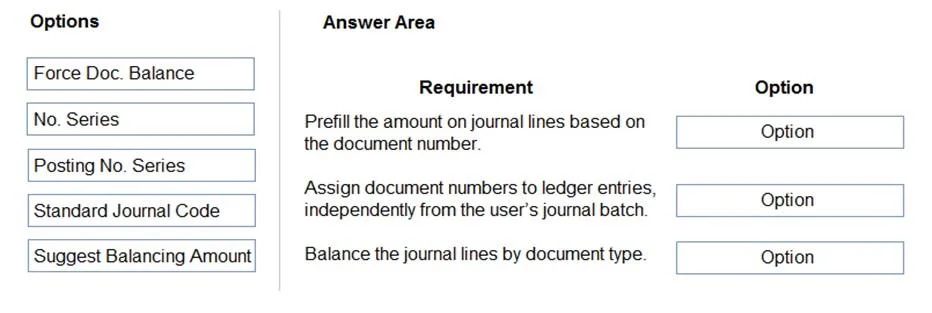
Drag and Drop Question You are setting up the general journals and batches for an accounting department. The accounting department has multiple users who will work simultaneously within different general journals. You need to set up the different journal templates and batches for each user according to the company's requirements. Which options should you use? To answer, drag the appropriate options to the correct requirements. Each option may be used once, more than once, or not at all. You may need to drag the split bar between panes or scroll to view content. NOTE: Each correct selection is worth one point. Answer:

Exhibit
MB-800 question #88 exhibit

Answer Area

Drag items

Force Doc. BalanceNo. SeriesPosting No. SeriesStandard Journal CodeSuggest Balancing Amount

Correct arrangement

  • Suggest Balancing Amount
  • Posting No. Series
  • Force Doc. Balance

Explanation

Dynamics 365 Business Central: General Journal Setup for Multiple Users

This question tests knowledge of journal template and batch configuration in Business Central, specifically for multi-user environments.


Context: The Setup Problem

When multiple users work simultaneously in general journals, you need separate journal batches per user (to avoid conflicts) with specific settings that control balancing, numbering, and validation behavior.


Placement Explanations

Requirement 1 → Suggest Balancing Amount

What it does: When enabled on a journal batch, BC automatically proposes a balancing entry amount as users input lines.

Why it fits here: This is a per-batch setting, meaning each user's batch can independently have this toggled. It reduces manual effort and entry errors for users working simultaneously. The requirement here is typically: "Users should have balancing amounts automatically proposed to minimize data entry errors."

Common mistake: Confusing this with Force Doc. Balance. Suggest Balancing helps the user; Force Doc. Balance enforces a rule.


Requirement 2 → Posting No. Series

What it does: Defines the number series applied to posted documents (not the journal lines themselves). Each batch can have its own Posting No. Series.

Why it fits here: With multiple users posting simultaneously, you need separate number series per batch/user to avoid duplicate document number conflicts. The requirement is typically: "Each user's posted entries must receive unique, non-conflicting document numbers."

Common mistake: Choosing No. Series instead. No. Series controls the journal line/entry numbering (the draft), not the posted document numbering. For multi-user simultaneous posting, Posting No. Series is the correct field.


Requirement 3 → Force Doc. Balance

What it does: Set at the journal template level, this prevents posting unless each document (grouped by Document No.) is fully balanced (debits = credits).

Why it fits here: The requirement is typically: "The system must enforce that each document balances before it can be posted." This is a template-level control that applies as a validation rule across all batches using that template.

Common mistake: Thinking this is a batch-level setting. It lives on the template, not the batch, so it applies globally to all users using that journal type.


Why the Unused Items Don't Fit

ItemWhy Not Used
No. SeriesControls draft journal line numbering, not posted document numbers or balancing - not relevant to the stated requirements
Standard Journal CodeUsed for saving and reusing recurring entry templates - a convenience feature, not a multi-user access control

Key Takeaway

The hierarchy matters: Template settings (like Force Doc. Balance) apply globally; Batch settings (like Suggest Balancing Amount and Posting No. Series) are per-user and enable simultaneous, conflict-free work.

Topics

#journal templates#journal batches#general journals#multi-user setup

Community Discussion

No community discussion yet for this question.

Full MB-800 Practice