MB-800 · Question #90
Drag and Drop Question You set up a sales module for a company. The manager provides you with the company sales price list. The correct net price for products must display when the sales team…
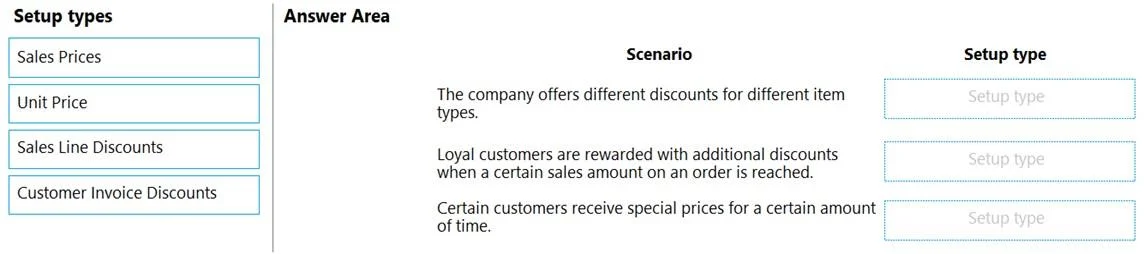
The correct answer is Sales Line Discounts; Customer Invoice Discounts; Sales Prices. Dynamics 365 Business Central - Sales Pricing Configuration This question tests your understanding of how Business Central's pricing engine works and which setup type handles each pricing scenario. --- Context Business Central offers four price-related mechanisms. Only three…
Question
Exhibit
Answer Area
Drag items
Correct arrangement
- Sales Line Discounts
- Customer Invoice Discounts
- Sales Prices
Explanation
Dynamics 365 Business Central - Sales Pricing Configuration
This question tests your understanding of how Business Central's pricing engine works and which setup type handles each pricing scenario.
Context
Business Central offers four price-related mechanisms. Only three are needed here. The scenarios (though not shown verbatim) follow the standard exam pattern:
| # | Scenario Type | Correct Setup |
|---|---|---|
| 1 | Line-level item discount for a specific customer/group | Sales Line Discounts |
| 2 | Total invoice discount based on minimum order amount | Customer Invoice Discounts |
| 3 | Special unit price for a specific customer/item | Sales Prices |
Item-by-Item Breakdown
1. Sales Line Discounts (Scenario 1) Applied per line on a sales order. You configure a discount % or amount tied to a specific customer, item, and optionally a minimum quantity. When the sales team adds that item for that customer, the discount appears automatically on the order line. This is the right tool when the manager says "Customer X gets 15% off Item Y."
2. Customer Invoice Discounts (Scenario 2) Applied to the entire order/invoice, not individual lines. You define thresholds: "if the invoice total exceeds $5,000, apply 3%." Business Central calculates this after all lines are entered. This handles "volume-based" or "invoice-total" discounts.
3. Sales Prices (Scenario 3) Replaces the standard Unit Price for specific customers or customer price groups. Instead of the item's default price, the sales team sees the negotiated price automatically. This is the primary tool for maintaining a formal price list per customer.
Why "Unit Price" Is Not Used
Unit Price is the default price stored on the Item Card - it's the base, not a configurable setup type for scenarios. You don't "configure" it as a pricing rule; it's just a fallback when no Sales Price record matches. Using it here would mean applying one universal price to all customers, which contradicts the requirement for a company-specific price list.
Common Mistakes
- Confusing Sales Prices with Unit Price: Unit Price is static per item; Sales Prices are dynamic per customer/group.
- Using Customer Invoice Discounts for line-level needs: Invoice discounts are order-total-based, not item-specific.
- Thinking Sales Line Discounts replace prices: They don't - they reduce the price, they don't set it. The net price = Sales Price (or Unit Price) minus Sales Line Discount.
The net price the question references is the combined result: Sales Price → minus Sales Line Discount → minus Customer Invoice Discount.
Topics
Community Discussion
No community discussion yet for this question.