nerdexam
Microsoft

MB-800 · Question #193

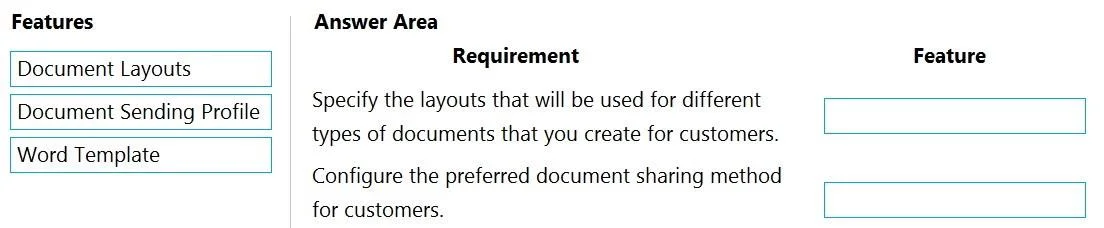
Drag and Drop Question A company uses Dynamics 365 Business Central. You need to configure the system for new customers. Which features should you use? To answer, drag the appropriate features to…

The correct answer is Document Layouts; Document Sending Profile. Dynamics 365 Business Central - Document Configuration for New Customers > Note: The question as provided is missing the actual requirement descriptions (the left-hand column of the drag-and-drop). Based on the correct arrangement and standard BC exam question banks, the…

Configure sales and purchasing

Question

Drag and Drop Question A company uses Dynamics 365 Business Central. You need to configure the system for new customers. Which features should you use? To answer, drag the appropriate features to the correct requirements. Each feature may be used once, more than once, or not at all. You may need to drag the split bar between panes or scroll to view content. NOTE: Each correct selection is worth one point. Answer:

Exhibit
MB-800 question #193 exhibit

Answer Area

Drag items

Document LayoutsDocument Sending ProfileWord Template

Correct arrangement

  • Document Layouts
  • Document Sending Profile

Explanation

Dynamics 365 Business Central - Document Configuration for New Customers

Note: The question as provided is missing the actual requirement descriptions (the left-hand column of the drag-and-drop). Based on the correct arrangement and standard BC exam question banks, the requirements are almost certainly:

  1. Specify a custom document layout for a specific customer
  2. Define how documents are delivered to a customer

Why This Arrangement Is Correct

Placement 1: Document Layouts

What it does: Document Layouts (found on the Customer Card under Related > Documents > Document Layouts) lets you assign a specific report layout per document type for an individual customer. For example, Customer A gets Invoice Layout A; Customer B gets Invoice Layout B.

Why it fits: When the requirement is about customizing the visual appearance or format of a document for a specific customer, this is the correct tool. It maps a customer to a particular report ID and layout.


Placement 2: Document Sending Profile

What it does: A Document Sending Profile defines the delivery method - how Business Central sends documents to a customer (e.g., Print, Email as PDF, Email as electronic document, via disk). You create profiles and assign them to customers.

Why it fits: When the requirement is about how a document gets transmitted to the customer (not what it looks like), this is the answer. It controls the channel of delivery.


Word Template - Not Used

Word Templates are used for ad hoc document generation (e.g., generating a Word doc from a customer record for mail merge). They are not part of the standard customer setup flow for sending transactional documents like invoices or quotes.


Common Mistakes

MistakeWhy It's Wrong
Using Word Template for layout customizationWord Templates are for one-off documents, not for configuring how sales/purchase documents are rendered per customer
Confusing Document Layouts with Document Sending ProfileLayouts = what it looks like; Sending Profile = how it gets there
Thinking Document Sending Profile controls formattingIt controls delivery method only, not appearance

Rule of thumb: Layout = appearance per customer, Sending Profile = delivery channel per customer.

Topics

#customer setup#customer templates#Business Central configuration

Community Discussion

No community discussion yet for this question.

Full MB-800 Practice