nerdexam
Microsoft

MB-800 · Question #91

Drag and Drop Question You are setting up a new company for a customer. The customer wants to understand the structure of the elements involved in inventory posting. You need to describe the…

The correct answer is Items; Item Ledger Entries; Value Entries. Inventory Posting Hierarchy in Business Central This question tests your understanding of how Microsoft Dynamics 365 Business Central structures inventory data, from master data through to financial valuation. --- The Hierarchy Explained `` Items → Item Ledger Entries → Value…

Inventory

Question

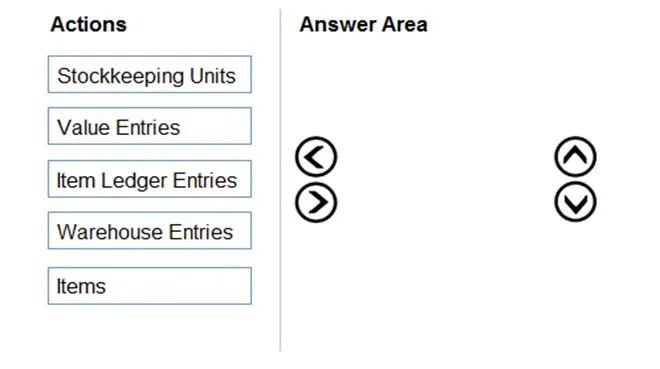
Drag and Drop Question You are setting up a new company for a customer. The customer wants to understand the structure of the elements involved in inventory posting. You need to describe the relationship between elements in a basic inventory setup. What is the hierarchical order of the elements included in inventory posting beginning with the master data? To answer, move the appropriate three entities from the list of actions to the answer area and arrange them in the correct order. Answer:

Exhibit
MB-800 question #91 exhibit

Answer Area

Drag items

Stockkeeping UnitsValue EntriesItem Ledger EntriesWarehouse EntriesItems

Correct arrangement

  • Items
  • Item Ledger Entries
  • Value Entries

Explanation

Inventory Posting Hierarchy in Business Central

This question tests your understanding of how Microsoft Dynamics 365 Business Central structures inventory data, from master data through to financial valuation.


The Hierarchy Explained

Items  →  Item Ledger Entries  →  Value Entries
(Master Data)    (Quantity)           (Value)

The flow represents a dependency chain: each layer cannot exist without the one above it.


Position 1: Items (Master Data)

Items are the foundation. They are master data records - they must exist before any transaction can be posted. The Item card defines what is being tracked (costing method, units of measure, posting groups, etc.). Every downstream record traces back to an Item. No Item = no inventory posting possible.


Position 2: Item Ledger Entries

When a transaction occurs (purchase, sale, adjustment, transfer), Business Central creates Item Ledger Entries to record the quantity movement - how many units moved in or out. These are the primary transactional records and are always linked to an Item. They answer the question: "What happened to the stock quantity?"


Position 3: Value Entries

Value Entries are attached to Item Ledger Entries and record the monetary value of each quantity movement. They drive the G/L (General Ledger) postings. A single Item Ledger Entry can have multiple Value Entries (e.g., initial cost + later cost adjustment). They answer: "What was that movement worth?"


Why the Other Items Are Wrong

ItemWhy Excluded
Stockkeeping Units (SKUs)SKUs are supplementary master data - location/variant overrides of Item settings. They are not part of the core posting chain.
Warehouse EntriesThese belong to the WMS (Warehouse Management) layer and track bin-level movements. They run parallel to inventory posting, not within it.

Common Mistakes

  1. Choosing SKUs instead of Items - SKUs feel like "master data" but they extend Items; the chain starts at the Item itself.
  2. Placing Warehouse Entries in the chain - Warehouse Entries are easy to confuse with Item Ledger Entries, but they serve physical bin management, not financial inventory posting.
  3. Reversing ILEs and Value Entries - The quantity record (ILE) is created first; value is then attached to it. Value Entries depend on ILEs, not the reverse.

Topics

#inventory posting#item groups#inventory posting groups#posting setup hierarchy

Community Discussion

No community discussion yet for this question.

Full MB-800 Practice