MB-800 · Question #296
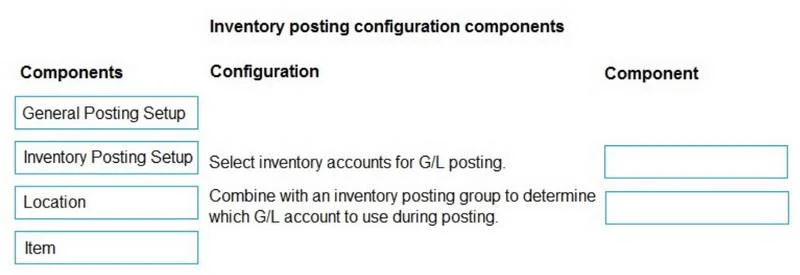
Drag and Drop Question A heavy equipment dealership with two warehouses is implementing Business Central. One warehouse is for parts, and one is for equipment. The dealership must separate inventory…
The correct answer is General Posting Setup; Inventory Posting Setup. Business Central Inventory Posting - Explanation The Core Requirement The dealership needs inventory transactions to hit two separate G/L balance sheet accounts based on item type (Parts vs. Equipment). In Business Central, two setups work in tandem to control all posting…
Question
Exhibit
Answer Area
Drag items
Correct arrangement
- General Posting Setup
- Inventory Posting Setup
Explanation
Business Central Inventory Posting - Explanation
The Core Requirement
The dealership needs inventory transactions to hit two separate G/L balance sheet accounts based on item type (Parts vs. Equipment). In Business Central, two setups work in tandem to control all posting: General Posting Setup and Inventory Posting Setup.
Why These Two - and Not the Others
1. General Posting Setup
Controls G/L account mapping for revenue, COGS, purchase discounts, and inventory adjustments by combining a Gen. Business Posting Group (who you're selling to/buying from) with a Gen. Product Posting Group (what category the item belongs to).
- You create Gen. Product Posting Groups (e.g.,
PARTS,EQUIP) - Assign them to items
- The Setup maps those combinations to accounts like COGS and sales revenue
- It's required for any complete item transaction to post without errors
2. Inventory Posting Setup
Controls which inventory balance sheet G/L account is used. It maps:
Location Code + Inventory Posting Group → Inventory G/L Account
This is the direct answer to the requirement:
- Create Inventory Posting Groups:
PARTS,EQUIP - Assign each group to the relevant items
- In Inventory Posting Setup, map
PARTS→ Parts Inventory account andEQUIP→ Equipment Inventory account - Optionally include the Location to further differentiate by warehouse
Why Location and Item Are NOT the Answer
| Component | Role | Why It's Wrong Here |
|---|---|---|
| Location | An input field used inside Inventory Posting Setup | It doesn't define G/L accounts itself - it's a filter criterion within the setup |
| Item | Carries the Inventory Posting Group and Gen. Prod. Posting Group assignments | It's a carrier of config, not a configuration table - the actual G/L mapping lives in the Posting Setup tables |
A common mistake is selecting Location thinking "we have two warehouses, so Location must be the answer." The Location is relevant within Inventory Posting Setup (you can make the mapping location-specific), but it is not the configuration mechanism itself.
Another mistake is selecting Item - while items must have posting groups assigned to them, configuring an Item card is not what creates the G/L account mapping. That mapping lives exclusively in the Posting Setup tables.
Summary
Both correct answers are setup tables, not master data records:
- General Posting Setup - governs the income statement side (COGS, revenue, adjustments)
- Inventory Posting Setup - governs the balance sheet side (which inventory account is debited/credited)
Both must be configured correctly for inventory to post to the right G/L accounts end-to-end.
Topics
Community Discussion
No community discussion yet for this question.