MB-800 · Question #83
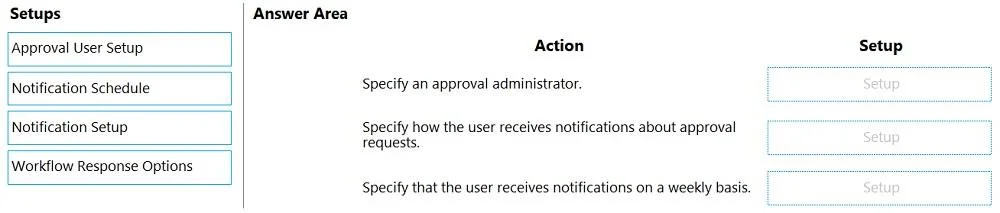
Drag and Drop Question You are implementing Dynamics 365 Business Central. The purchasing manager wants to implement an approval system by using email notifications. You need to set up the…
The correct answer is Approval User Setup; Notification Setup; Notification Schedule. Dynamics 365 Business Central - Email Notification Approval System Overview Setting up an email-based approval system in Business Central follows a logical three-step sequence: first establish who is involved, then configure how they're notified, then define when they're…
Question
Exhibit
Answer Area
Drag items
Correct arrangement
- Approval User Setup
- Notification Setup
- Notification Schedule
Explanation
Dynamics 365 Business Central - Email Notification Approval System
Overview
Setting up an email-based approval system in Business Central follows a logical three-step sequence: first establish who is involved, then configure how they're notified, then define when they're notified.
Item-by-Item Breakdown
1. Approval User Setup (Position 1)
This is the foundation. Before any notification can be sent, Business Central needs to know who the approvers are, their approval limits, substitutes, and the approval hierarchy chain. Without defining approval users first, the system has no targets to send notifications to. This setup links users to the approval workflow and assigns email addresses used for notification delivery.
2. Notification Setup (Position 2)
Once approvers are defined, you configure how and what triggers a notification. Notification Setup specifies the notification method (Email vs. Note), and which events generate a notification - such as "Approval Request" or "Overdue Approval Request." This must come after Approval User Setup because notifications are configured per user.
3. Notification Schedule (Position 3)
This defines when notifications are delivered - immediately, or batched on a daily/weekly schedule. It layered on top of Notification Setup, so it logically comes last. Without a schedule, notifications either don't send or default to immediate delivery.
Why "Workflow Response Options" Is Not Used
Workflow Response Options control what happens when an approval step is triggered (e.g., "Send Approval Request for Record"), not the notification infrastructure itself. It's a common mistake to include it here because it sounds notification-related, but it governs workflow logic, not the email notification pipeline.
Common Misconceptions
- Confusing Notification Setup and Notification Schedule - Setup is what/how; Schedule is when.
- Thinking Workflow Response Options is part of notification setup - it's part of the workflow definition, not the notification infrastructure.
- Skipping Approval User Setup - without it, the notification system has no user-level configuration to reference.
Topics
Community Discussion
No community discussion yet for this question.