
MB-800 · Question #245
Drag and Drop Question A company is implementing Dynamics 365 Business Central. You need to create a new company that is configured similarly to an existing company. The existing company has data…
The correct answer is Assisted Setup; Configuration Questionnaire; Configuration package. Dynamics 365 Business Central - Company Creation Tools The question maps three sequential requirements in the RapidStart Services workflow to three tools. The implied requirements (standard for this exam question format) are: --- Requirement 1 → Assisted Setup What it does: The…
Question
Exhibit
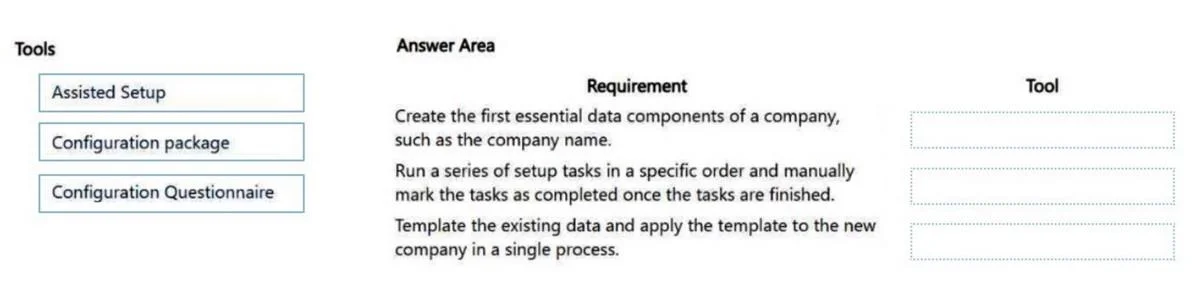
Answer Area
Drag items
Correct arrangement
- Assisted Setup
- Configuration Questionnaire
- Configuration package
Explanation
Dynamics 365 Business Central - Company Creation Tools
The question maps three sequential requirements in the RapidStart Services workflow to three tools. The implied requirements (standard for this exam question format) are:
Requirement 1 → Assisted Setup
What it does: The Assisted Setup wizard is the entry point for creating a new company in Business Central. It walks you through naming the company, choosing a company type, and basic initialization.
Why it goes here: You cannot configure a company that doesn't exist yet. Assisted Setup is always the first step - it provisions the empty company shell.
Common mistake: Candidates sometimes think Configuration Package creates the company. It does not - it only moves data into an already-existing company.
Requirement 2 → Configuration Questionnaire
What it does: A Configuration Questionnaire (part of RapidStart Services) lets you define structured questions about setup preferences - chart of accounts, payment terms, posting groups, etc. - and collect answers from key stakeholders before applying them.
Why it goes here: Before copying data from the existing company, you need to understand what configuration the new company needs. The questionnaire captures those requirements in a structured, reviewable format.
Common mistake: Confusing this with Configuration Package. The Questionnaire gathers and validates requirements; the Package moves the actual table data.
Requirement 3 → Configuration Package
What it does: A Configuration Package exports tables and records (setup data, master data templates) from the source company as a .rapidstart package, then imports and applies them to the new company.
Why it goes here: This is the mechanism that actually transfers the existing company's data into the new one. It fulfills the scenario's key constraint: "data from the existing company must be used as a template."
Common mistake: Assuming Configuration Questionnaire can transfer data on its own. It can't - questionnaire answers must still be applied via a package or manually.
The Logic in One Line
Create (Assisted Setup) → Define requirements (Configuration Questionnaire) → Copy the data (Configuration Package)
This is the standard RapidStart Services implementation sequence in Business Central.
Topics
Community Discussion
No community discussion yet for this question.