
MB-800 · Question #237
A company recently implemented Business Central. The company uses Teams extensively for day-to-day collaboration. The company finance manager must be able to search for contacts and share Business…
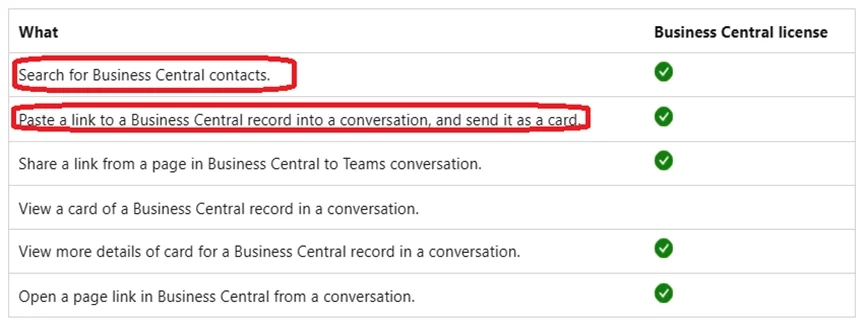
The correct answer is B. Search for Teams App Centralized Deployment in Business Central. Most features of the Business Central app for Teams also require a Business Central license, as shown in the following table. Managing the Business Central app (optional) As a Teams administrator, you can manage all apps for your organization, including the Business Central…
Question
Exhibit
Options
- ASelect the Share action on Attachment Documents in Business Central.
- BSearch for Teams App Centralized Deployment in Business Central.
- CAdd a Planner tab to a team channel.
- DManage apps in the Business Central admin center.
How the community answered
(43 responses)- A2% (1)
- B93% (40)
- C5% (2)
Explanation
Most features of the Business Central app for Teams also require a Business Central license, as shown in the following table. Managing the Business Central app (optional) As a Teams administrator, you can manage all apps for your organization, including the Business Central app. You can approve or install the Business Central app for your organization, block user's from installing the app, and more. Installing the Business Central app by using Centralized Deployment The Microsoft Teams admin center is where you configure Teams app setup policies for the organization. In the Teams admin center, you can use the Centralized Deployment feature to automatically install the Business Central app in Teams for all users in your organization, specific groups, or individual users. https://learn.microsoft.com/en-us/dynamics365/business-central/admin-teams-integration
Topics
Community Discussion
No community discussion yet for this question.