
MB-800 · Question #141
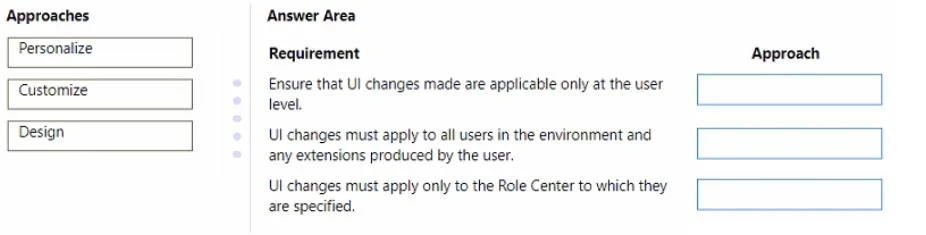
Drag and Drop Question You are implementing Dynamics 365 Business Central for a client. You need to ensure that the user interface (UI) meets the client's requirements. Which approach should you…
The correct answer is Personalize; Design; Customize. D365 Business Central: UI Approach Explanations > Note: The question is missing the actual requirement descriptions - only the answer arrangement is shown. The explanation below is based on the standard MB-800 exam mapping for these three items. --- The Three Approaches 1…
Question
Exhibit
Answer Area
Drag items
Correct arrangement
- Personalize
- Design
- Customize
Explanation
D365 Business Central: UI Approach Explanations
Note: The question is missing the actual requirement descriptions - only the answer arrangement is shown. The explanation below is based on the standard MB-800 exam mapping for these three items.
The Three Approaches
1. Personalize → Requirement 1
Typical requirement: A user wants to modify their own view of a page (e.g., hide fields, rearrange columns) for personal use only.
Why Personalize:
- Available to any end user - no admin rights needed
- Changes are per-user only - no one else is affected
- Accessed via the gear icon → Personalize on any page
- Common actions: hide/show fields, freeze columns, move fields, add fields from the page's underlying table
- Changes persist across sessions but are isolated to that user's profile
2. Design → Requirement 2
Typical requirement: A developer or admin needs to make structural changes to a page that affect all users globally.
Why Design:
- Requires admin/developer access in the web client
- Accessed via gear icon → Design (only visible to admins)
- Makes changes at the page definition level - affects all users regardless of their profile
- Can add fields that aren't already on the page (including from related tables via extensions)
- Changes are more permanent and structural than Customize
3. Customize → Requirement 3
Typical requirement: An administrator needs to configure the UI for all users belonging to a specific role/profile.
Why Customize:
- Done via Profiles (Roles) page → select a profile → Customize pages
- Changes apply to all users assigned to that profile/role
- Scope is between Personalize (one user) and Design (all users)
- Admins can set a "baseline" UI for a role, which users can then further Personalize
Scope Hierarchy (Key Concept)
Design      → All users (global, structural)
Customize   → All users in a specific profile/role
Personalize → Single user only
Common Mistakes
| Mistake | Correction |
|---|---|
| Confusing Customize and Personalize | Customize = role-wide; Personalize = individual |
| Thinking Design is only for AL developers | Admins can use the in-browser Designer without writing code |
| Assuming Personalize overrides Customize | They stack - Customize sets the profile baseline, Personalize layers on top |
| Thinking any user can access Design | Design requires administrator permissions in Business Central |
Topics
Community Discussion
No community discussion yet for this question.