nerdexam
Microsoft

MB-800 · Question #142

Drag and Drop Question A company uses Dynamics 365 Business Central. The company has two finance managers. You need to configure approval workflow for purchase orders. Only one manager is required…

The correct answer is Workflow; Approval User Setup; Workflow User Group. Dynamics 365 Business Central: Purchase Order Approval Workflow The Core Requirement Two finance managers exist, but only one needs to approve a purchase order. This "any one of" logic is what drives the specific page selection. --- Why Each Item Is Placed Here 1. Workflow…

Purchasing

Question

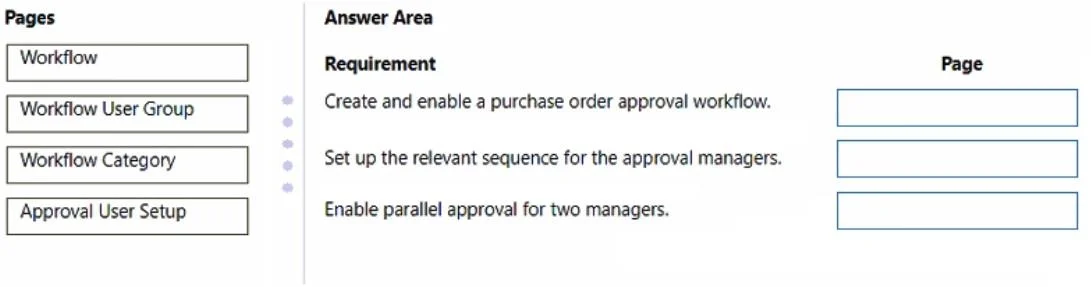
Drag and Drop Question A company uses Dynamics 365 Business Central. The company has two finance managers. You need to configure approval workflow for purchase orders. Only one manager is required to approve a purchase order. How should you complete the configuration? To answer, drag the pages to the correct requirements. Each page may be used once, more than once, or not at all. You may need to drag the split bar between panes or scroll to view content. NOTE: Each correct selection is worth one point. Answer:

Exhibit
MB-800 question #142 exhibit

Answer Area

Drag items

WorkflowWorkflow User GroupWorkflow CategoryApproval User Setup

Correct arrangement

  • Workflow
  • Approval User Setup
  • Workflow User Group

Explanation

Dynamics 365 Business Central: Purchase Order Approval Workflow

The Core Requirement

Two finance managers exist, but only one needs to approve a purchase order. This "any one of" logic is what drives the specific page selection.


Why Each Item Is Placed Here

1. Workflow

Role: The master definition of the approval process.

This is where you define the trigger (a purchase order submitted for approval), the conditions, and the responses. Every approval configuration starts here - it references the approvers and approval type. Without a workflow record, nothing else matters.

2. Approval User Setup

Role: Registers individual users as participants in approval workflows.

Each finance manager must be configured here before they can act as approvers. This page sets:

  • Who the user is in the approval chain
  • Their approval limits (monetary thresholds)
  • Substitute approvers
  • Their approval administrator status

Both managers must have entries here for the system to recognize them as valid approvers.

3. Workflow User Group

Role: Groups multiple approvers so that any one member can satisfy the approval step.

This is the critical piece for the "only one required" requirement. By creating a Workflow User Group and adding both finance managers as members, you configure the workflow to accept approval from any member of the group - not requiring all of them. Without this, a sequential chain through Approval User Setup would require both managers to approve.


Why Workflow Category Is Excluded

Workflow Category is purely an organizational/classification tool (e.g., grouping workflows by Finance, Sales, etc.). It has no functional role in approval routing or user assignment. Including it is a common distractor.


Common Mistakes

MistakeWhy It's Wrong
Skipping Workflow User GroupWithout it, you can't implement "any one of" logic - the workflow would require sequential approval from all users
Using only Approval User SetupThat alone sets up users but doesn't group them for parallel/single-approval scenarios
Including Workflow CategoryIt's optional metadata; not a required configuration step
Setting up managers as a sequential chainSequential chains require every approver in the chain to respond, violating the "only one required" rule

Summary

  • Workflow = the process definition
  • Approval User Setup = individual user credentials/limits
  • Workflow User Group = the mechanism that makes "any one approver" possible

Topics

#approval workflow#purchase order approval#workflow configuration#approver setup

Community Discussion

No community discussion yet for this question.

Full MB-800 Practice