nerdexam
Microsoft

MB-800 · Question #184

Drag and Drop Question A company uses Dynamics 365 Business Central. A maintenance manager buys weekly cleaning supplies from a local hardware store and would like to automate purchase order…

The correct answer is Configure Standard Purchase Code and set up relevant G/L account.; Choose Standard Purchase Code for the selected vendor as a recurring purchase code.; Change the Insert Rec. Lines on Orders to Automatic, and then close the window. Dynamics 365 Business Central - Standard Purchase Codes Explained The Goal Automate purchase orders for a vendor so that a specific G/L account is pre-populated every time an order is created for that vendor. --- Why This Sequence? The three steps follow a logical dependency…

Purchasing

Question

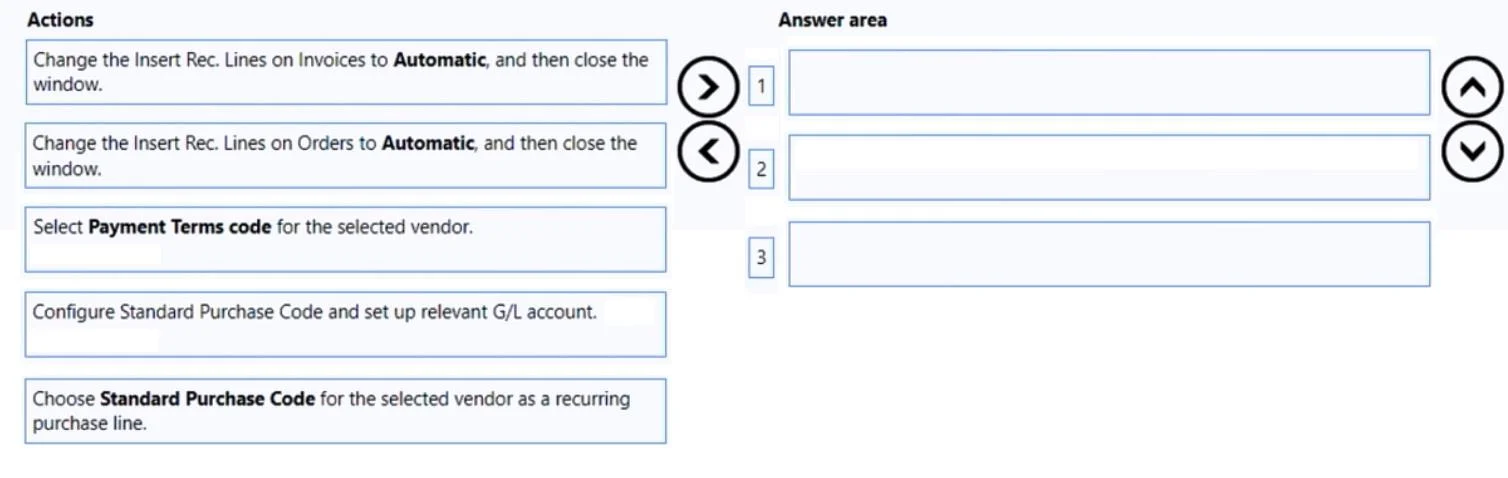
Drag and Drop Question A company uses Dynamics 365 Business Central. A maintenance manager buys weekly cleaning supplies from a local hardware store and would like to automate purchase order entries. You need to configure the system to add a default general ledger (G/L) account to the hardware store purchase orders. Which three actions should you perform in sequence? To answer, move the appropriate actions from the list of actions to the answer area and arrange them in the correct order. Answer:

Exhibit
MB-800 question #184 exhibit

Answer Area

Drag items

Change the Insert Rec. Lines on Invoices to Automatic, and then close the window.Select Payment Terms code for the selected vendor.Configure Standard Purchase Code and set up relevant G/L account.Choose Standard Purchase Code for the selected vendor as a recurring purchase code.

Correct arrangement

  • Configure Standard Purchase Code and set up relevant G/L account.
  • Choose Standard Purchase Code for the selected vendor as a recurring purchase code.
  • Change the Insert Rec. Lines on Orders to Automatic, and then close the window.

Explanation

Dynamics 365 Business Central - Standard Purchase Codes Explained

The Goal

Automate purchase orders for a vendor so that a specific G/L account is pre-populated every time an order is created for that vendor.


Why This Sequence?

The three steps follow a logical dependency chain: create the template → link it to the vendor → activate automation.


Step-by-Step Breakdown

Step 1: Configure Standard Purchase Code and set up relevant G/L account.

This must come first because the Standard Purchase Code is the template. It defines what lines get inserted automatically - in this case, a G/L account line for cleaning supplies. You cannot reference something that doesn't exist yet, so the code must be created before it can be assigned to anyone.

Step 2: Choose Standard Purchase Code for the selected vendor as a recurring purchase code.

With the code created, you now navigate to the vendor card and assign that code under Recurring Purchase Lines. This links the template to the specific hardware store vendor. The vendor card stores which standard code applies, so this must happen before any automation behavior is configured.

Step 3: Change the Insert Rec. Lines on Orders to Automatic, and then close the window.

This is the automation trigger. On the same recurring purchase lines setup for the vendor, there is a field called Insert Rec. Lines on Orders (not Invoices). Setting it to Automatic tells Business Central to insert the lines without prompting whenever a purchase order is created for this vendor.


Common Mistakes & Misconceptions

MistakeWhy It's Wrong
Selecting "Insert Rec. Lines on Invoices"The question says purchase orders, not invoices. These are separate fields - a very common distractor on this exam.
Assigning the vendor code before creating the Standard Purchase CodeThe code doesn't exist yet; the lookup would be empty.
Skipping Step 2 and just setting AutomaticThe vendor has no code assigned, so there are no lines to insert automatically.
Selecting Payment Terms codeThis is irrelevant to G/L account automation - it's a distractor about vendor payment configuration.

Key Takeaway

The distractor "Insert Rec. Lines on Invoices" vs. the correct "Insert Rec. Lines on Orders" is the critical detail. The scenario explicitly involves purchase orders, so the Orders field is what controls the behavior here.

Topics

#default G/L account#vendor card#purchase orders#recurring purchases

Community Discussion

No community discussion yet for this question.

Full MB-800 Practice