
MB-800 · Question #183
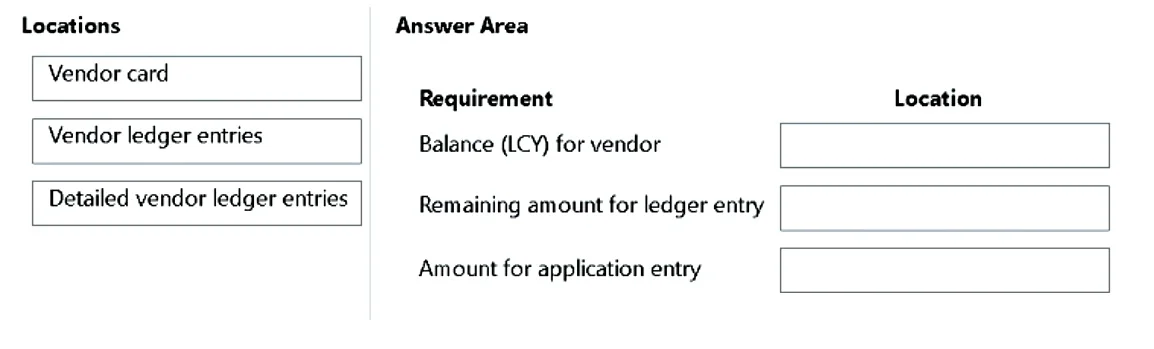
Drag and Drop Question A company uses Dynamics 365 Business Central. Users in the purchasing and accounts payable departments require the following information about vendors and vendor ledger…
The correct answer is Vendor card; Vendor ledger entries; Detailed vendor ledger entries. Explanation: Vendor Information Locations in Business Central The Core Concept Business Central stores vendor financial data in a three-tier hierarchy: vendor summary → transaction headers → transaction detail lines. Each requirement maps to a different tier. --- Placement 1…
Question
Exhibit
Answer Area
Drag items
Correct arrangement
- Vendor card
- Vendor ledger entries
- Detailed vendor ledger entries
Explanation
Explanation: Vendor Information Locations in Business Central
The Core Concept
Business Central stores vendor financial data in a three-tier hierarchy: vendor summary → transaction headers → transaction detail lines. Each requirement maps to a different tier.
Placement 1: Balance (LCY) → Vendor Card
The Vendor Card is the master record for a vendor. The Balance (LCY) field is a calculated aggregate - it sums all open vendor ledger entries and displays the total outstanding balance in local currency at the vendor level.
- This is a summary field, not a raw transaction field.
- It gives a single number representing overall vendor exposure.
Common mistake: Thinking Balance (LCY) lives in Vendor Ledger Entries. It does not - the ledger entries table stores individual transactions, not vendor-level totals.
Placement 2: Remaining Amount → Vendor Ledger Entries
The Vendor Ledger Entries page stores one record per transaction (invoice, payment, credit memo, etc.). Each entry has a Remaining Amount field showing how much of that specific document is still unpaid/open.
- Once fully applied (e.g., invoice paid in full), Remaining Amount = 0 and the entry is closed.
- This is transaction-header-level data.
Common mistake: Confusing Remaining Amount with Amount. Remaining Amount decreases as payments are applied; Amount stays fixed at the original transaction value.
Placement 3: Amount for Application Entry → Detailed Vendor Ledger Entries
The Detailed Vendor Ledger Entries table stores the granular debit/credit movements that make up each vendor ledger entry. When a payment is applied to an invoice, Business Central creates application entries (entry type = "Application") in this table recording the exact amounts matched.
- Every vendor ledger entry has at least one detailed entry (the initial entry).
- Application entries only exist at this level - they are not visible in the parent Vendor Ledger Entries.
Common mistake: Looking for application entry amounts in Vendor Ledger Entries. That page shows document totals; it does not break out the application sub-entries.
Summary Table
| Requirement | Location | Why |
|---|---|---|
| Balance (LCY) | Vendor Card | Aggregate vendor-level field |
| Remaining Amount | Vendor Ledger Entries | Per-transaction open balance |
| Amount (application entry) | Detailed Vendor Ledger Entries | Granular application sub-records |
Topics
Community Discussion
No community discussion yet for this question.