nerdexam
Microsoft

MB-800 · Question #82

Drag and Drop Question You manage several companies within one Dynamics 365 Business Central database. Most users work in only one of these companies, where they have a specific role. You need to…

The correct answer is User Personalization; Profile (Role); Users and User Groups; Permission Sets and Permissions. Dynamics 365 Business Central - Security Setup Question Explained Since the requirement labels aren't shown in the question text (they'd appear in the drag-and-drop interface), I'll reconstruct the typical requirements based on the correct answers and the BC security model…

Set up Business Central

Question

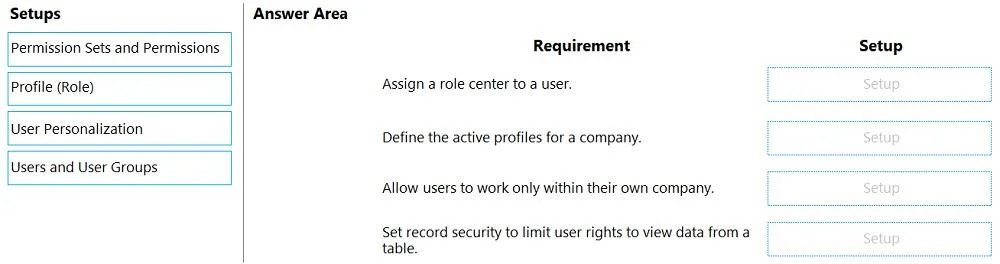
Drag and Drop Question You manage several companies within one Dynamics 365 Business Central database. Most users work in only one of these companies, where they have a specific role. You need to set up security according to company requirements. Which setup should you use? To answer, drag the appropriate setups to the correct requirements. Each setup may be used once, more than once, or not at all. You may need to drag the split bar between panes or scroll to view content. NOTE: Each correct selection is worth one point. Answer:

Exhibit
MB-800 question #82 exhibit

Answer Area

Drag items

Permission Sets and PermissionsProfile (Role)User PersonalizationUsers and User Groups

Correct arrangement

  • User Personalization
  • Profile (Role)
  • Users and User Groups
  • Permission Sets and Permissions

Explanation

Dynamics 365 Business Central - Security Setup Question Explained

Since the requirement labels aren't shown in the question text (they'd appear in the drag-and-drop interface), I'll reconstruct the typical requirements based on the correct answers and the BC security model.


The BC Security Model (Layered)

Think of it as four distinct concerns, each handled by a different tool:

Company Default  →  User Personalization
UI / Role Center →  Profile (Role)
Access Grouping  →  Users and User Groups
Data/Action Perms→  Permission Sets and Permissions

Each Placement Explained

1. User Personalization → "Set a user's default company"

Why: The scenario says most users work in only one company. User Personalization is where you set the default company (and language/locale) for a specific user. When they log in, BC opens that company automatically.

  • Technical reason: User Personalization records are per-user settings stored in the User Personalization table. The Company field there controls which company loads on login.
  • Common mistake: Confusing this with Users - the Users page manages authentication/licensing, not the default company.

2. Profile (Role) → "Assign a role/role center to a user"

Why: The scenario says users have a specific role. A Profile (Role) defines the Role Center (home page dashboard) a user sees, tailored to their job function (e.g., Accountant, Sales Order Processor).

  • Technical reason: Profiles are linked to a Role Center page ID. Assigning a profile to a user via User Personalization or directly controls their entire UI experience.
  • Common mistake: Thinking "Profile" controls permissions - it does not. It only controls the UI layout and navigation, not data access.

3. Users and User Groups → "Manage access for multiple users with similar needs"

Why: User Groups let you assign a collection of permission sets to multiple users at once. If 20 users all need the same permissions, you assign them to a group rather than configuring each individually.

  • Technical reason: A User Group contains one or more Permission Sets. Assigning a user to a group automatically grants all the group's permissions.
  • Common mistake: Thinking User Groups are optional - in multi-company, multi-role environments they're the efficient, maintainable approach. Assigning permission sets directly to individual users does work but doesn't scale.

4. Permission Sets and Permissions → "Control what data/actions a user can access"

Why: This is the actual security enforcement layer. Permission Sets define exactly what a user can do: Read, Insert, Modify, Delete, Execute on specific BC objects (tables, pages, reports, codeunits).

  • Technical reason: BC checks permissions at the object level on every operation. Without the correct permission set, a user gets an error even if their UI (Profile) shows the feature.
  • Common mistake: Confusing this with Profile - Profile = what you see, Permission Sets = what you're allowed to do. You can see a button but be blocked from clicking it if you lack the permission.

Summary Table

PositionSetupControls
1User PersonalizationDefault company on login
2Profile (Role)UI / Role Center / dashboard
3Users and User GroupsBatch-assigning permissions to groups
4Permission Sets and PermissionsData & action access enforcement

Key insight: These are complementary, not interchangeable. A complete security setup uses all four - they operate at different layers of the system.

Topics

#user permissions#permission sets#company security#user roles

Community Discussion

No community discussion yet for this question.

Full MB-800 Practice