nerdexam
Microsoft

MB-800 · Question #36

Drag and Drop Question You need to configure a new journal template. What should you do? To answer, drag the appropriate fields to the correct requirements. Each field may be used once, more than once

The correct answer is Force Doc. Balance; Bal. Account Type and Bal. Account No.; Source Code; Reason Code. Journal Template Configuration - Microsoft Dynamics 365 Business Central This question tests knowledge of the General Journal Template setup page in Business Central. Each field maps to a distinct configuration requirement. --- Placement Breakdown 1. Force Doc. Balance What it do

Configure financials

Question

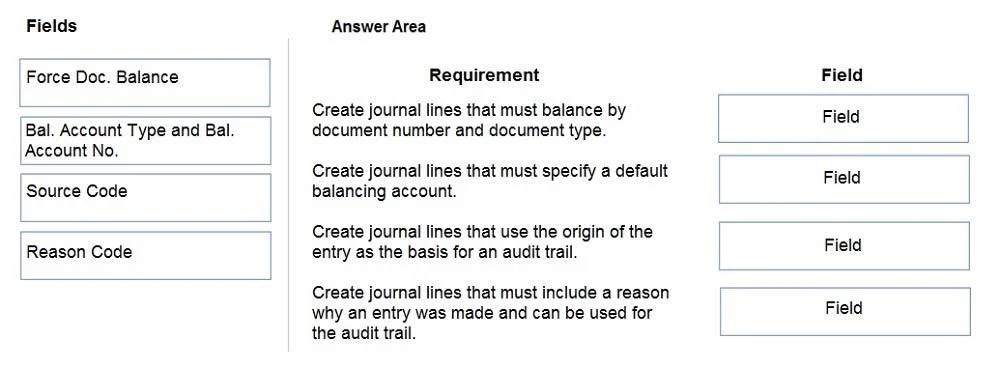
Drag and Drop Question You need to configure a new journal template. What should you do? To answer, drag the appropriate fields to the correct requirements. Each field may be used once, more than once, or not at all. You may need to drag the split bar between panes or scroll to view content. NOTE: Each correct selection is worth one point. Answer:

Exhibit
MB-800 question #36 exhibit

Answer Area

Drag items

Force Doc. BalanceBal. Account Type and Bal. Account No.Source CodeReason Code

Correct arrangement

  • Force Doc. Balance
  • Bal. Account Type and Bal. Account No.
  • Source Code
  • Reason Code

Explanation

Journal Template Configuration - Microsoft Dynamics 365 Business Central

This question tests knowledge of the General Journal Template setup page in Business Central. Each field maps to a distinct configuration requirement.


Placement Breakdown

1. Force Doc. Balance

  • What it does: When enabled, all journal lines sharing the same Document No. must net to zero before posting is allowed.
  • Why it goes here: This is a posting control requirement - it enforces document-level balancing as a hard rule, not just a suggestion. It prevents partially-entered documents from being posted.
  • Common mistake: Confusing this with overall batch balance. Force Doc. Balance operates at the document level, not the journal batch level.

2. Bal. Account Type and Bal. Account No.

  • What it does: Defines a default balancing account (e.g., a Bank Account or G/L Account) that auto-populates on journal lines.
  • Why it goes here: This is a default offset account requirement - it speeds up data entry by pre-filling the counterpart account (e.g., always offset to a specific bank account in a cash journal).
  • Common mistake: These are set on the Journal Batch, not just the template. Both levels support them, but the template sets the baseline default.

3. Source Code

  • What it does: Tags every ledger entry created from this template with an origin identifier (e.g., GENJNL, SALES).
  • Why it goes here: This is an audit trail / traceability requirement - it allows filtering ledger entries by their source for reconciliation and reporting.
  • Common mistake: Thinking the Source Code is optional. Business Central requires it on every journal template; it is critical for audit compliance.

4. Reason Code

  • What it does: Attaches a user-defined business reason to posted entries (e.g., CORRECTION, ACCRUAL).
  • Why it goes here: This is an additional categorization requirement - it supplements the Source Code with business-context metadata.
  • Common mistake: Conflating Reason Code with Source Code. Source Code = system origin (where it came from); Reason Code = business reason (why it was posted). Reason Code is optional; Source Code is not.

Key Takeaway

FieldPurposeMandatory?
Force Doc. BalancePosting controlOptional (toggle)
Bal. Account Type/No.Default offset accountOptional
Source CodeAudit trail origin tagRequired
Reason CodeBusiness reason annotationOptional

The arrangement follows a logical order: control → defaults → traceability → annotation.

Topics

#journal templates#journal batch#general journal setup#number series

Community Discussion

No community discussion yet for this question.

Full MB-800 Practice