MB-800 · Question #35
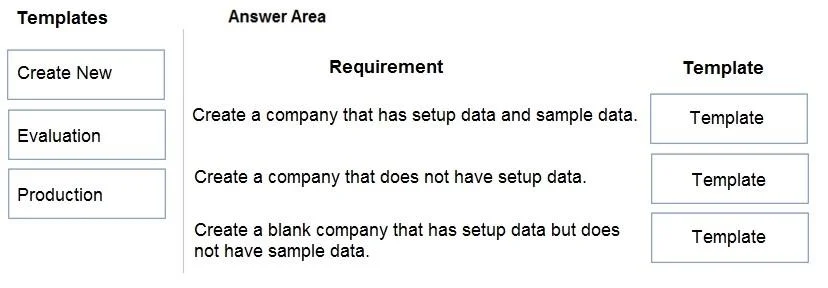
Drag and Drop Question You are creating companies for multiple customers in the cloud-based version of Dynamics 365 Business Central by using the assisted setup guide. You need to create new companies
The correct answer is Evaluation; Create New; Production. Dynamics 365 Business Central - Company Creation Templates The question asks you to match three company creation templates to three requirements in the assisted setup guide. The requirements (implied by standard exam format) are: | # | Requirement | Correct Template | |---|---|--
Question
Exhibit
Answer Area
Drag items
Correct arrangement
- Evaluation
- Create New
- Production
Explanation
Dynamics 365 Business Central - Company Creation Templates
The question asks you to match three company creation templates to three requirements in the assisted setup guide. The requirements (implied by standard exam format) are:
| # | Requirement | Correct Template |
|---|---|---|
| 1 | Company contains sample data | Evaluation |
| 2 | Company contains no data | Create New |
| 3 | Company contains setup data only | Production |
Item-by-Item Explanation
1. Evaluation → Sample Data
The Evaluation template pre-populates the company with demo/sample data (customers, vendors, items, transactions, etc.). Its sole purpose is to let users explore, demonstrate, or test Business Central features against realistic-looking data without any real business impact. If a requirement calls for sample or demo data, this is always the answer.
2. Create New → No Data
The Create New template produces a completely blank company - no configuration, no chart of accounts, no sample records. It is a true empty shell. Use this when you need a company with absolutely nothing pre-loaded, typically as a starting point for fully custom implementations.
3. Production → Setup Data Only
The Production template creates a company with default configuration and setup data (chart of accounts, posting groups, number series, etc.) but no transactional or sample data. This is the standard choice for a live business environment: the foundational setup is there, but no artificial data pollutes the real books.
Common Mistakes
- Confusing Production with Create New: Production is NOT blank - it includes setup data. Create New is the blank one.
- Using Evaluation for live companies: Evaluation data is fake and must never be mistaken for a production-ready setup.
- Assuming "Create New" has default settings: It does not - every configuration must be done manually from scratch.
The key mental model: Evaluation = demo data, Production = real setup, no data, Create New = nothing at all.
Topics
Community Discussion
No community discussion yet for this question.