nerdexam
Microsoft

MB-800 · Question #34

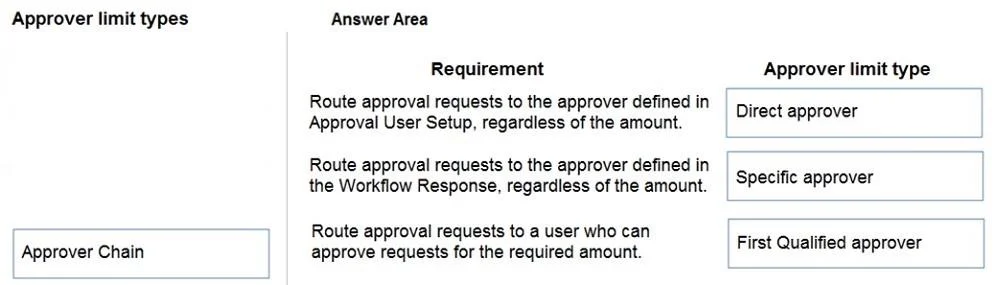
Drag and Drop Question You are setting up approval workflows in Dynamics 365 Business Central. You need to configure approver limits. Which approver limit types should you use? To answer, drag the app

The correct answer is Direct approver; Specific approver; First Qualified approver. Dynamics 365 Business Central: Approver Limit Types Context: In Business Central, Approval User Setup lets you define who approves a request and how the system routes it. The "Approver Limit Type" field controls routing logic. --- The Three Correct Types (and why) 1. Direct Appro

Set up Business Central

Question

Drag and Drop Question You are setting up approval workflows in Dynamics 365 Business Central. You need to configure approver limits. Which approver limit types should you use? To answer, drag the appropriate approver limit types to the correct requirements. Each approver limit type may be used once, or not at all. You may need to drag the split bar between panes or scroll to view content. NOTE: Each correct selection is worth one point. Answer:

Exhibit
MB-800 question #34 exhibit

Answer Area

Drag items

Direct approverSpecific approverFirst Qualified approverApprover Chain

Correct arrangement

  • Direct approver
  • Specific approver
  • First Qualified approver

Explanation

Dynamics 365 Business Central: Approver Limit Types

Context: In Business Central, Approval User Setup lets you define who approves a request and how the system routes it. The "Approver Limit Type" field controls routing logic.


The Three Correct Types (and why)

1. Direct Approver Routes the request to whoever is set as the submitter's direct approver in the Approval User Setup table - essentially their manager in the system hierarchy.

  • Use when: Approval should follow the organizational chain of command, one level up.
  • Technical reason: Business Central looks up the Approver ID field on the submitting user's setup record. No amount thresholds are evaluated - it simply goes to that designated person.

2. Specific Approver Routes to one hard-coded, named person every time, regardless of who submitted or what the org hierarchy says.

  • Use when: A specific individual (e.g., a CFO or procurement officer) must always approve a certain document type.
  • Technical reason: The approver is explicitly identified on the workflow, bypassing user hierarchy entirely.

3. First Qualified Approver Walks up the approver chain and stops at the first person whose approval limit (amount threshold) is high enough to cover the document amount.

  • Use when: Approval authority is based on monetary limits - small purchases auto-route to a team lead, large ones escalate to a director.
  • Technical reason: Business Central compares the document amount against each approver's configured limit fields (e.g., Purchase Amount Approval Limit) and routes to the first match.

Why "Approver Chain" Is Excluded

Approver Chain routes the document through every approver in the hierarchy sequentially - everyone must approve, not just the first qualified one. This is a distinct escalation model. The requirements in this question call for targeted, single-stop routing, so it is a deliberate distractor.


Common Mistakes

MistakeCorrection
Confusing First Qualified with Approver ChainFirst Qualified stops at the first sufficient approver; Chain requires all levels to sign off
Using Direct Approver when a fixed person is neededDirect Approver changes if the user's manager changes; use Specific Approver for a stable, named approver
Assuming Specific Approver respects limitsIt does not - the named person approves regardless of the document amount

Topics

#approval workflows#approver limits#workflow setup#approval hierarchy

Community Discussion

No community discussion yet for this question.

Full MB-800 Practice