
MB-800 · Question #33
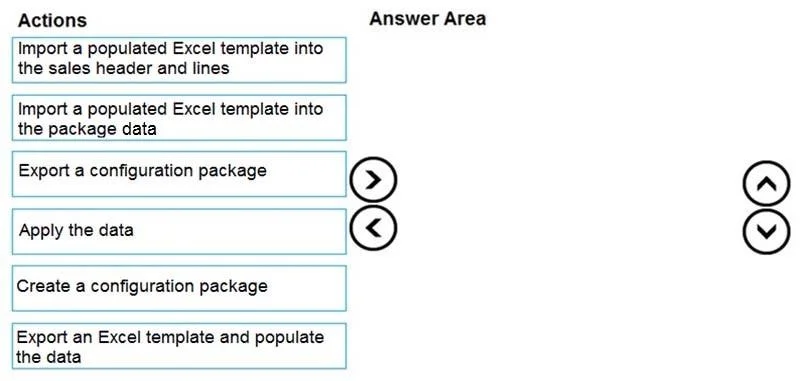
Drag and Drop Question You set up a new company for a customer. The customer provides you with a Microsoft Excel file that contains master data. You need to import the master data by using…
The correct answer is Item2. Import a populated Excel template into the package data Item4. Apply the data Item5. Create a configuration package Item6. Export an Excel template and populate the data. Configuration Packages: Master Data Import - Explained The Correct 4-Step Sequence From the 6 options, the correct four actions in order are: | Step | Action | |------|--------| | 1 | Create a configuration package (Item5) | | 2 | Export an Excel template and populate the data…
Question
Exhibit
Options
- Item1Import a populated Excel template into the sales header and lines
- Item2Import a populated Excel template into the package data
- Item3Export a configuration package
- Item4Apply the data
- Item5Create a configuration package
- Item6Export an Excel template and populate the data
Explanation
Configuration Packages: Master Data Import - Explained
The Correct 4-Step Sequence
From the 6 options, the correct four actions in order are:
| Step | Action |
|---|---|
| 1 | Create a configuration package (Item5) |
| 2 | Export an Excel template and populate the data (Item6) |
| 3 | Import a populated Excel template into the package data (Item2) |
| 4 | Apply the data (Item4) |
Why This Order?
Step 1 - Create a configuration package (Item5) You must define the package first - specifying which tables and fields will receive data. Without a package, there is nothing to export or import into. This is the foundation of the entire process in Business Central RapidStart Services.
Step 2 - Export an Excel template and populate the data (Item6) Once the package exists, you export it as an Excel template. This gives you a structured spreadsheet matching the BC table layout. The customer's raw Excel data is then mapped/populated into this template. The template enforces the correct column structure BC expects.
Step 3 - Import a populated Excel template into the package data (Item2) The filled-in template is imported back into BC - specifically into the package data staging area, not directly into live tables. This is a critical staging step: it loads data into the package buffer where it can be validated before touching production records.
Step 4 - Apply the data (Item4) Only after the data is staged in the package buffer do you apply it. This pushes the data from the package into the actual BC database tables. Separating import from apply allows validation checks before committing.
The Two Distractors - and Why They're Wrong
Item1 - "Import a populated Excel template into the sales header and lines" This is a distractor. Importing directly into a specific table like Sales Header bypasses the configuration package process entirely. It would also only work for sales data - not general master data. The correct target for the import is the package data staging area.
Item3 - "Export a configuration package"
This describes exporting the raw .rapidstart package file (used for migrating between environments), not generating the Excel template for data entry. In a master data import scenario, you need the Excel template export, not the package file export. Confusing these two export types is a very common mistake.
Common Misconceptions
- "Apply" = "Import": Many candidates think importing the Excel is the final step. It is not - import stages the data; apply commits it to the database.
- Skipping the staging step: Some assume you can import directly into live tables. The package data buffer exists for a reason - validation happens there.
- Export type confusion: There are two distinct exports (Excel template vs. package file). The question specifically requires the Excel template path because the customer is providing an Excel file.
Topics
Community Discussion
No community discussion yet for this question.