
MB-500 · Question #312
Drag and Drop Question You have a test environment that has an independent software vendor (ISV) solution. The ISV solution requires a license to enable it. You need to add a license file to a…
The correct answer is Add the license file to a source control repository.; Add the task named Add Licenses to Deployable Package.; Provide a search pattern for the license file to add to the package.; Provide a file name and the path of the deployable package to update. Explanation: Adding a License File to a Deployable Package This question is about configuring an Azure DevOps build pipeline for a Dynamics 365 Finance & Operations (D365 F&O) environment where an ISV solution requires a license file included in the deployable package. --- Why…
Question
Exhibit
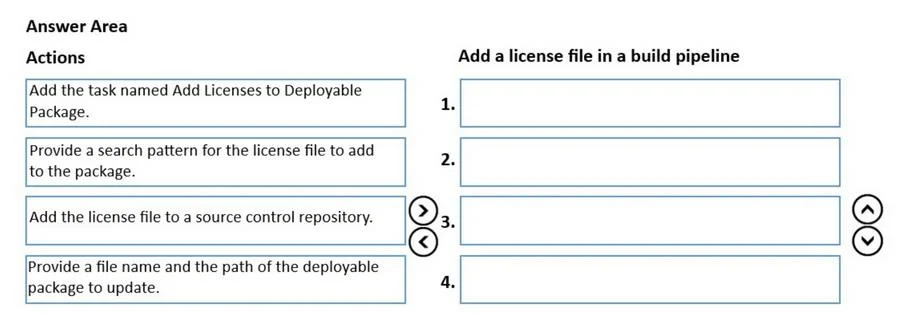
Answer Area
Drag items
Correct arrangement
- Add the license file to a source control repository.
- Add the task named Add Licenses to Deployable Package.
- Provide a search pattern for the license file to add to the package.
- Provide a file name and the path of the deployable package to update.
Explanation
Explanation: Adding a License File to a Deployable Package
This question is about configuring an Azure DevOps build pipeline for a Dynamics 365 Finance & Operations (D365 F&O) environment where an ISV solution requires a license file included in the deployable package.
Why This Order?
The sequence follows a logical dependency chain: store the asset → set up the tool → configure the tool's inputs → configure the tool's output.
Step-by-Step Breakdown
1. Add the license file to a source control repository
This must come first because the build pipeline runs on a build agent that has no prior knowledge of your license file. Source control (e.g., Azure Repos/Git or TFVC) is the only place the build agent can reliably retrieve files during a build. If the file isn't in source control, no subsequent build task can find or use it.
Common mistake: Trying to configure the build task first without having the license file committed. The task will have nothing to reference.
2. Add the task named "Add Licenses to Deployable Package"
Once the file exists in source control, you add this specific build task to your Azure DevOps pipeline. You must add the task to the pipeline before you can configure it - you can't fill in settings for a task that doesn't yet exist in the pipeline.
Common mistake: Confusing this with a manual deployment step. This is a pipeline task, meaning it runs automatically on each build.
3. Provide a search pattern for the license file to add to the package
This is the first configuration field of the task you just added. The search pattern (a glob/wildcard pattern like **/*.lic) tells the task which file(s) to pick up from source control. It must be specified so the task knows what to include.
4. Provide a file name and the path of the deployable package to update
This is the second configuration field - it tells the task where to put the license file (i.e., which deployable package to inject it into). This is the output target and logically comes after you've defined the input (step 3).
Why Steps 3 & 4 Can Be Swapped
The exam note states more than one correct order exists. Steps 3 and 4 are both configuration fields of the same task - they have no dependency on each other. You could reasonably specify the package path before the search pattern and still achieve the correct result. The hard dependencies are:
- Source control before build task (can't use what doesn't exist)
- Build task added before it's configured (can't configure what isn't there)
- Both configuration steps after the task is added
Topics
Community Discussion
No community discussion yet for this question.