
MB-500 · Question #164
Drag and Drop Question A company uses Dynamics 365 Finance. The company is implementing an independent software vendor (ISV) solution. You overlay the ISV code to add functionality to the solution…
The correct answer is Compare and merge code; Compare code with baseline; Compare metadata with baseline. Dynamics 365 Finance: Code Compare Options for ISV Overlay Context When you overlay ISV code in Dynamics 365 Finance, you're adding customizations on top of another vendor's code layer. Managing these overlays requires the right comparison tool for each scenario - and each…
Question
Exhibit
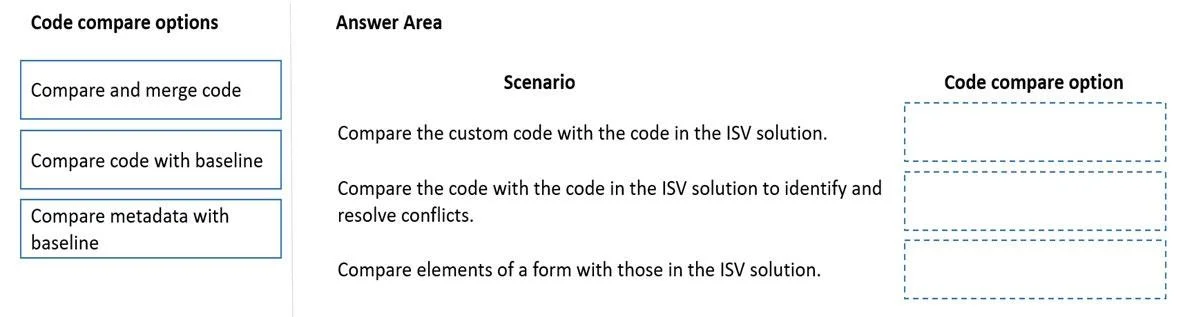
Answer Area
Drag items
Correct arrangement
- Compare and merge code
- Compare code with baseline
- Compare metadata with baseline
Explanation
Dynamics 365 Finance: Code Compare Options for ISV Overlay
Context
When you overlay ISV code in Dynamics 365 Finance, you're adding customizations on top of another vendor's code layer. Managing these overlays requires the right comparison tool for each scenario - and each option targets a different type of difference.
The Three Options Explained
1. Compare and Merge Code
Used when: The ISV releases an updated version of their solution and you must reconcile your overlay customizations with the new ISV code.
- This is an active, two-way operation - you are not just viewing differences, you are merging your changes into the updated baseline.
- Think of it like a Git merge: your overlay sits on one side, the new ISV code on the other, and this tool helps you combine them without losing your work.
- This is the most complex operation because conflicts must be resolved manually when both sides changed the same lines.
2. Compare Code with Baseline
Used when: You want to audit what X++ code changes your overlay introduced on top of the original ISV code.
- "Baseline" = the ISV's original code before your overlay touched it.
- This is a read-only diff - you're inspecting, not merging.
- Useful for documenting your changes or preparing for an upgrade review.
- Scope: code only (X++ logic, methods, class members).
3. Compare Metadata with Baseline
Used when: You want to see what structural/metadata changes your overlay made - not code, but properties and definitions.
- Metadata includes: table field definitions, form layouts, menu items, label overrides, data types, etc.
- A common scenario: you overlaid an ISV form and changed a field's mandatory property - "Compare metadata with baseline" reveals that change.
- Scope: metadata only - no X++ code is compared here.
Why This Arrangement?
| # | Option | Trigger |
|---|---|---|
| 1 | Compare and merge code | ISV released an update; you need to merge overlay changes |
| 2 | Compare code with baseline | You need to see what X++ code your overlay changed |
| 3 | Compare metadata with baseline | You need to see what structural/property changes your overlay made |
Common Mistakes
- Confusing #2 and #3: Many candidates assume "code" and "metadata" are interchangeable - they are not. Code = X++ logic. Metadata = object properties and structure.
- Using #1 when you only need to view: "Compare and merge" is for active reconciliation during ISV upgrades, not for simple inspection. If you just want to see differences, use #2 or #3.
- Forgetting baseline means the layer below yours: The baseline is the ISV's original code in their layer - not your previous version or Microsoft's base layer.
Topics
Community Discussion
No community discussion yet for this question.