
MB-500 · Question #319
Drag and Drop Question A company has a cloud-based installation of a Dynamics 365 Finance environment. Azure DevOps Version Control is configured with the following branches. Development VMs are set…
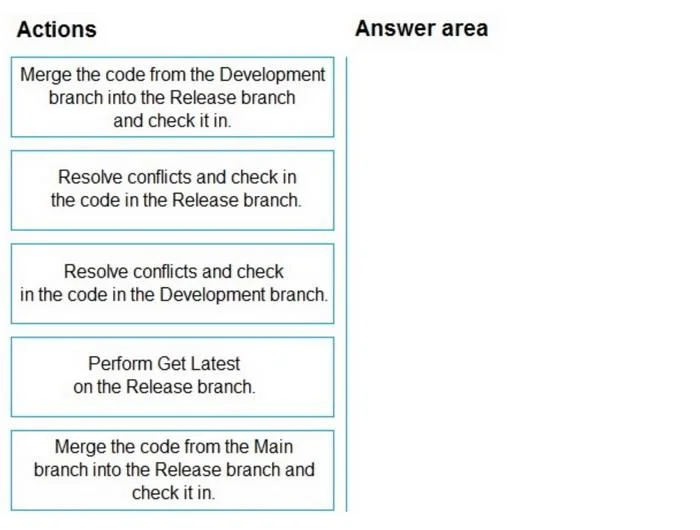
The correct answer is Perform Get Latest on the Release branch.; Merge the code from the Development branch into the Release branch and check it in.; Resolve conflicts and check in the code in the Development branch. Explanation: Azure DevOps Branch Merge Sequence for D365 Finance Scenario Summary Developer1 created extensions in Development, then checked them into Release Developer2 created extensions in Development that overlap with Developer1's objects Goal: Get Developer2's code into…
Question
Exhibit
Answer Area
Drag items
Correct arrangement
- Perform Get Latest on the Release branch.
- Merge the code from the Development branch into the Release branch and check it in.
- Resolve conflicts and check in the code in the Development branch.
Explanation
Explanation: Azure DevOps Branch Merge Sequence for D365 Finance
Scenario Summary
- Developer1 created extensions in Development, then checked them into Release
- Developer2 created extensions in Development that overlap with Developer1's objects
- Goal: Get Developer2's code into Release, with all conflicts resolved
Why This Sequence
Step 1 - Perform Get Latest on the Release branch
Why first: Before any merge operation, you must synchronize your local workspace with the current server state of the target branch (Release). Developer1 already checked code directly into Release. Without Get Latest, your local copy of Release is outdated - you won't see Developer1's changes, so you can't detect conflicts accurately.
Common mistake: Skipping this step and going straight to the merge. This causes you to work against a stale baseline and miss conflicts entirely, producing a corrupt or incorrect merged result.
Step 2 - Merge the code from the Development branch into the Release branch and check it in
Why second: After your local Release workspace is current, you initiate the merge from Development → Release. This brings Developer2's changes into the Release branch. Because Developer2 modified the same objects Developer1 already has in Release, TFVC will flag conflicts at this point.
Why not merge from Main? The question establishes that Developer2's work is in the Development branch, not Main. Merging from Main would not include Developer2's changes.
Common mistake: Thinking you should merge Main → Release instead. That action is irrelevant here - the work needing to move is in Development.
Step 3 - Resolve conflicts and check in the code in the Development branch
Why last: After the merge surfaces conflicts, you resolve them and finalize the check-in.
Important note on the answer wording: The answer states "Development branch" here, which is counterintuitive - the merge target is Release, so conflicts surface in the Release branch context. The logically correct location to resolve and check in is the Release branch (this aligns with item "Resolve conflicts and check in the code in the Release branch"). This appears to be an error in the exam answer key. In practice, you resolve conflicts in the target branch (Release), not the source (Development).
Common mistake: Trying to resolve conflicts in Development before the merge - conflicts between Developer2's Development code and Developer1's Release code don't fully exist until you perform the merge into Release.
Items Correctly Excluded
| Item | Why Excluded |
|---|---|
| Merge from Main → Release | Main isn't where Developer2's work lives |
| Resolve conflicts in Release branch | Logically correct, but the exam answer key picked Development (see note above) |
Key Takeaway
The flow is always: sync target → merge source into target → resolve conflicts in target. The counterintuitive "Development branch" in step 3 is very likely a typo in this exam question - if this appears on a real exam, the answer is whichever option says "Release branch" for conflict resolution.
Topics
Community Discussion
No community discussion yet for this question.