
MB-500 · Question #318
Drag and Drop Question Developers at a company discover a bug in the production environment. You update the existing code in a development environment to resolve the bug. You need to get the updated…
The correct answer is Develop the code and check it in to your version control system.; Generate a deployable package in Azure DevOps by using a build pipeline.; Apply the deployable package to a sandbox environment.; Mark the deployable package as a release candidate on the sandbox environment.; Schedule the production update with the release candidate version. Azure DevOps Bug Fix Deployment - Explanation This question tests knowledge of the standard deployment pipeline in Microsoft Dynamics 365 Finance & Operations (D365 F&O) using Azure DevOps and Lifecycle Services (LCS). --- The Correct Sequence & Why 1. Develop the code and…
Question
Exhibit
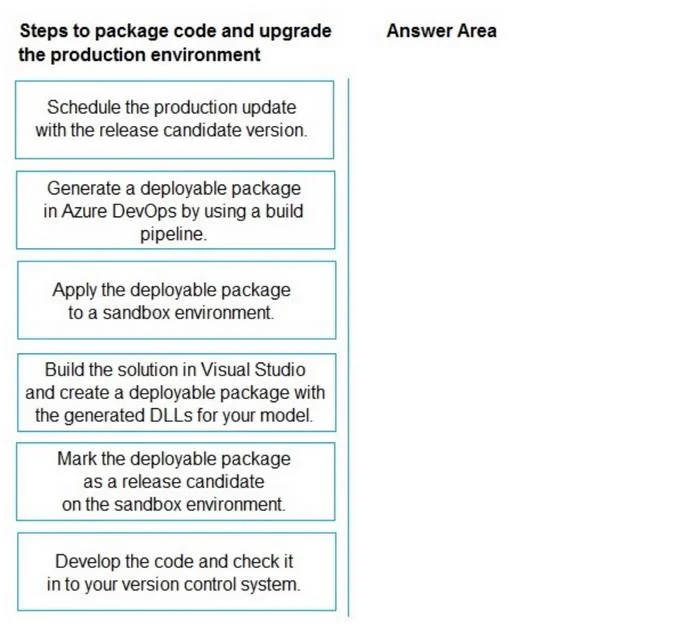
Answer Area
Drag items
Correct arrangement
- Develop the code and check it in to your version control system.
- Generate a deployable package in Azure DevOps by using a build pipeline.
- Apply the deployable package to a sandbox environment.
- Mark the deployable package as a release candidate on the sandbox environment.
- Schedule the production update with the release candidate version.
Explanation
Azure DevOps Bug Fix Deployment - Explanation
This question tests knowledge of the standard deployment pipeline in Microsoft Dynamics 365 Finance & Operations (D365 F&O) using Azure DevOps and Lifecycle Services (LCS).
The Correct Sequence & Why
1. Develop the code and check it in to your version control system
Why first: Everything downstream depends on source-controlled code. The bug fix lives in your dev environment - it doesn't enter the pipeline until it's committed to Azure DevOps Repos (or Git). No pipeline can act on code that only exists locally.
2. Generate a deployable package in Azure DevOps by using a build pipeline
Why second: Once code is checked in, the Azure DevOps build pipeline (CI step) compiles it and packages it into a .zip deployable package. This is the automated, pipeline-driven artifact that LCS can consume. The build pipeline ensures the package is built consistently and traceably from source control.
Key misconception: Many candidates confuse this with the excluded item - building locally in Visual Studio. The question explicitly requires Azure DevOps, so the automated pipeline approach is correct. Manual Visual Studio builds bypass the DevOps pipeline, losing traceability, automation, and governance.
3. Apply the deployable package to a sandbox environment
Why third: You never deploy untested code directly to production. The sandbox (UAT/staging) environment mirrors production and is where you validate the fix. Applying the package here first is a safeguard - if something breaks, it affects the sandbox, not production users.
4. Mark the deployable package as a release candidate on the sandbox environment
Why fourth: In LCS, after successful sandbox deployment and validation, you formally mark the package as a release candidate. This is a deliberate gate - it signals the package has been tested and approved. You cannot schedule a production update with an unmarked package; this designation is a prerequisite for the next step.
Common mistake: Candidates sometimes put this step before applying to sandbox. You must deploy and validate in sandbox before marking it as a release candidate - the RC designation certifies that sandbox validation happened.
5. Schedule the production update with the release candidate version
Why last: Production updates in D365 F&O/LCS are scheduled (often requiring a maintenance window). You can only schedule using a package that's been marked as a release candidate (step 4). This is the final controlled action that pushes the fix to production users.
Why the Excluded Item Is Wrong
"Build the solution in Visual Studio and create a deployable package with the generated DLLs for your model"
This describes a manual, local build process - it was common in older D365 workflows but is not the Azure DevOps pipeline approach. Using it would:
- Bypass the automated build pipeline
- Break traceability from source control to artifact
- Violate the "using Azure DevOps" requirement in the question
Mental Model
Code committed → CI builds artifact → Validated in sandbox → Approved as RC → Scheduled to prod
Each step is a gate. You cannot skip or reorder them because each step's output is the next step's required input.
Topics
Community Discussion
No community discussion yet for this question.