
MB-500 · Question #317
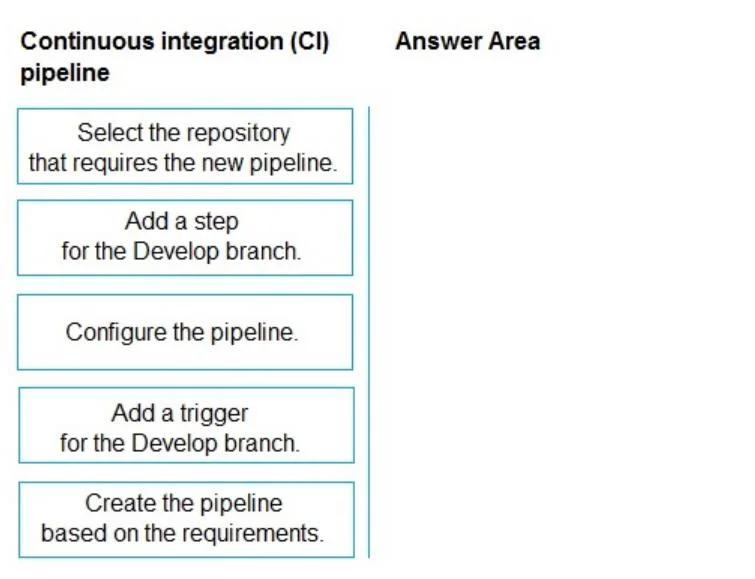
Drag and Drop Question A company uses Dynamics 365 Finance and Azure Pipelines. The company requires a new YAML-based pipeline to be built with each commit to a branch named Develop. You need to…
The correct answer is Select the repository that requires the new pipeline.; Create the pipeline based on the requirements.; Configure the pipeline.; Add a trigger for the Develop branch. Creating a YAML-Based Azure Pipeline - Sequence Explained The Excluded Item (Important Distractor) "Add a step for the Develop branch" is intentionally wrong. Steps are build/task actions (compile, test, publish) - they have no relationship to branch targeting. Branches are…
Question
Exhibit
Answer Area
Drag items
Correct arrangement
- Select the repository that requires the new pipeline.
- Create the pipeline based on the requirements.
- Configure the pipeline.
- Add a trigger for the Develop branch.
Explanation
Creating a YAML-Based Azure Pipeline - Sequence Explained
The Excluded Item (Important Distractor)
"Add a step for the Develop branch" is intentionally wrong. Steps are build/task actions (compile, test, publish) - they have no relationship to branch targeting. Branches are controlled by triggers, not steps. This is the most common misconception in this question.
Correct Sequence & Technical Reasoning
1. Select the repository that requires the new pipeline
This is mandatory first. In Azure DevOps, creating a new pipeline begins at Pipelines → New Pipeline, where you must choose your source (Azure Repos, GitHub, etc.) before any pipeline artifact can exist. Nothing else is possible without a connected repository.
2. Create the pipeline based on the requirements
Once the repo is selected, Azure Pipelines prompts you to create the YAML file - either from a starter template or from scratch. This step instantiates the pipeline object. "Based on the requirements" signals you're choosing YAML format (not the classic GUI editor) and scoping it to the company's Dynamics 365 Finance build needs.
3. Configure the pipeline
With the pipeline created, you now define its jobs, stages, tasks, and agent pool - the actual build logic. This must come before the trigger because the trigger is just a metadata addition to an already-structured pipeline.
4. Add a trigger for the Develop branch
The final step. In YAML, this means adding:
trigger:
  branches:
    include:
      - Develop
This is last because the trigger only makes sense once the pipeline is fully configured - there's nothing to trigger until the pipeline exists and is configured.
Common Mistakes
| Mistake | Why it's wrong |
|---|---|
| Putting the trigger before configure | The trigger fires the pipeline; the pipeline must exist and be configured first |
| Including "Add a step for the Develop branch" | Steps execute build tasks, not branch conditions - that's what triggers are for |
| Swapping steps 2 and 3 | You can't configure something that hasn't been created yet |
Topics
Community Discussion
No community discussion yet for this question.