
MB-500 · Question #167
Drag and Drop Question A company has a cloud-based installation of Dynamics 365 Finance. The company also has Dynamics 365 Sales and Customer Service systems. The company implements an analytical…
The correct answer is Bring your own database; Entity store. Dynamics 365 Finance: Analytical Storage Features Explained Context The scenario involves a company running Dynamics 365 Finance alongside Sales and Customer Service. The key detail is that cross-system reporting is in scope - this distinction drives the correct storage choice…
Question
Exhibit
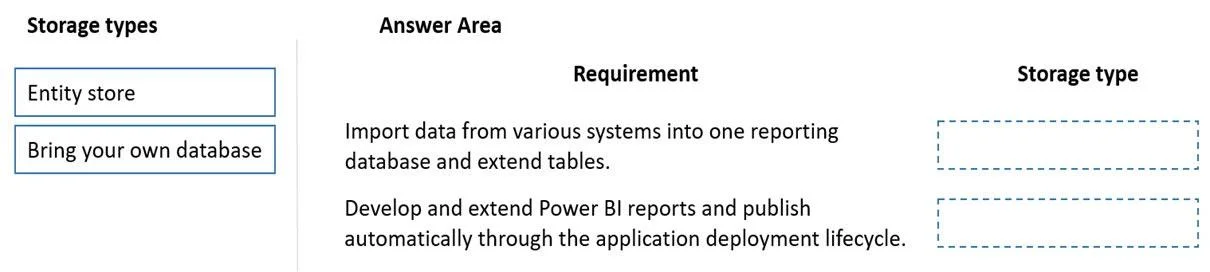
Answer Area
Drag items
Correct arrangement
- Bring your own database
- Entity store
Explanation
Dynamics 365 Finance: Analytical Storage Features Explained
Context
The scenario involves a company running Dynamics 365 Finance alongside Sales and Customer Service. The key detail is that cross-system reporting is in scope - this distinction drives the correct storage choice for each requirement.
The Two Storage Options
| Feature | What it is | Scope |
|---|---|---|
| Entity store | An in-product operational data store within D365 Finance, optimized for aggregate measurements and embedded Power BI reports | D365 Finance data only |
| Bring your own database (BYOD) | Export D365 entities to an external SQL database you own and manage | Multi-system / external access |
Placement 1 → Bring Your Own Database
Requirement type: Consolidating data across multiple Dynamics 365 systems (Finance + Sales + Customer Service) into a unified reporting store, or enabling external BI tools to access data independently of the D365 environment.
Why BYOD here:
- BYOD lets you export entities from D365 Finance to an external SQL database you control
- Because Sales and Customer Service can also push data to that same external database, it becomes a single consolidated store for cross-system analytics
- External BI tools (e.g., custom Power BI datasets, third-party tools) connect directly to this database without depending on the D365 runtime
Common mistake: Assuming Entity store can aggregate data from Sales or Customer Service. It cannot - it is scoped exclusively to D365 Finance.
Placement 2 → Entity Store
Requirement type: Creating embedded analytical reports or Power BI dashboards that rely on pre-built aggregate measurements within D365 Finance only.
Why Entity store here:
- Entity store is purpose-built for DirectQuery Power BI connections inside D365 Finance
- It stores pre-aggregated data (aggregate measurements) that make analytical queries fast without hitting transactional tables
- It requires no external database setup - it is managed entirely within the D365 Finance environment
- Microsoft maintains and refreshes it automatically
Common mistake: Thinking Entity store can serve as a consolidated cross-app warehouse. It is an in-product feature for Finance-only analytics, not a general-purpose data lake.
Key Decision Rule
If the requirement involves only D365 Finance data and embedded/Power BI reports → Entity store
If the requirement involves multiple systems, external access, or data the company owns and controls → Bring your own database
Topics
Community Discussion
No community discussion yet for this question.