
MB-500 · Question #314
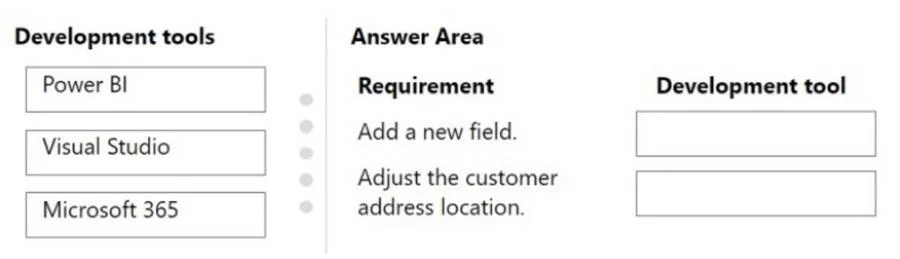
Drag and Drop Question A company uses Dynamics 365 Commerce for sales and distribution operations. The following reporting changes are required based on feedback from user acceptance testing: - Add…
The correct answer is Microsoft 365; Visual Studio. Explanation: Dynamics 365 Commerce Development Tools Requirement 1: Add a field to a business document template → Microsoft 365 Business document templates in Dynamics 365 are managed via the Business document management feature (part of the Electronic Reporting framework)…
Question
Exhibit
Answer Area
Drag items
Correct arrangement
- Microsoft 365
- Visual Studio
Explanation
Explanation: Dynamics 365 Commerce Development Tools
Requirement 1: Add a field to a business document template → Microsoft 365
Business document templates in Dynamics 365 are managed via the Business document management feature (part of the Electronic Reporting framework). These templates are Excel-based files that users can open and edit directly through the Microsoft 365 (Office) integration - specifically Excel. No code or IDE is required. The workflow is:
- Navigate to Business document management in D365
- Open the template - it launches in Excel via Microsoft 365
- Add/modify fields, save, and publish back
Why not Visual Studio here? Business document templates are not code artifacts; they are configuration-based Excel files. Modifying them in VS would be the wrong tool for the job.
Requirement 2: Adjust customer address location on an SSRS report → Visual Studio
SSRS (SQL Server Reporting Services) reports in Dynamics 365 Finance/Commerce are X++ development artifacts - they consist of report designs, data providers, and contracts deployed to the AOS. To change the layout (e.g., move a field's position), you must:
- Open the SSRS report design in Visual Studio (with the D365 developer tools extension)
- Use the Report Designer to reposition the control
- Build and deploy the report to the environment
This requires direct code/designer-level access only available in VS.
Why Power BI is Not Used
Power BI is for analytical dashboards and self-service BI - it is not used to modify existing operational SSRS reports or business document templates. A common mistake is selecting Power BI whenever "reporting" is mentioned, but Power BI does not interact with SSRS report layouts or D365 document templates.
Summary Table
| Requirement | Tool | Reason |
|---|---|---|
| Add field to business document template | Microsoft 365 | Templates are Excel-based; edited via Office integration |
| Adjust address location on SSRS report | Visual Studio | SSRS layouts are code artifacts requiring the D365 developer toolset |
Topics
Community Discussion
No community discussion yet for this question.