nerdexam
Microsoft

MB-500 · Question #17

Case Study 2 - First Up Consultants Background Overview First Up Consultants provides Commercial Cleaning services to its clients. The company purchases all its cleaning supplies from Best For You…

The correct answer is DataContractAttribute; DataMemberAttribute; SRSReportParameterAttribute. Explanation: Outstanding Invoice Report Attributes This question tests your knowledge of the SSRS reporting pattern in Dynamics 365 Finance (X++). Creating a report with parameters requires three distinct attributes applied at different layers of the report architecture…

Implement reporting

Question

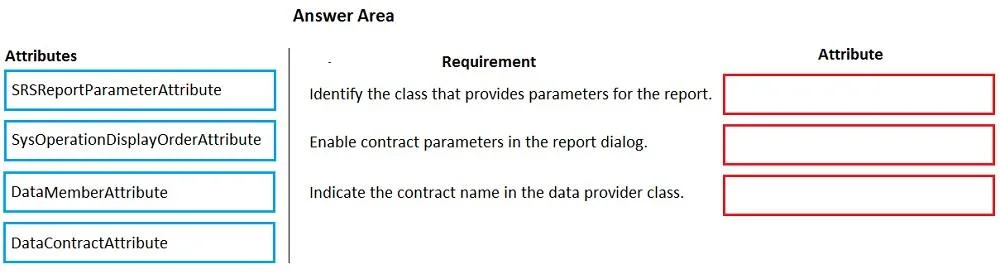
Case Study 2 - First Up Consultants Background Overview First Up Consultants provides Commercial Cleaning services to its clients. The company purchases all its cleaning supplies from Best For You Organics Company. First Up Consultants is using a cloud-based Dynamics 365 Finance instance. The system has a foundation table named CashDisc that contains one cash discount record for each cash discount type. Best For You Organics Company invoices First Up Consultants and allows cash discounts based on how fast an invoice is paid. First Up Consultants is entitled to a two percent discount from Best for You Organics for any invoice that is paid within 10 days and has a minimum invoice amount of $2,500. Business requirements All new and extended objects must be located in an existing model named FinanceExt. The creation of new models is not permitted. Best For You Organics Company requires that First Up Consultants apply specific minimum invoice amounts to each cash discount record. A cash discount may only be applied when the minimum invoice amount requirement has been met. The new field must be added to the CashDisc form grid with the allowable visible number of characters set to 10. First Up Consultants must retrieve the required Cash Discount methods and corresponding minimum invoice amounts directly from Best For You Organics Company's enterprise resource planning (ERP) system. The Chief Financial Officer (CFO) requires the following reports: A report that shows all outstanding invoices, their cash discount types including the new minimum threshold applicable, and the amount of the discount. The report must only be accessed by users who are members of the Accounts Payable Manager role. You must create a Microsoft Excel workbook that lists unpaid invoices to Best For You Organics Company that have a due date earlier than 5/1/2019 and an Invoice Amount between $20,000 and $100,000. Cash discounts for unpaid invoices must be updated with the new minimum invoice amounts. Financial requirements Vendor Invoices Past Due form You must be able to filter the grid on the Vendor Invoices Past Due form. By default, you must filter the form based on the Due Date, Invoice Amount, and Vendor columns. Users must be able to apply reusable user-specific filters to a page using multiple fields. CashDisc form You must extend the CashDisc form to add a new field named MinimumInvoiceAmount to the form. You must add a new Extended Data Type to the extension model for the new field. The new field must be added above the discount method field. The field must display 10 characters. The accounts payable manager and the accounts payable clerk have Delete access to the form. You must after permissions to limit accounts payable clerks to have only View access to the form. Cash Discount Records report You must create a report that shows a list of CashDisc records. You must include the MinimumInvoiceAmount field and filtered data by using the CashDisc.DiscMethod field. Applicable security objects must be created in the existing "FinanceExt" model and configured so the report is accessible by those users to the accounts payable role. Batch jobs You must create a batch job that runs on the last day of each month to update the current unpaid invoices with changes in the minimum invoice amount. The job must meet the following requirements: Accept the following parameters: Vendor, DueDate. Be callable by an Action menu item. Allow users to specify vendors to include in the job. Use SysOperation Framework for all batch jobs. You must create a batch job to identify modified CashDisc.MinimumInvoiceAmount values and apply these to open Purchase Lines. Drag and Drop Question You need to create the outstanding invoice report for the CFO. Which attributes should you use? To answer, drag the appropriate attributes to the requirements. Each attribute answer may be used once, more than once, or not at all. You may need to drag the split between panes or scroll to view content. NOTE: Each correct selection is worth one point. Answer:

Exhibit

MB-500 question #17 exhibit

Answer Area

Drag items

SRSRreportParameterAttributeSysOperationDisplayOrderAttributeDataMemberAttributeDataContractAttribute

Correct arrangement

  • DataContractAttribute
  • DataMemberAttribute
  • SRSReportParameterAttribute

Explanation

Explanation: Outstanding Invoice Report Attributes

This question tests your knowledge of the SSRS reporting pattern in Dynamics 365 Finance (X++). Creating a report with parameters requires three distinct attributes applied at different layers of the report architecture.


The Pattern: How SRS Reports Work

A parameterized SSRS report in D365 Finance requires three components working together:

[DataContractAttribute]       ← marks the parameter class
class MyReportContract { }

    [DataMemberAttribute]     ← marks each parameter method inside it
    public method parmX() { }

[SRSReportParameterAttribute] ← links the contract to the report controller
class MyReportController { }

Placement 1: DataContractAttribute

Applied to: the data contract class itself (the class declaration).

This attribute tells the X++ serialization framework that this class is a data contract - a serializable container for report parameters. Without it, the framework cannot recognize or serialize the class as a parameter holder.

Think of it as registering the class as "this is the parameter bag for the report."


Placement 2: DataMemberAttribute

Applied to: each parm method inside the data contract class.

Each report parameter (e.g., vendor filter, date range) is exposed via a parm method. DataMemberAttribute marks each method as a serializable member of the contract, making it visible and bindable in the report parameter dialog.

Without this, individual parameters are invisible to the framework even if the class itself is recognized.


Placement 3: SRSReportParameterAttribute

Applied to: the report controller class.

This attribute takes the data contract class name as its argument and links the controller to its parameter contract. It tells the SRS runtime which contract class to instantiate when the report is run.

[SRSReportParameterAttribute(classStr(MyReportContract))]
class MyReportController extends SrsReportRunController { }

Why SysOperationDisplayOrderAttribute is NOT used here

AttributeFrameworkPurpose
SysOperationDisplayOrderAttributeSysOperation (batch jobs)Controls UI display order of batch parameters
DataContractAttributeSRS ReportsMarks a class as a report parameter contract

The case study also involves batch jobs using SysOperation Framework, which does use SysOperationDisplayOrderAttribute. This is the primary distractor - candidates confuse the two frameworks.


Common Mistakes

  1. Using SysOperationDisplayOrderAttribute for the report - it belongs to batch jobs, not SSRS reports.
  2. Forgetting DataMemberAttribute - the class alone isn't enough; each parm method must also be decorated.
  3. Applying SRSReportParameterAttribute to the wrong class - it goes on the controller, not the data contract.

Topics

#DataContractAttribute#DataMemberAttribute#SRSReportParameterAttribute#SSRS report attributes

Community Discussion

No community discussion yet for this question.

Full MB-500 Practice