
MB-500 · Question #311
Drag and Drop Question You are creating custom functionality for Dynamics 365 Supply Chain Management. You reference standard models in the custom model to use data types and classes in the…
The correct answer is Application model; Application model; Platform model. Dynamics 365 SCM Model Types - Explanation Model Architecture Overview In Dynamics 365 Finance & Operations (including Supply Chain Management), models are layered in a dependency hierarchy: | Layer | Model Type | Contains | |---|---|---| | Business logic | Application model |…
Question
Exhibit
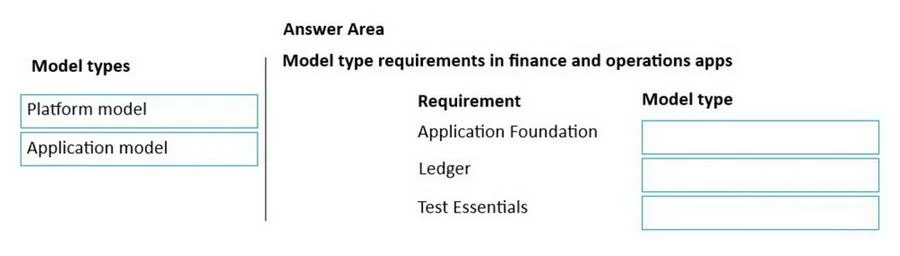
Answer Area
Drag items
Correct arrangement
- Application model
- Application model
- Platform model
Explanation
Dynamics 365 SCM Model Types - Explanation
Model Architecture Overview
In Dynamics 365 Finance & Operations (including Supply Chain Management), models are layered in a dependency hierarchy:
| Layer | Model Type | Contains |
|---|---|---|
| Business logic | Application model | Tables, forms, enums, business classes (e.g., SalesTable, PurchTable, ApplicationSuite) |
| Framework/kernel | Platform model | Base types, kernel classes, xRecord, RunBase, system infrastructure |
A custom model must reference whichever standard model contains the types/classes it depends on.
Placement Explanations
Requirement 1 → Application model
Your customization uses application-layer artifacts - business tables, domain-specific enums, or business logic classes (e.g., extending SalesTable or an ApplicationSuite class). These live in the Application model, so your custom model must reference it.
Requirement 2 → Application model Same reasoning: if you consume business data types, forms, or classes that belong to the business application layer (e.g., supply chain-specific extended data types or workflow elements), you reference the Application model.
Requirement 3 → Platform model
Your customization uses kernel-level or framework base types - things like xRecord, Common, RunBase, RefRecId, or system-level infrastructure classes. These are defined at the Platform layer and are not part of the application business logic, so you reference the Platform model.
Common Mistakes
- Referencing Application model for everything: Developers assume all standard types are "application" types. In reality, foundational kernel classes (
xRecord,RunBase,SysOperation) live at the platform level. - Confusing dependency direction: You don't reference a model to extend it - you reference it to consume its types. The model you reference must already contain what you need.
- Over-referencing: Adding an Application model reference when you only need a platform-level type adds unnecessary dependency weight to your custom model.
Key Rule of Thumb
If the type/class is business-domain-specific → Application model. If the type/class is part of the core framework or kernel → Platform model.
Topics
Community Discussion
No community discussion yet for this question.